There's a Way to See How Many Comments You've Made in WA!


Published on November 3, 2017
Published on Wealthy Affiliate — a platform for building real online businesses with modern training and AI.
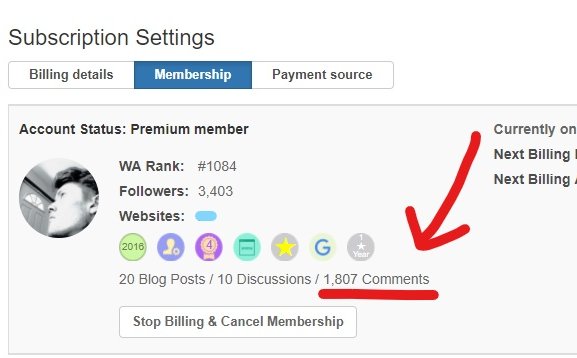
While looking through my account settings, I discovered a section that shows you how many comments you've made in Wealthy Affiliate!
To access this statistic, click your profile picture (top right) >> then click Account Settings >> and under Subscription Settings, click Membership. Under the list of your badges, it will show how many blog posts, discussions (I believe it means questions?) and comments you have made.
Sorry if this was already widely-known. I just haven't seen it in my 1.5 years here, so I figured it was worth sharing.
How many comments have you made? Share the number with us below!
Share this insight
This conversation is happening inside the community.
Join free to continue it.The Internet Changed. Now It Is Time to Build Differently.
If this article resonated, the next step is learning how to apply it. Inside Wealthy Affiliate, we break this down into practical steps you can use to build a real online business.
No credit card. Instant access.