Remember to allow comments on your site


Published on November 12, 2017
Published on Wealthy Affiliate — a platform for building real online businesses with modern training and AI.
His Guys and Gal
This is very important and often over looked
Imagine that you just wrote a new page on your site OK
What is one of the most import thongs that you want?
When a person reads your page you would love a comment from the person reading and so you have to make sure that you have the comment turned on!
Where is it? Go to you all pages section - see below
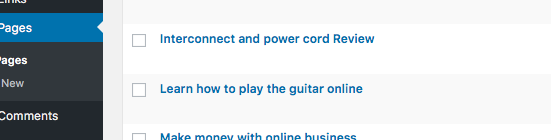
Next put out mouse over the one that you want and it becomes active and have chosen my last page 'Learn to play the guitar online' - see below
Ready to put this into action?
Start your free journey today — no credit card required.
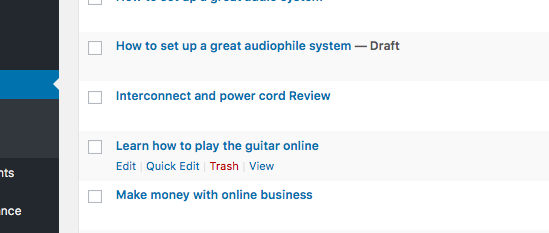
Next click on the quick edit tab and this opens - see below
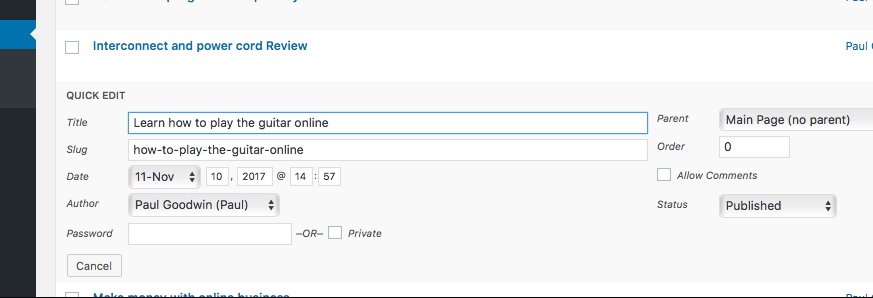
look over to the right and you will see a box that says allow comments so all you have to do is check this box - see below
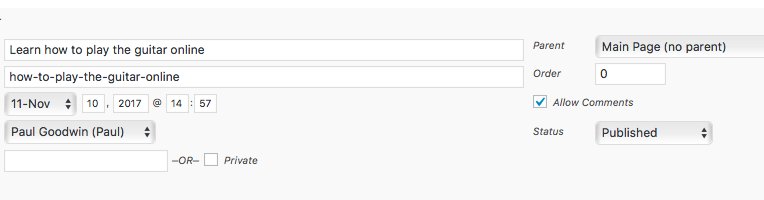
And that is IT now you will allow conmments ok
BUT WAIT now you have to UPDATE this now. Look to the right at the BLUE update - box see below
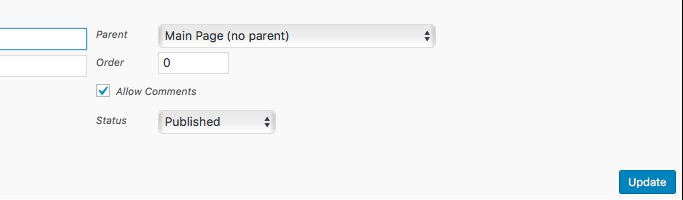
Click on the UPDATE button and you are done
IMPORTANT
You can only do one at a time!!!!
all good fun
Paul
Share this insight
This conversation is happening inside the community.
Join free to continue it.The Internet Changed. Now It Is Time to Build Differently.
If this article resonated, the next step is learning how to apply it. Inside Wealthy Affiliate, we break this down into practical steps you can use to build a real online business.
No credit card. Instant access.