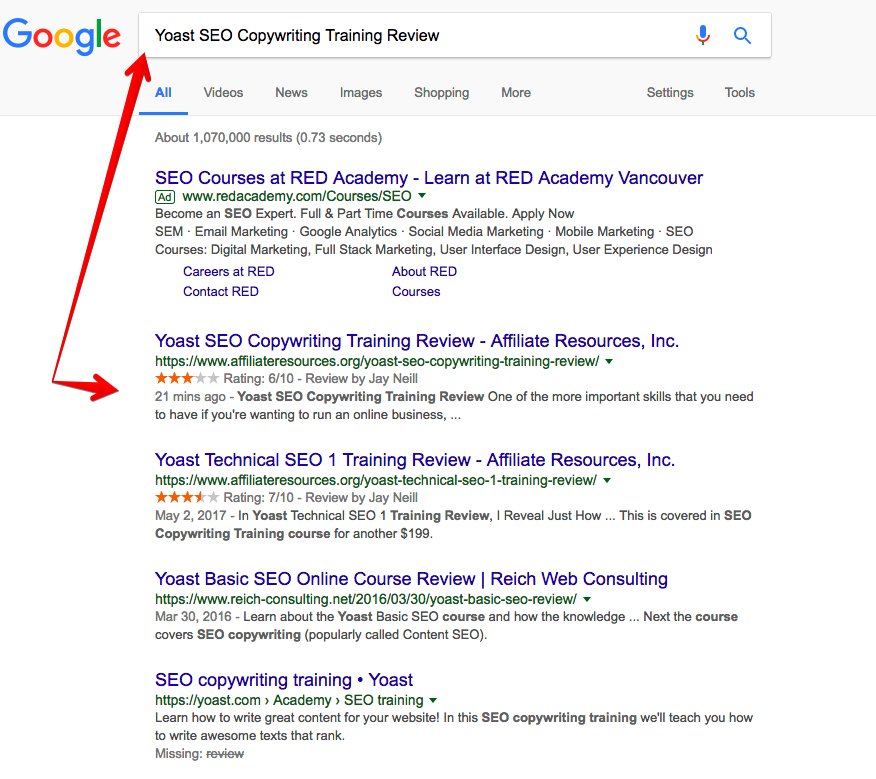
It Ranked in 21 Minutes

240
103
37.4K followers

Hi Folks,

Thought I would share this cool accomplishment with you.

Today I wrote a review on my site and within a few minutes of posting, the review was indexed and ranked in Google.

Within 21 Minutes!

I know what you are thinking…

"Jay! How did you do that? What is your secret?"

There is no secret.

I simply follow a set of On-Page SEO metrics which include:

  • Meta Title
  • Meta Description
  • Keyword in Content
  • Alt tag within an image
  • Internal links
  • External links
  • Video Embedded

So, when you create your next post - follow those 7 On-Page SEO metrics and you’ll do just fine. :)

240
103

Join FREE & Launch Your Business!

Exclusive Bonus - Offer Ends at Midnight Today

00

Hours

:

00

Minutes

:

00

Seconds

2,000 AI Credits Worth $10 USD

Build a Logo + Website That Attracts Customers

400 Credits

Discover Hot Niches with AI Market Research

100 Credits

Create SEO Content That Ranks & Converts

800 Credits

Find Affiliate Offers Up to $500/Sale

10 Credits

Access a Community of 2.9M+ Members

By continuing, you agree to our Terms of Service and Privacy Policy
No credit card required

Recent Comments

103

That's awesome Jay, like accad mentions, I would also like to see an example of an "alt tag within an image" example. Great Job Jay!

1

Hi Ralph,

Here it is.
I add it when I upload the image within WordPress.

1

Thanks Jay, that is awesome!

1

Very good.

2

Cool!

2

congrats!

2

This is great and moocho congrats! Ya, you sure can read minds...

Thank you for sharing this valuable information!

2

congratulations

2

The term “alt tag” is a commonly used abbreviation of what’s actually an alt attribute on an img tag. For any image on your site, the alt tag should describe what’s on it. Screen readers for the blind and visually impaired will read out this text and thus make your image accessible. (Yoast)

I am imagining how alt tag within an image looks and how it is placed. Can a screen shot be shown here? Thank you

2

Hi Jimmy,

I've attached an image where you add the info for the Alt tag.

2

Thank you, simple things are difficult things to a novice.

1

Thanks for sharing.
Ed

2

Congrats and Thanks for sharing!

Tristen

2

Very nice! Thank you for sharing this Jay.

1

See more comments

Join FREE & Launch Your Business!

Exclusive Bonus - Offer Ends at Midnight Today

00

Hours

:

00

Minutes

:

00

Seconds

2,000 AI Credits Worth $10 USD

Build a Logo + Website That Attracts Customers

400 Credits

Discover Hot Niches with AI Market Research

100 Credits

Create SEO Content That Ranks & Converts

800 Credits

Find Affiliate Offers Up to $500/Sale

10 Credits

Access a Community of 2.9M+ Members

By continuing, you agree to our Terms of Service and Privacy Policy
No credit card required

2.9M+

Members

190+

Countries Served

20+

Years Online

50K+

Success Stories

The world's most successful affiliate marketing training platform. Join 2.9M+ entrepreneurs building their online business with expert training, tools, and support.

© 2005-2025 Wealthy Affiliate
All rights reserved worldwide.

🔒 Trusted by Millions Worldwide

Since 2005, Wealthy Affiliate has been the go-to platform for entrepreneurs looking to build successful online businesses. With industry-leading security, 99.9% uptime, and a proven track record of success, you're in safe hands.