Contact Form 7 SPAM Problem Eliminated


Contact Form 7 users can stop spam.
Contact Form 7 is the most popular free contact form WordPress plugin. Consequently, it attracts lots of spammers wanting to send users spam email.
To combat spam, Contact Form 7 users have several options:
- Use another contact form plugin
- Add another spam control plugin like the Contact Form 7 Honeypot
- Use the Contact Form 7 built-in antispam measures
I choose option #3 for my Contact Form 7. Built-in antispam measures include:
- Adding Quiz
- Adding minimum and maximum character count in the message text area
- Adding Google reCaptcha
Adding the Quiz antispam measure
I will show you the steps involved to adding a quiz to your contact form.
Step 1. Open your contact form in WordPress.
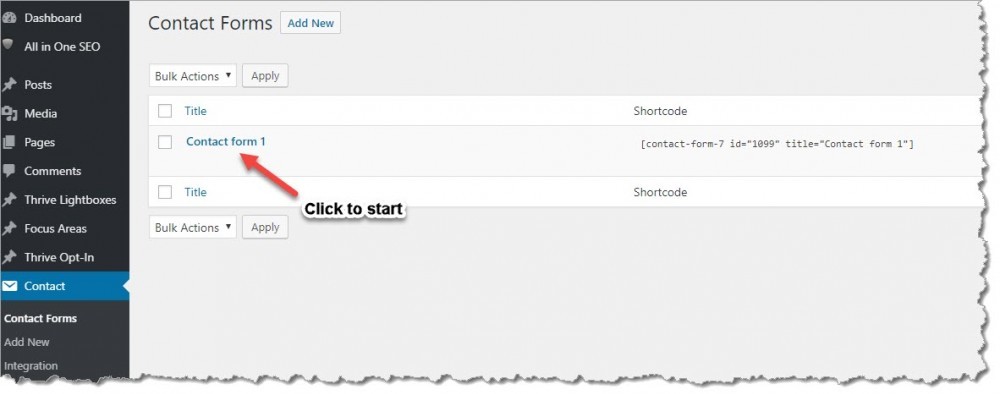
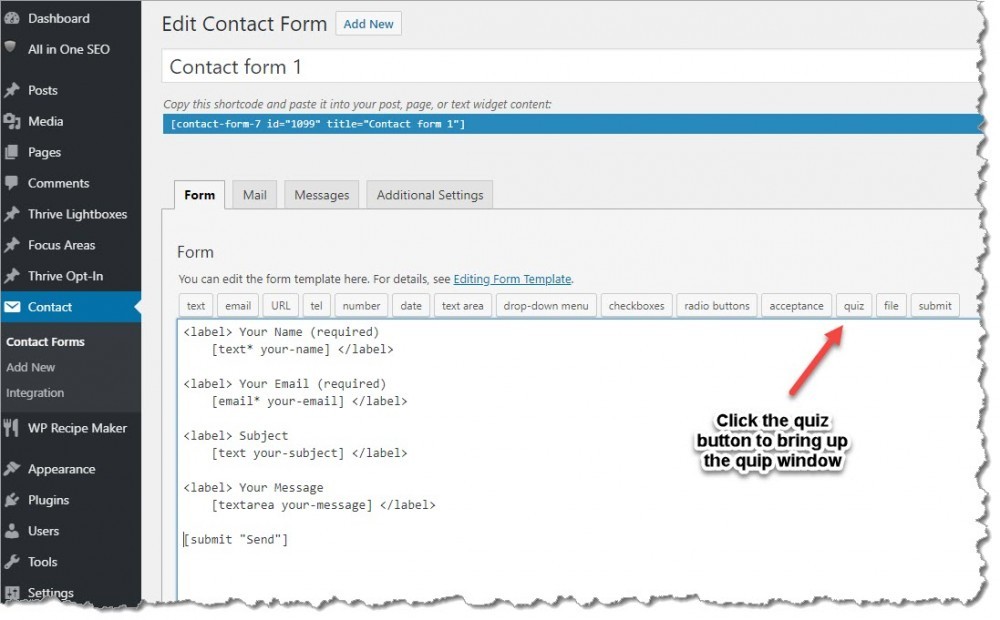
Step 2. Click on the Contact Form 7 Quiz button.
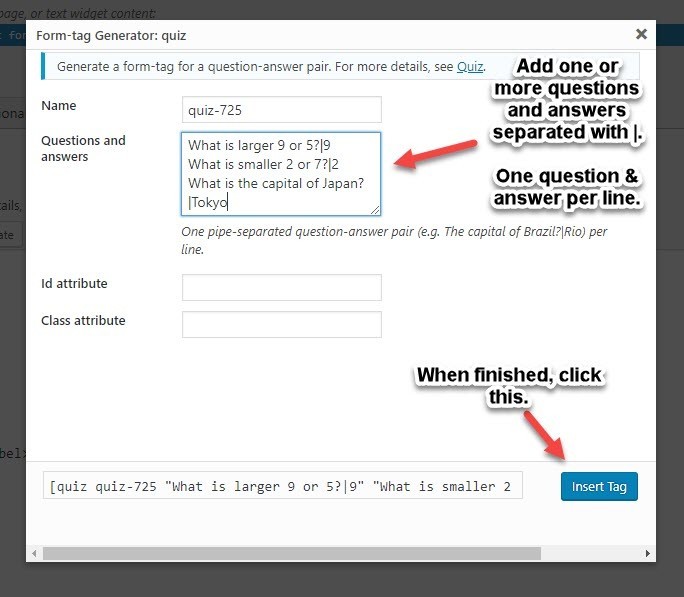
Step 3. Add one or more questions and answers. Adding more than one question and answer will randomize them on the form. Click on the Insert Tab button.
Step 4. Review the form. The quiz tag may not be where you want it. In my example, it is on the bottom before the Send button. You can highlight the tag and drag it to where you want it. Click save when ready.
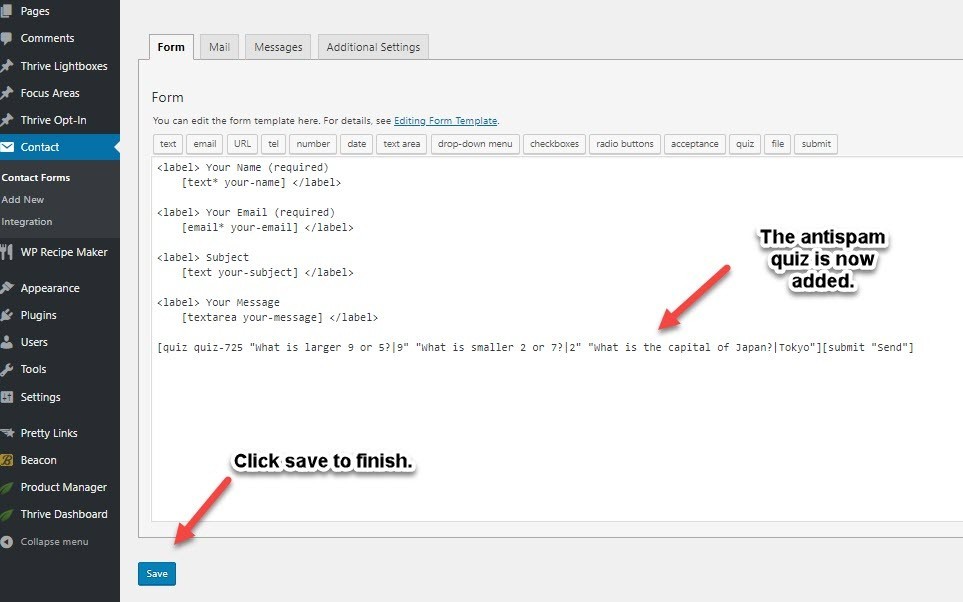
Here are my before and after Contact Form 7 boxes.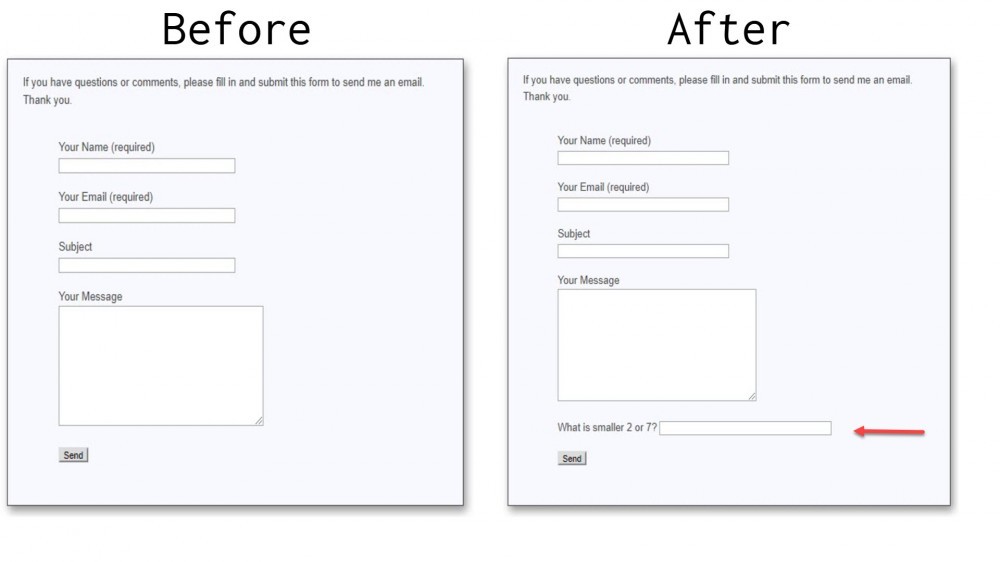
Contact Form 7 reCaptcha integration
Contact Form 7 version 7.5.1 introduced major improvements in the integration of reCaptcha antispam measures. ReCaptcha is a Google product. So registration of your website is required to receive the API keys required to configure it on your website.
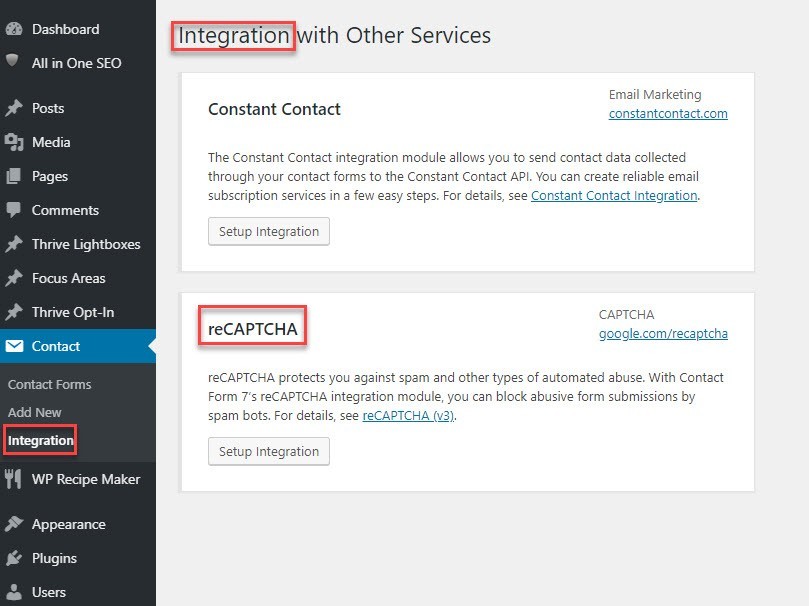
Note: Contact Form 7 also integrates with Constant Contact now for email marketing functionality.
I am NOT a fan of reCaptcha as I often don't select all the required images to pass the reCaptcha measure. I think it is not user friendly and is intrusive.
Hopefully, this information helps you combat Contact Form 7 email spam issues. While these antispam measures work against spam bots, they do not prevent spammers from manually using the contact form to send unwanted email.
Join FREE & Launch Your Business!
Exclusive Bonus - Offer Ends at Midnight Today
00
Hours
:
00
Minutes
:
00
Seconds
2,000 AI Credits Worth $10 USD
Build a Logo + Website That Attracts Customers
400 Credits
Discover Hot Niches with AI Market Research
100 Credits
Create SEO Content That Ranks & Converts
800 Credits
Find Affiliate Offers Up to $500/Sale
10 Credits
Access a Community of 2.9M+ Members
Recent Comments
43


Thanks, Glen. We use Contact Form 7 but were unaware of those anti-spam features, we will check them out.
We read somewhere the other day that this plugin can have a detrimental effect on site speed. Have you noticed this? Also, in your opinion, would using these anti-spam features have a further effect on site speed?
I have seen reports that say it does and others say it doesn't.
I check my site with GTMetrix to see if plugins impact site speed. There was no difference in speed in my case. When using the antispam measures, I didn't notice any impact.
Thanks, Glen, we installed the GTMetrix plugin and will check.
One last question, if you don't mind. When we went to install GTMetrix we noticed a plugin called Fast Velocity Minify which claims to help with site speed and has a lot of good reviews. Do you know anything about this?
I don't use the GTMetrix plugin. I just go to their website and enter the URL I want checked. And I have not seen the minify plugin. I will take a look. Thanks.


I actually stopped using Contact Form 7 because it was being too restrictive in it's spam grabbing! Which is actually kind of funny, since everyone is experiencing the opposite.
I switched to WP Forms, and haven't had a problem since. Though, I use my contact form to get websites to look into, so, that could be one reason why I was getting a lot of things flagged as spam.

Hey Glen,
This is great info, thank you. I don't use Contact Form 7 yet.
I have this bookmarked.
Thank you and have a great weekend.
Monica

I have to say Glen that I've used Contact Form 7 for over 4 years and never had any problems regarding spam.
Enjoy your Saturday.
Robert
I get a ton of spam from my old site (8-years-old). Spam is not a problem with my newer ones. But I know some members are having a problem even with their new sites.
Best to delete the plugin and then try another one and see how you get on.
Or follow Glens instructions to stop the spam.
Mine works perfectly and I've been using it for 4 years.
Robert

I stopped using Contact Form 7 a while back because of this problem. Now I can try it again, thanks!
You're welcome, Rosana. I use Contact Form 7 because it enables my website visitors to keep the communications between us private. Some people are embarrassed to ask questions. So they won't ask using the comment system because it is all so public.
See more comments
Join FREE & Launch Your Business!
Exclusive Bonus - Offer Ends at Midnight Today
00
Hours
:
00
Minutes
:
00
Seconds
2,000 AI Credits Worth $10 USD
Build a Logo + Website That Attracts Customers
400 Credits
Discover Hot Niches with AI Market Research
100 Credits
Create SEO Content That Ranks & Converts
800 Credits
Find Affiliate Offers Up to $500/Sale
10 Credits
Access a Community of 2.9M+ Members
Great info, thanks for taking the time to write this up for us.
Thanks, Philip. I appreciate you commenting.