How to Use Your WA Affiliate Link Using WA Training Blogs or A Class on Your Website




(Cover image: a group of workers or coworkers attending a training presentation, they are watching a computer training session in an office setting)
How to Use Your WA Affiliate Link Using WA Training Blogs or A Class on Your Website
Your Wealthy Affiliate links are a way to earn money from referring customers to this platform. You can learn more about this from the dollar $ icon at the top of your WA home page and copy your affiliate link to add to your website.
Let's say that you are promoting other products in your niche. You can add your Wealthy Affiliate link at the bottom of the page as an anchor text " I learned how to blog." You'll need to place your WA affiliate links if you're training for the Affiliate Bootcamp Training here at WA. For example, if you have a blog about the make money online niche. You could create an affiliate link to one of WA's training and earn a commission when someone upgrades to Premium and Premium Plus. You can place your WA affiliate links about a class you watched or are training from WA blog posts, social media posts, email marketing (autoresponder), and other places where it is appropriate.
Let's pretend I want to write a blog article on How to Create a YoutubeShort Training on my WordPress website.
First, I will search and type in the search box at WA and type how to create a YouTube short. I will see different links, click the title, and it will lead me to Isreal17's profile page. He did a training about this. Aha, now I can use this in my blog postbox.
I want to copy only some of what he wrote ( Google frowns on duplicate content). I want to show my readers about this training. You and I might ask how do I do this?
I'll include some screenshots to see how you and I can create this. Without further ado, I have it here for you.
ScreenShot 1:
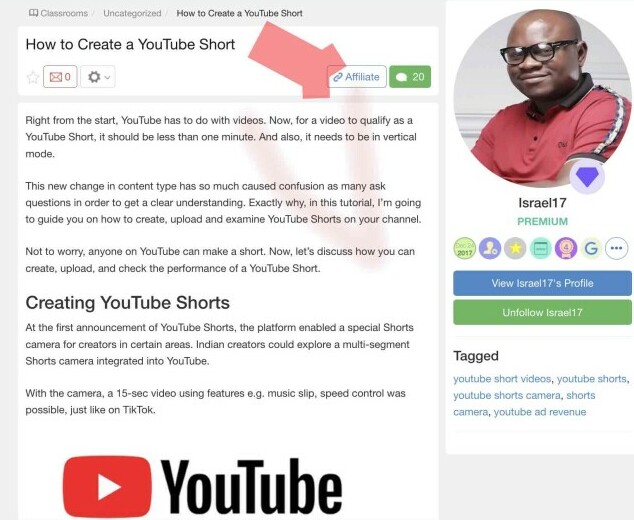
Do you see the Affiliate box with the link icon at the top where the red arrow is? You go ahead and click that box,
Screenshot 2:
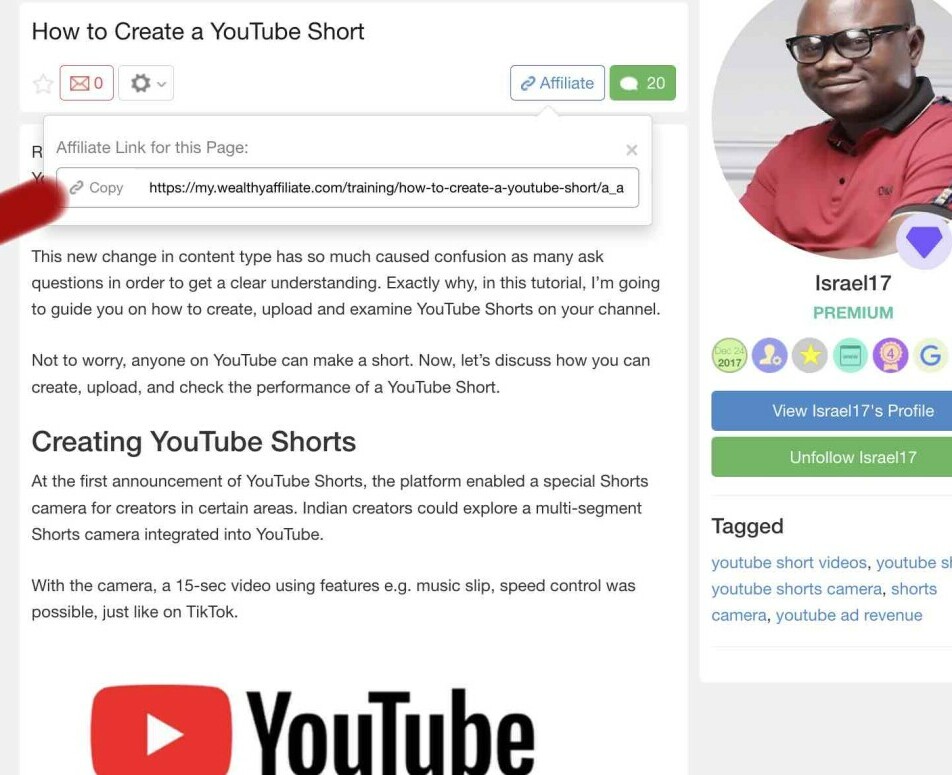
Please take a look at the red pen pointing to copy. You click copy which will be the full URL. Your WA affiliate link identification number will be at the end of the URL
Next, you will go to your WordPress site and draft your article.
Screenshot 3:
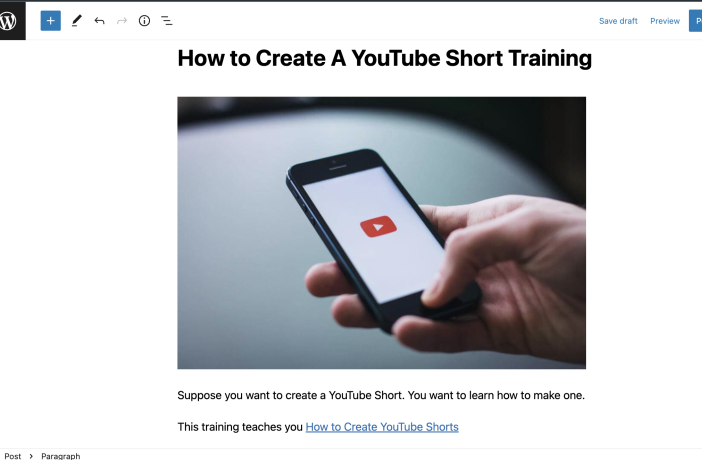
Let's pretend I drafted the article. I went through my introduction and the body. I decided to add more training information in the body of the article. I placed my WA affiliate link that I just copied from Screenshot 2 as an anchor text, as seen in "How to Create YouTube Shorts."
Next, I show you what your readers will see when they click on my WA affiliate link anchor text.
Screenshot 4:
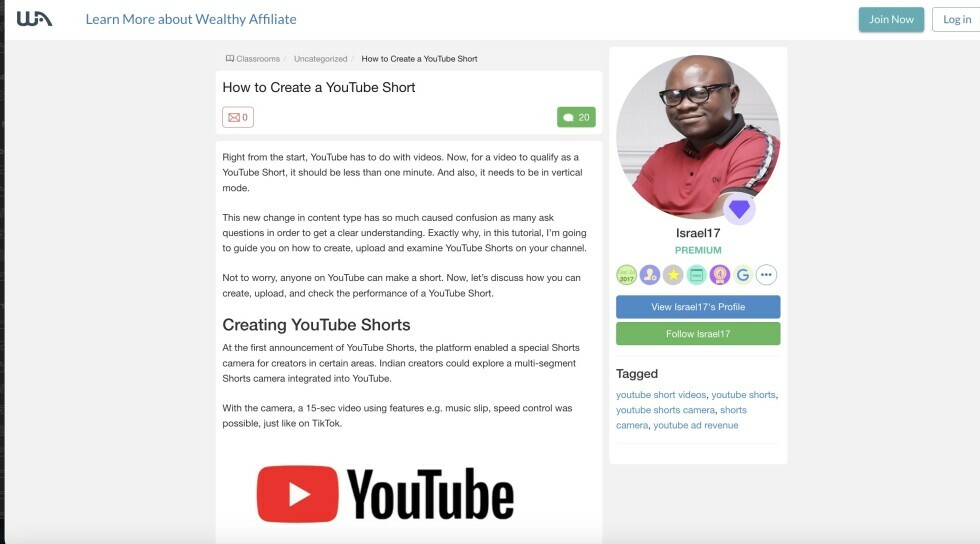
You will wait a few seconds and then move your mouse cursor arrow to leave. What happens next is in Screenshot 5
Screenshot 5:
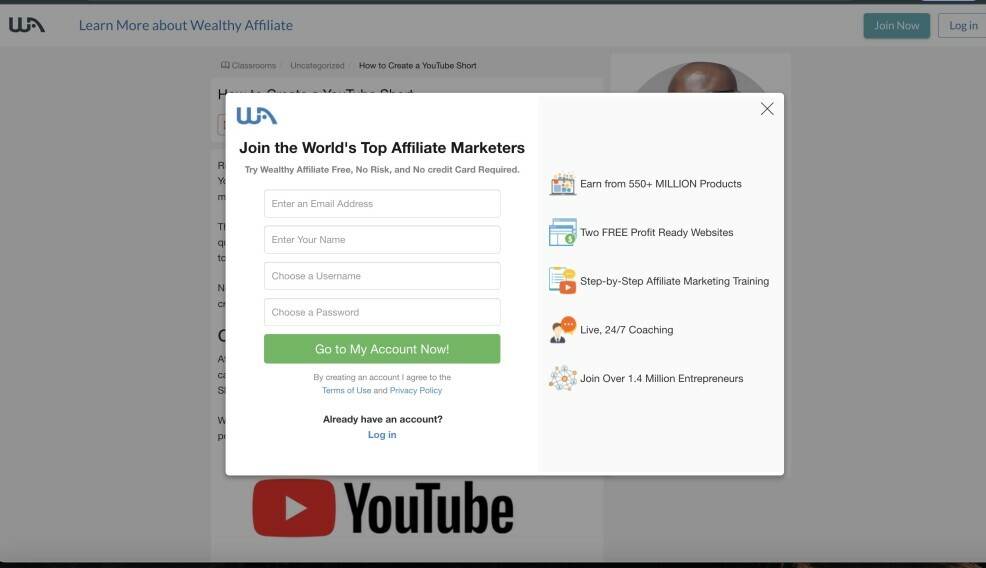
Aha, there is a pop-up window offering a FREE Starter Account. Your readers may be curious and want to see more of the training and might sign up as your referrals. They might close the box and leave, but at least the pop-up is there, and you just gained a referral when they signed up.
It is simple as that.
I hope this has been helpful to everyone.
Other Resources for you:
How to Properly Find Your Affiliate Link-URL has changed
Five Search Engine Optimization (SEO) Statistics Facts for Newbies
How to Build a Personal Brand Website For Your Affiliate Marketing Business
Please share feedback and likes. Thank you.
-BrendaMZ
Join FREE & Launch Your Business!
Exclusive Bonus - Offer Ends at Midnight Today
00
Hours
:
00
Minutes
:
00
Seconds
2,000 AI Credits Worth $10 USD
Build a Logo + Website That Attracts Customers
400 Credits
Discover Hot Niches with AI Market Research
100 Credits
Create SEO Content That Ranks & Converts
800 Credits
Find Affiliate Offers Up to $500/Sale
10 Credits
Access a Community of 2.9M+ Members
Recent Comments
45


Thanks Brenda! Can you explain further what you mean by “Anchor text” please? Is that hyperlinking some text in a sentence?
How about taking a screenshot of Israel’s post (a portion of it), editing it with a CTA and inserting that in the blog or on the website (Sidebar for example) and linking the picture with WA affiliate link to the training?
Just asking as an additional possibility with a visual. 😎 is this concept frowned upon? I see it is a method other affiliate marketers use for their product ads.


See more comments
Join FREE & Launch Your Business!
Exclusive Bonus - Offer Ends at Midnight Today
00
Hours
:
00
Minutes
:
00
Seconds
2,000 AI Credits Worth $10 USD
Build a Logo + Website That Attracts Customers
400 Credits
Discover Hot Niches with AI Market Research
100 Credits
Create SEO Content That Ranks & Converts
800 Credits
Find Affiliate Offers Up to $500/Sale
10 Credits
Access a Community of 2.9M+ Members
Hey Brenda,
Thanks for sharing this informative post with
the visuals:)