How to Properly Find Your Affiliate Link-URL has changed.



(Cover Image: Heavy thick metal chains linked together on a white background)
How to Properly Find your Affiliate Link with the Correct URLI saw Kyle mentioning on someone else's blog that the affiliate link URL that we have used is not the correct URL that is on our dollar sign icon.
Enclosed are Screenshots Explaining what I noticed.
Step 1: Go here to the circle dollar sign- click $
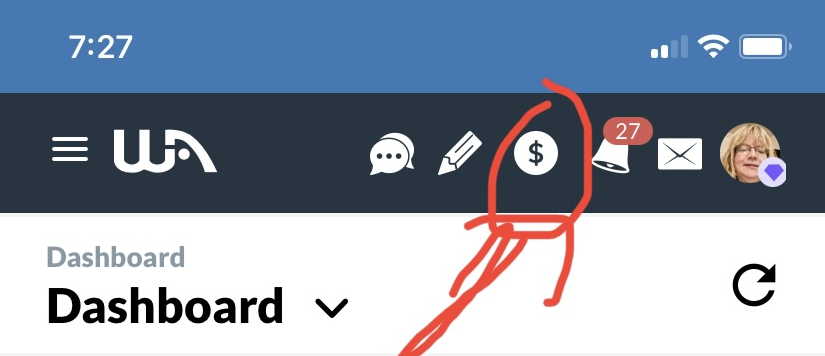
Screenshot1 Image: arrow with circle sign over the dollar sign on the right column of your WA dashboard.
Step 2: You see your affiliate link below. Learn More- You click Copy
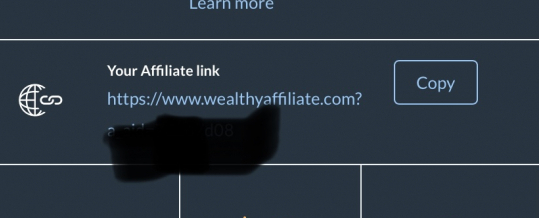
Screenshot 2 Image: Your Affiliate link with mine blacked lined out for privacy and not allow the affiliate link to be shown on WA Blog-
Step 3: I clicked Copied
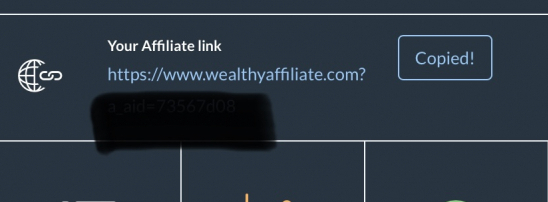
Screenshot 3 Image: Your Affiliate link mine blackened again.
Step 4: Now, I can paste the link into my Chrome Browser.
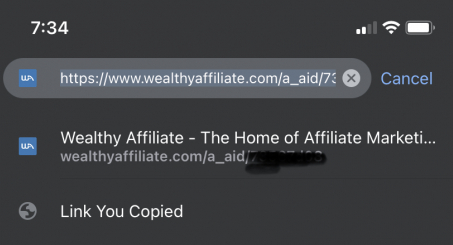
Screenshot 4 Image: URL coped in browser blacklined my affiliate id
Did anyone notice the difference?
See Screenshot 5 Image here:
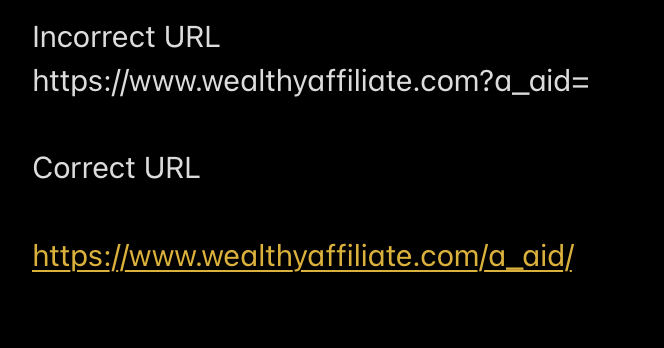
Kyle told the other member the correct URL was without the ? mark to make sure we properly get credit for our referrals.
I did not spell out the full URL. The screenshot 5 already shows it.
affilate.com?/a_aid=your affiliate id number will not work if you use it on YouTube or other links.
The correct way to link is this:
affiliate.com/a_aid/youraffiliateidnumber
We can see in the Step 4 screenshot in the browser- there is no ? mark listed there, so that is why some people have their affiliate link URL, not in the correct format.
I wanted to give everybody the heads up on how to format your URL correctly so you can get credit for the referrals.
I did notice it changed automatically in my browser; however, for some embedded links, it might not work.
I recommend that you all follow the correct link to your affiliate ID without the question mark format. See Screenshot 5 image, the correct URL.
This must be the new thing interface. I was not aware of this change until Kyle mentioned it. The URL looks clean like a permalink, and it's so simple and easy to link your affiliate id.
Let me know if this is correct, Kyle or Carson.
Will that ...affiliate.com?/a_aid=affiliateid link still work versus the newer way without the question mark?
-BrendaMZ
Join FREE & Launch Your Business!
Exclusive Bonus - Offer Ends at Midnight Today
00
Hours
:
00
Minutes
:
00
Seconds
2,000 AI Credits Worth $10 USD
Build a Logo + Website That Attracts Customers
400 Credits
Discover Hot Niches with AI Market Research
100 Credits
Create SEO Content That Ranks & Converts
800 Credits
Find Affiliate Offers Up to $500/Sale
10 Credits
Access a Community of 2.9M+ Members
Recent Comments
39


See more comments
Join FREE & Launch Your Business!
Exclusive Bonus - Offer Ends at Midnight Today
00
Hours
:
00
Minutes
:
00
Seconds
2,000 AI Credits Worth $10 USD
Build a Logo + Website That Attracts Customers
400 Credits
Discover Hot Niches with AI Market Research
100 Credits
Create SEO Content That Ranks & Converts
800 Credits
Find Affiliate Offers Up to $500/Sale
10 Credits
Access a Community of 2.9M+ Members
Thank you for your blog post; it's appreciated.
I don't quite understand, if you are correct, then surely we should have all been alerted. On the other end of the scale, I'm sure this is very fixable and something that needs fixing from whoever manages the Wealthy Affiliate website.
I have checked my links and they changed to the correct format. I feel very sorry if people are sending traffic and signups and then not being rewarded correctly.
Have a great day and thank you for the heads up.
Roy
Thank you for your reply, Brenda, it's appreciated.
I often use a subdomain for my affiliate links, it's probably safer. When I click on my subdomain, the affiliate link appears to open correctly.
I actually sent my reply to you yesterday, but I think that as I hit reply Wealthy Affiliate and Amazon-hosted websites went down in the UK. It was down for about four hours. Fortunately, I had a copy of my comment to you!
All the best.
Roy
Hello Brenda,
I have never used pretty links, but I have always liked the idea of it. Is it a plug-in or software or something?
I must admit I hadn't heard of the Thirsty Affiliates plug-in, that sounds like another ideal solution! We never stop learning, that's one of the many benefits of talking to the community!
For a subdomain, I just go to my domain provider, create a subdomain and forward the subdomain to the affiliate link. It seems to work.
All the best.
Roy
It's a pleasure, Brenda! I appreciate the initial info, thank you.
Roy