Amazon Associates: How to Make Product Images A Link


Published on August 18, 2014
Published on Wealthy Affiliate — a platform for building real online businesses with modern training and AI.
Since I haven't been a premium member for 3 months, I can't create training just yet. BUT, I will make a blog for now.
Background:
My website, collegedormroom.us uses various affiliate links. I understand that for Google ranking, this may not be the greatest option for those pages. In my case however, with high use of social media, it's been working out great for my particular niche.
Purpose:
I would love to show you all how easy it is to make a product's image a link. For example, if you click on any of the images I have shown on my page: "15 Pinterest Inspired Looks You Can Own" - it will take you directly to Amazon's product in a new tab.
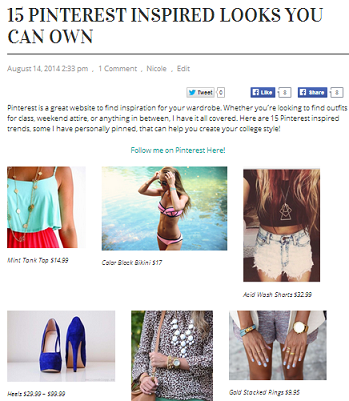
I'll use the example of those blue heels in my Pinterest article.
Your Turn!
The code that you need to enter into your page/post is located below. Make sure you paste this into the TEXT section and not the VISUAL on wordpress.
Ready to put this into action?
Start your free journey today — no credit card required.
<a href="PRODUCT LINK" ><img src="IMAGE URL"></a>
- When you're on the home page, type in and search for the product you would like to have on display (blue arrow)
- Copy and paste the product link to replace PRODUCT LINK (pink arrow)
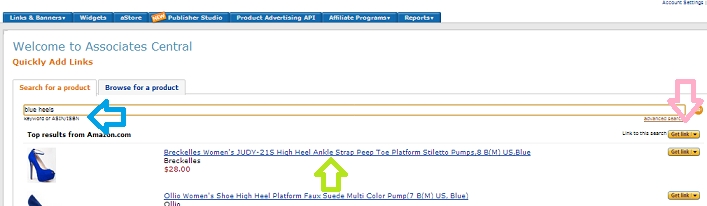
- To get the image URL, click directly on the product link from within this page - it will look as if you have chosen that item to purchase. The name, description, price should show up like any other Amazon product (green arrow)
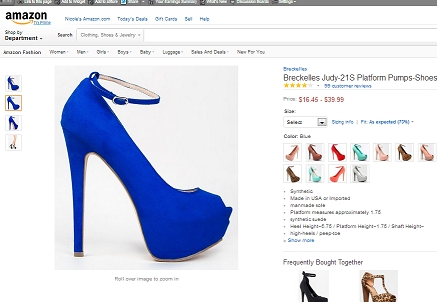
- From here you can click on the product for a detailed image. Right click to chose option "Copy image URL" and past it right into IMAGE URL above.
You can always simply use Amazon's "Link to this Page" - "Image Only"... But I like this approach because you get to pick the exact image you are presenting (color, angle, etc).
I hope this helps! Let me know if there are any questions or if anyone needs further detail :)
Share this insight
This conversation is happening inside the community.
Join free to continue it.The Internet Changed. Now It Is Time to Build Differently.
If this article resonated, the next step is learning how to apply it. Inside Wealthy Affiliate, we break this down into practical steps you can use to build a real online business.
No credit card. Instant access.