How to revamp an old post


Published on December 6, 2016
Published on Wealthy Affiliate — a platform for building real online businesses with modern training and AI.


You can rewrite old posts, which are not ranking
- Why, is it because the content?
- How many words did you use? Make them above 750+
- add new lines and/or products.
What next? When you update the post, it will not be visible on your recent posts. So you have to change a few things
I choose to keep the same keyword phrase, but when the post isn't ranking at all, you can search for new keywords, you can add some new tags as well.
Don't change the permalink!
What to do?
1. Rewrite your post, keywords, products, tags
2. Update the date and time to the date of today and be sure the time is in the past
Ready to put this into action?
Start your free journey today — no credit card required.
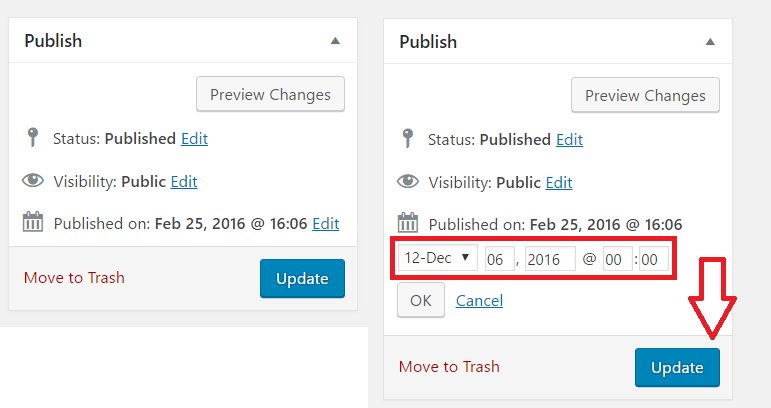
3. Update/publish your post
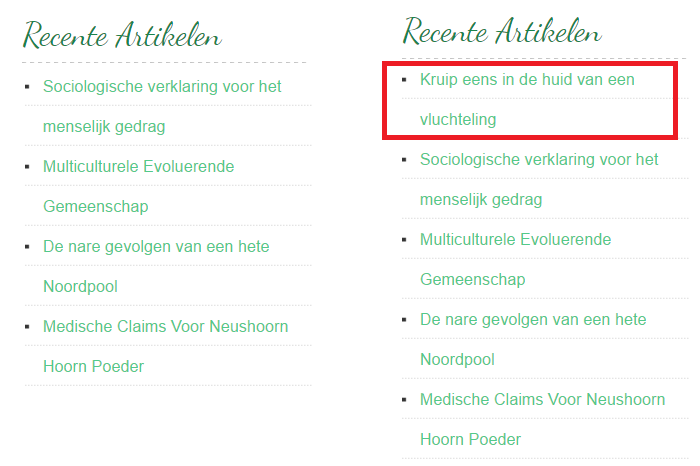
The post published on Febr 25, 2016 will appear on top of my recent posts again.
4. Fetch with Google
Google webmasters tools googlebot fetch
5. So themes take you comments along some themes don't and they will be gone, so, in that case, you need to collect new comments too. Perhaps it's best to revamp posts without comments.
(You can try to change the comment date too, but in my case, they didn't display on the site)
6. Share on Social Media again
Happy revamping :)

Share this insight
This conversation is happening inside the community.
Join free to continue it.The Internet Changed. Now It Is Time to Build Differently.
If this article resonated, the next step is learning how to apply it. Inside Wealthy Affiliate, we break this down into practical steps you can use to build a real online business.
No credit card. Instant access.