Rearrange Pages in Header


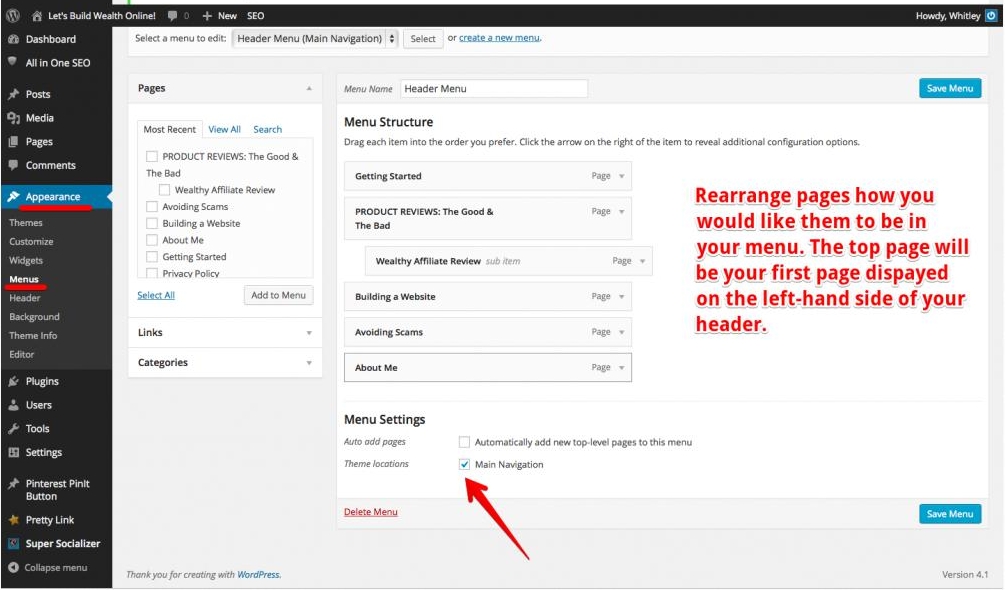
So I have been trying and trying to figure out how to rearrange my menu of my pages in my header on my website because they show up in alphabetical order; therefore, my About Me page shows up first, which I want to show up last or on the very right-hand side of the header. I finally figured it out.
If anyone is having the same problem I was having, I am here to help you out :)
- First go to your Dashboard in WordPress.
- Next go to the appearance tab.
- Click on Menus.
- Now you can arrange the menu order how you prefer them to be.
- (Here is the part I didn't know I had to do for it to actually change in my header) Now you need to click in the box that says Theme Locations Main Navigation.
Hope this helps!
~Whitley
Join FREE & Launch Your Business!
Exclusive Bonus - Offer Ends at Midnight Today
00
Hours
:
00
Minutes
:
00
Seconds
2,000 AI Credits Worth $10 USD
Build a Logo + Website That Attracts Customers
400 Credits
Discover Hot Niches with AI Market Research
100 Credits
Create SEO Content That Ranks & Converts
800 Credits
Find Affiliate Offers Up to $500/Sale
10 Credits
Access a Community of 2.9M+ Members
Recent Comments
27


OMG you are a life saver! I was cracking my head trying to do this, thank God I found tour tutorial Thank you so much. I shall follow you.
Ann

Hi Whitley, this helped me! Thank you for posting the info about clicking the box that says Theme Locations Main Navigation. I was going nowhere trying to figure out how to change the order of my header pages! Arrrg!!! Best to you, Beanca


The theme location box shows the menu you are using. Generally (and I don't yet know when you wouldn't - obviously it seems if you have more than one menu ) this should show 'Main Menu'. (This should show at the top of the appearance menu page as 'Menu Name main.) I don't have any trouble with this.
Then set your order by either clicking the drop down arrow by 'page' and selecting the way you want to move up or down. Or you can drag the page to where you want it. Make sure, if it is a stand alone page, it lines up on the left. If you indent it, it will become a 'child' of the page just above it.

Hi, When I do this and select the 'Theme locations' box, it makes my menu disappear on my website unless you hover over the area with the cursor then the menu titles appear. If I un click the 'Theme locations' box and the other box too the menu reappears but in the wrong order still. Any suggestions?

I wish I knew how to help you, but I would have to see how your settings are set up with your chosen theme, etc. I'm sorry! I am not sure what's wrong.

i am not having any luck - when I go to my menu section, the pages section is grey and there is no option for theme locations or any of that - it doesnt give me the option to move anything at all - just a greyed out box on the left side and the right side is blank. Can you help me? I've been trying for 2 hours to figure this out!

Do you know how to take a screen shot? If so, take one and show us your problem. Otherwise we can't help


I remember the first time I was confused on that and man was it frustrating, but once you figure it out once, it becomes VERY easy.
Just a heads up to anyone:
I once had a menu item where I made a sub menu with about 50+ reviews in it. It was a BAD idea since it took FOREVER for the menu to load up each time I wanted to update it so if anyone is using the sub menu option, keep it simple guys and limit the amount of sub menus you add there. I'd say no more than 5 per menu item (if that makes sense).
Okay. So I was going to do exactly that -- put my reviews as submenus haha. What do you suggest instead?
Well nothing really lol. Let your blog do all the work. People who visit your site will land on your blog page, not your homepage anyway and in the end, you want to funnel them into your wealthy affiliate review anyway so those sub menus are only going to be a distraction.
So just write my reviews as blogs instead of pages? And then in the review blog, link my Wealthy Affiliate review?

Vitaly, thanks for the heads up. However, if you do this do you lose the work you have done perhaps a month ago? It seems as if it disappears into an abyss! This would give me the feeling that the work I did a month ago and prior has been for nothing!
Absolutely not Terry. You're just indicating which pages you want to show on your home page and not. Everything that will not show is still on the site. I recommend making your homepage a blog roll and then customizing the menu on everything else so you can have an index to keep track of for easy linking. If not, it's OK too, because you still can access all of your posts/pages through your dashboard.
Thanks Vitaly, do you think you could have a look at theexpertaffiliate.com if you get time to see if I have this correct. I am not missing any posts from my menu yet as I am not that big. But soon I will be in that territory where I will not have my earlier posts in my menu
Looks fine to me Terry. If anything, I'd cut down on the top menu bar and just have a get started, an about terry page and a link to your WA review. As long as you keep it simple, it'll be easier for users to navigate the site.
See more comments
Join FREE & Launch Your Business!
Exclusive Bonus - Offer Ends at Midnight Today
00
Hours
:
00
Minutes
:
00
Seconds
2,000 AI Credits Worth $10 USD
Build a Logo + Website That Attracts Customers
400 Credits
Discover Hot Niches with AI Market Research
100 Credits
Create SEO Content That Ranks & Converts
800 Credits
Find Affiliate Offers Up to $500/Sale
10 Credits
Access a Community of 2.9M+ Members
Thanks so much, great explanation.