How to verify your wordpress website using meta tag


Hi all,
I found this easiest way to get your wordpress website verified with google.
Step 1:
On the wordpress page click on plugins
Step 2:
Click on Add New Plugin
Step 3:
Search for "Google Site Verification plugin using Meta Tag"
Click on the 1st option
install the plugin and activate it

Login to google webmaster tools
click on Add a site

Step 5:
Click on alternate method and choose the first option which will be like below
"Add a meta tag to your site's home page.
1. Copy the meta tag below, and paste it into your site's home page. It should go in the <head> section, before the first <body> section"
On the Text box you can find something like
<meta name="google-site-verification" content="X_xxxxxxxxxxxxxxxx" />

Step 6:
copy and paste it in notepad and Copy the one in bold letters X_xxxxxxxx without " "
Step 7:
On your wordpress website click on Settings and you can find Google sitemap verification on the sub menu (This will appear only if you have activated your plugin)
Step 8:
Click on the plugin and you will see a screen with below text
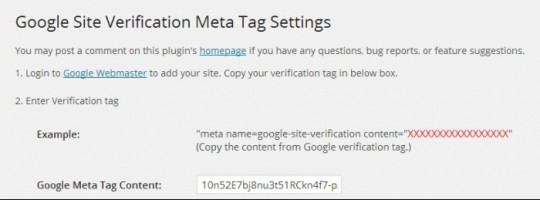
Next to the Google Meta Tag Content copy and paste the one in quotes "X_XXXXXX" click on Save changes
Step 9:
Once the changes are saved you can click on Verify button on your google webmaster tools
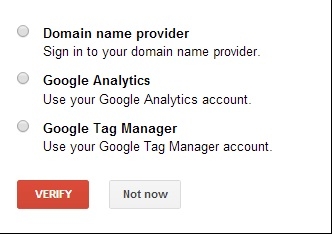
Step 10:
You will see a Tick Mark with a success message.
Join FREE & Launch Your Business!
Exclusive Bonus - Offer Ends at Midnight Today
00
Hours
:
00
Minutes
:
00
Seconds
2,000 AI Credits Worth $10 USD
Build a Logo + Website That Attracts Customers
400 Credits
Discover Hot Niches with AI Market Research
100 Credits
Create SEO Content That Ranks & Converts
800 Credits
Find Affiliate Offers Up to $500/Sale
10 Credits
Access a Community of 2.9M+ Members
Recent Comments
3


Join FREE & Launch Your Business!
Exclusive Bonus - Offer Ends at Midnight Today
00
Hours
:
00
Minutes
:
00
Seconds
2,000 AI Credits Worth $10 USD
Build a Logo + Website That Attracts Customers
400 Credits
Discover Hot Niches with AI Market Research
100 Credits
Create SEO Content That Ranks & Converts
800 Credits
Find Affiliate Offers Up to $500/Sale
10 Credits
Access a Community of 2.9M+ Members
Do you have to have a certain number of subscribers before your channel can be verified?
No, you don't need any subscribers.
Just follow what Jay shows you in this video: Hello: Google Webmaster Tools