Google Analytics - Beware Of Referal Spam!


Published on March 10, 2018
Published on Wealthy Affiliate — a platform for building real online businesses with modern training and AI.


What is referral spam?
Why is it bad?
How do I spot it?
Where does it come from?
Chances are if you know how to find referral spam in your Google Analytics, you will find at least some... Almost all high value websites like ours have some, if not a lot, of referral spam.
Referral spam is essentially fake traffic, not a real human visitor. It is a bad thing because it damages your analytics stats like Session Duration and Bounce Rate. These stats affect your rankings so damage to them is a very bad thing.
Finding out if you have any referral spam is pretty easy:
Ready to put this into action?
Start your free journey today — no credit card required.
Go into Google Analytics, in the left-hand menu select
Acquisition -> All Traffic -> Referrals
Once there, scroll down to see the source of your referrals. Any source that has a 100% Bounce Rate and 00:00 Session Duration is spam. Each of these hits is damaging to your stats. Chances are, it is an automated Spider or Bot and not a real human visitor.
NEVER visit a site that appears to be spam as you might end up infected with malware. This type of spam is also used to generate traffic from the curious, believe it or not, so avoid visiting the spam sites.
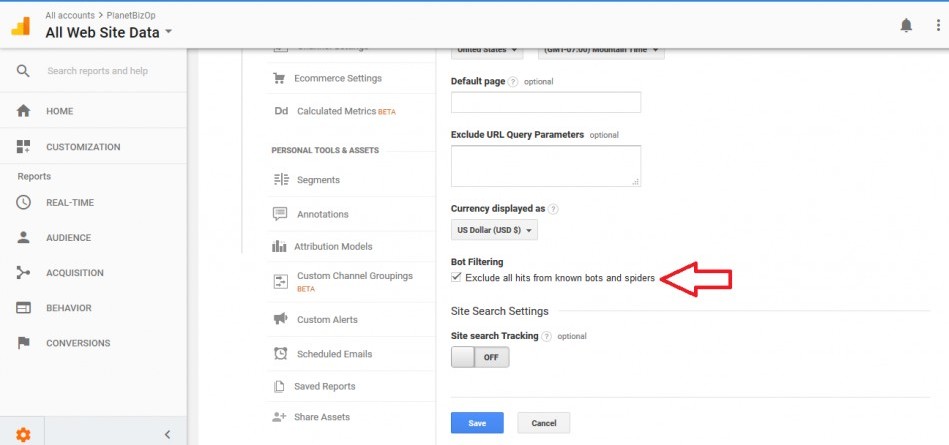
One simple thing you can do is turn on Google Analytics Bot Filtering, check the box labeled 'Exclude all hits from known bots and spiders'.
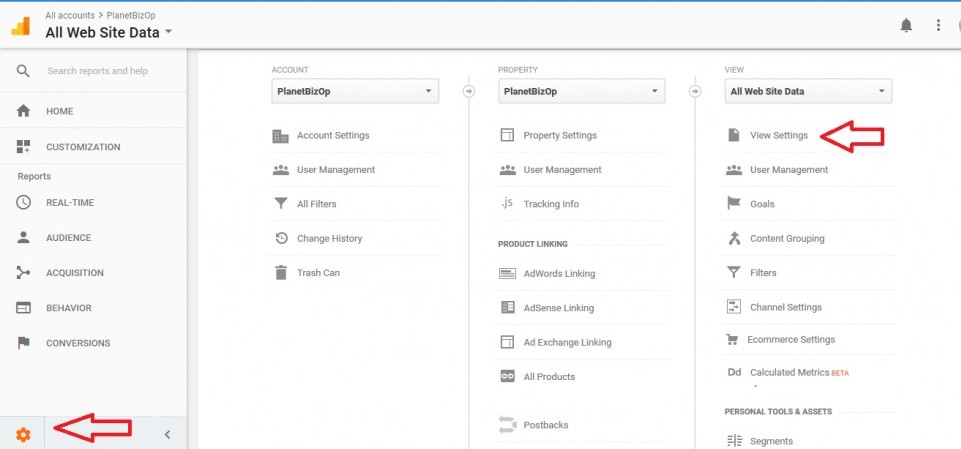
At the bottom of the Google Analytics left side menu click the gear icon and select View Settings. See below:
Once inside View Settings, scroll down to find Bot Filtering and check the box to filter out spiders:
This isn't the most effective way to filter this nuisance traffic but it should help. The best way to prevent this kind of spam is with filters. They can be a bit technical so if you are interested in using filters do a Google search on 'Analytics referral spam' and you'll find lots of tutorials on how to create spam filters. I'm not an expert on Analytics filters so asking me won't get you any good answers, sorry.
At the very least, turn on bot filtering and the most egregious spiders should be silenced.
Hope this helps some of you out!
Share this insight
This conversation is happening inside the community.
Join free to continue it.The Internet Changed. Now It Is Time to Build Differently.
If this article resonated, the next step is learning how to apply it. Inside Wealthy Affiliate, we break this down into practical steps you can use to build a real online business.
No credit card. Instant access.