How to Create a Drop Cap


How to Create a Drop Cap
I don't know if this is of general interest or not, but someone who downloaded one of my e-books asked how I created the drop caps that I use at the start of each chapter.
For example:
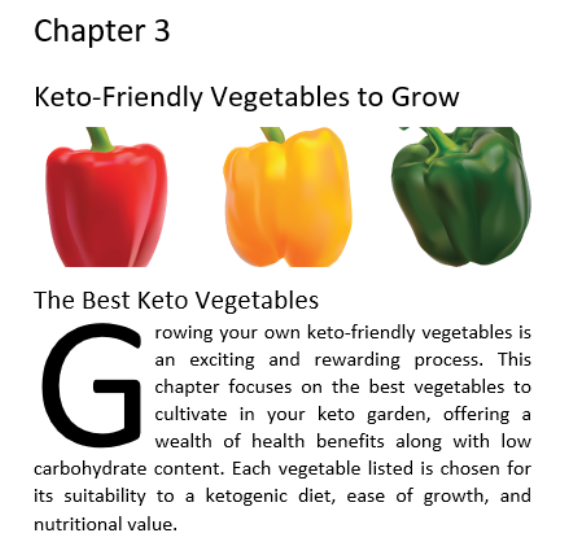 The first "G", of course, is the drop cap.
Drop Caps have been around for centuries and pre-date the printing press.
They are most often found in print books and I think they give a professional look to your work.
They are very easy to do if you are using Word as your source document. They are also supported by some of the free alternatives to Word.
(I create all my e-books in Word and then save them as PDFs for website publishing and customer download).
Here's how to do a drop cap in Word:
(1) Place the cursor in front of the letter to be dropped.
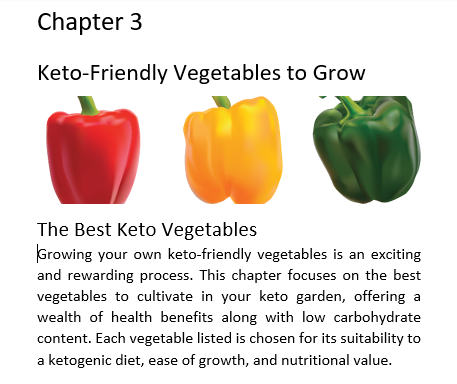 Note that the cursor is in front of the "G".
(2) In the Insert group, select Drop Cap.
 (3) Select Dropped from the options.
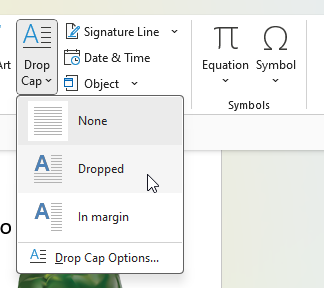
(4) This will drop the capital letter 3 lines by default.
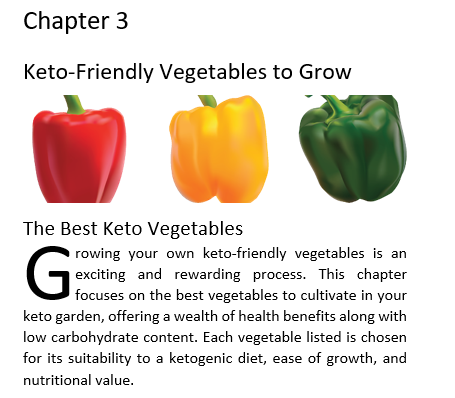 (5) You can change this by clicking on Drop Cap Options.
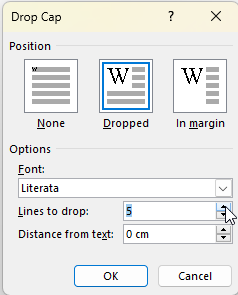 (6) Here, I've changed it to drop 5 lines instead of 3, giving:
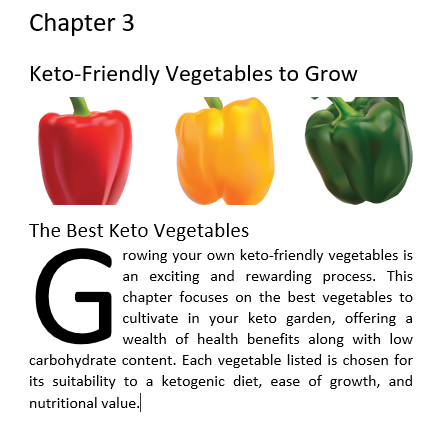 The drop cap is preserved when you save your Word doc as a PDF.
So... a very simple way to add a touch of class to your printed words.
Join FREE & Launch Your Business!
Exclusive Bonus - Offer Ends at Midnight Today
00
Hours
:
00
Minutes
:
00
Seconds
2,000 AI Credits Worth $10 USD
Build a Logo + Website That Attracts Customers
400 Credits
Discover Hot Niches with AI Market Research
100 Credits
Create SEO Content That Ranks & Converts
800 Credits
Find Affiliate Offers Up to $500/Sale
10 Credits
Access a Community of 2.9M+ Members
Recent Comments
39


I never knew it was possible to create a Drop Cap in Word. This proves that we never stop learning.
Thanks for passing on more of your knowledge, Phil.
Much appreciated.
Valerie


I had to laugh, Phil, when I saw the peppers.
I was a bit confused, I though you were going to show us how to prepare stuffed peppers or something...grin.
Then when I saw the text, I knew instantly what you were gojng to share...
Great post, the dropped cap can be a statement all unto itself!
Rudy
See more comments
Join FREE & Launch Your Business!
Exclusive Bonus - Offer Ends at Midnight Today
00
Hours
:
00
Minutes
:
00
Seconds
2,000 AI Credits Worth $10 USD
Build a Logo + Website That Attracts Customers
400 Credits
Discover Hot Niches with AI Market Research
100 Credits
Create SEO Content That Ranks & Converts
800 Credits
Find Affiliate Offers Up to $500/Sale
10 Credits
Access a Community of 2.9M+ Members
Very informative. Thank You
You are most welcome, Dazzel.