Categorize Your Posts


Categorize Your Posts
The above image is categorized on PixaBay as Dogs, White, River, Water, Vietnam and Lifestyle, so it can be found under any of those seaches.
I'm often asked to look at WA members' websites and see blog post after blog post labeled as "uncategorized".
And when I point this out, I'm asked how to fix that.
When to Add a Category
Like most things in WordPress, it's pretty simple.
And can be done from different access points.
But the best time to do it is when you're creating the blog post. Do it every time and you'll never be faced with the major task of having to edit all your previous posts.
Well, major task if you've got hundreds of them.
How to Add a Category
When you create a new blog post, there are a number of options made available to you in the right hand sidebar.
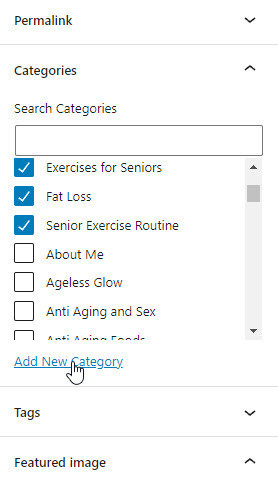
One of them is categories.
Click Add New Category and add a category that is appropriate to this blog post.
Note that the category you add will be permanently stored and will be available for future blog posts, so try to choose category names that can link associated blog posts together.
How to Use a Previously Added Category
Previously added categories will be shown in a list. All you have to do to select one is to click its check box.
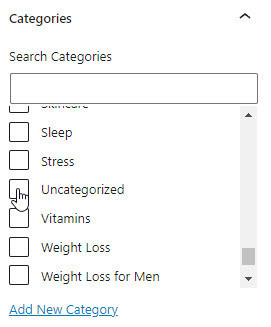
Uncategorized will be selected by default.
Click to uncheck it.
Can I Make Global Changes?
You also have separate access to the categories you've created and can edit them (including changing the name, adding new ones and deleting them). This will automatically update existing blog post categories.
In your WordPress admin area, go to Posts >> Categories.
There you will see all of your existing categories and can edit them or create new ones, which will then become available to be added to blog posts.
Categories in a Menu
A powerful use of categories is in your header menu.
You could create a header menu item called Categories and then drag individual categories across as sub-menu items.
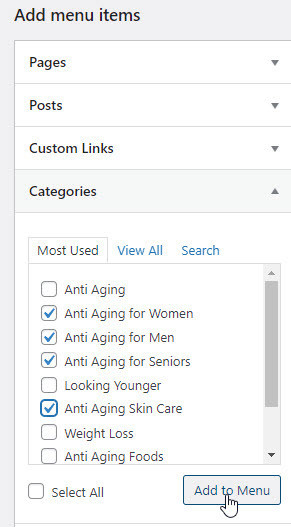
Then, when your visitor clicks on the category name, your website will immediately display all the related blog posts that share that category.
This is powerful stuff and helps to keep your site relevant and nicely organized.
Let me know if you'd like more detail about how to do this. If enough members are interested, I'll create a separate tutorial for it.
Join FREE & Launch Your Business!
Exclusive Bonus - Offer Ends at Midnight Today
00
Hours
:
00
Minutes
:
00
Seconds
2,000 AI Credits Worth $10 USD
Build a Logo + Website That Attracts Customers
400 Credits
Discover Hot Niches with AI Market Research
100 Credits
Create SEO Content That Ranks & Converts
800 Credits
Find Affiliate Offers Up to $500/Sale
10 Credits
Access a Community of 2.9M+ Members
Recent Comments
62


This is something I need to do before I go any further! Thank you for the clear and detailed instructions. I will save this post so I can refer back to it.
If I change the title of one of my posts will that be an issue with Google? I’m wondering if it will affect indexing because the keyword will have changed

You're welcome, Karen.
Blog posts are indexed by slug, so changing the title will not affect indexing. It may affect ranking, especially if keywords are changed.

Thanks, Phil! It's real easy to forget to assign the category when I start my post. I do it when starting a post, but it's sporadic. I forgot about putting the categories in the menu, too. Thanks for this very important post.


See more comments
Join FREE & Launch Your Business!
Exclusive Bonus - Offer Ends at Midnight Today
00
Hours
:
00
Minutes
:
00
Seconds
2,000 AI Credits Worth $10 USD
Build a Logo + Website That Attracts Customers
400 Credits
Discover Hot Niches with AI Market Research
100 Credits
Create SEO Content That Ranks & Converts
800 Credits
Find Affiliate Offers Up to $500/Sale
10 Credits
Access a Community of 2.9M+ Members
THANK YOU! Now the question. I'm having trouble wrapping my head around Categories and Pages. I get that we add our pages to our Categories. My menu is a MESS and I'm trying to sort it out. Like you mentioned if you don't do it correctly in the beginning it is a problem to do it later. This is where I'm at! Can you have too many categories? How do we remove them without losing what is there? I'm really confused. If you are doing it from the preview page do you have to publish to save it? I'm doing something wrong. I have watched several videos and I'm just so unsure of what I'm doing that I feel I'm making a bigger mess.
You can also edit categories. dashboard/categories