Why Books Don’t Use Pink Paper (and What That Teaches Us About Conversions)


Published on October 7, 2025
Published on Wealthy Affiliate — a platform for building real online businesses with modern training and AI.


Today I want to discuss design. Website design, and just how simple and "fun" decisions, can adversely impact the success of your content and the overall readability.
When it comes to designing websites, background color is often treated as a playground for creativity. After all, you can change your site to green, purple, or patterned gradients with the click of a button.
But here’s the key question: just because you can, should you?
Why White Backgrounds DOMINATE...
Think about books. For thousands of years (from papyrus scrolls to modern publishing) content has been delivered on light backgrounds with dark text. If there were a more effective way to consume written content, it would have evolved. Yet here we are, centuries later, still reading black ink on white paper.
Why?
Because it works.
It’s the most legible, the most comfortable for the human eye, and the least distracting. Readers don’t notice the background, they focus on the content. That is the ultimate goal. And in a world where attention is more scarce than ever, that’s exactly what you want.
The Travesty That I’m Seeing Out There..
Lately, I’ve noticed people experimenting with all sorts of background colors, flashy fonts, and even random text colors within their content.
Some go heavy on bolding, italics, underlining, or even rainbow-highlighted text. The intention might be to make their work “pop,” but the result is the opposite...it pulls the reader’s attention away from the actual message (and sometimes makes the content very difficult to read).

Instead of letting the content shine, the formatting becomes the story. And here’s the hard truth: your visitors didn’t show up for the fireworks, they showed up for the value. When you bury your message in unnecessary visual stimulation, you’re asking your audience to work harder to get to the good stuff. That’s friction...and friction kills conversions.
Ready to put this into action?
Start your free journey today — no credit card required.
Conversion Data on Background Colors.
OK, now let's get to the numbers. Research consistently shows that readability and contrast drive conversions:
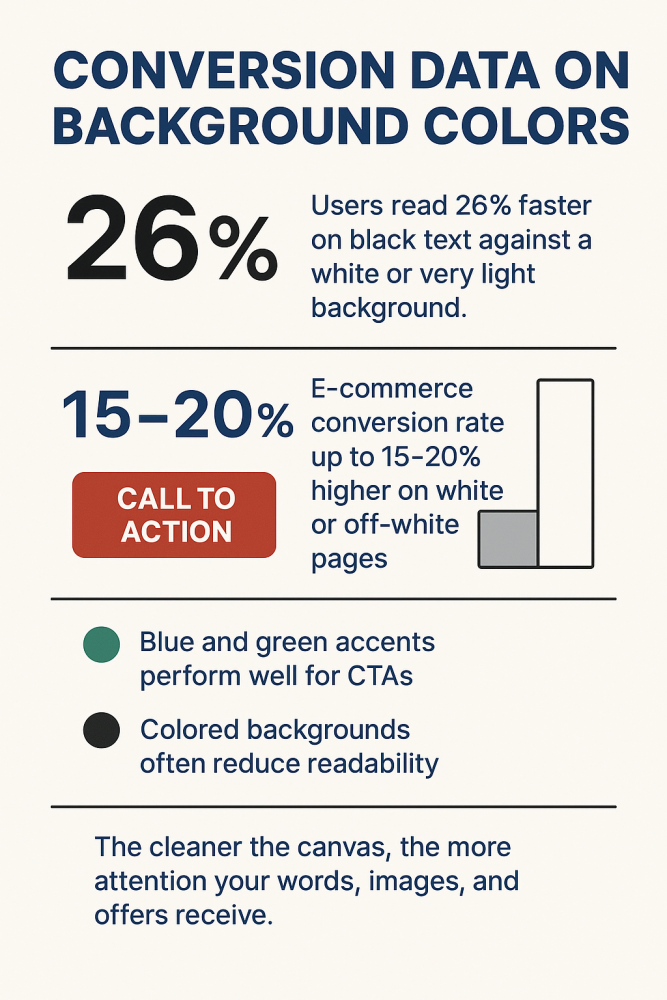
(1) High contrast (dark text on light background) yields the highest reading speed and comprehension. Users read 26% faster on black text against a white or very light background compared to low-contrast alternatives.
(2) White backgrounds are associated with trust and professionalism. E-commerce studies reveal up to a 15–20% higher conversion rate when product and checkout pages use a simple white or off-white background.
(3) Colored backgrounds can work in specific sections like calls-to-action (CTAs). But across the main content area, they often reduce readability, increase bounce rates, and lower session duration.
(4) Blue and green accents perform well for CTAs buttons and links because they signal calmness, trust, and forward movement, while red grabs immediate attention but should be used sparingly.
The principle is simple: the cleaner the canvas, the more attention your words, images, and offers receive. Here is a breakdown of the data.
The Rise of Dark Mode
Not all audiences are the same. There has been a significant rise in dark mode these days, which is white text on a black backdrop. This style is quickly growing in popularity, particularly among people in the technical space. Developers, coders, and data professionals often prefer light text on dark backgrounds as it reduces eye strain in low-light settings and aligns with many of the tools they use daily.
Here is an example of this, and you can test the readability of yourself.
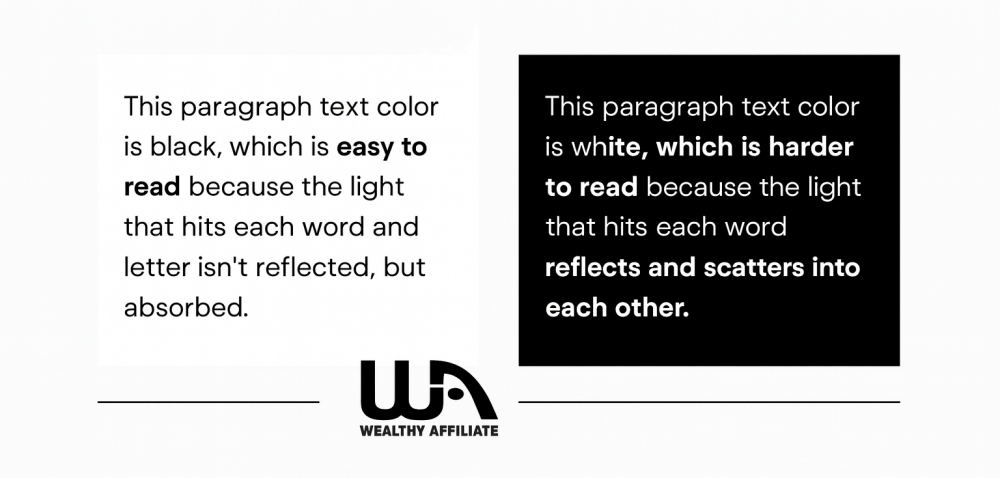
I am old school and still prefer light mode, but I know there is a significant group of people here within Wealthy Affiliate (including Carson) that are dark mode only. The key is to treat dark mode as an option rather than a default as it is here within the platform at WA. Many Wordpress themes now allow you to "toggle" between light mode and dark mode as well.
It works brilliantly for certain audiences, but it doesn’t replace the need for clarity and contrast, it simply flips it.
Now it is Time to Put it All Together...
If your goal is conversion, not self-expression, keep these rules in mind.
- Stick to white or light backgrounds for core content. That’s what readers are accustomed to, and it’s proven to be the most effective.
- Avoid random text colors and overformatting. They pull attention away from your message and reduce readability.
- Use contrast wisely. Black or very dark gray text on white remains the gold standard.
- Reserve color for accents. Save blues, greens, or bold tones for CTAs, banners, and buttons. not for the body of your content.
- Offer dark mode when relevant. If your audience skews technical, this option will improve satisfaction and engagement.
At the end of the day, your website is NOT for you, it’s for your audience. Background colors and formatting should never be about “because you can.” They should always be about because it works.
What are your thoughts on this, have you seen pages/websites that you simply left because you deemed them unreadable? What colors have you noticed lead to the most readability on your end?
Drop your comments below!
Share this insight
This conversation is happening inside the community.
Join free to continue it.The Internet Changed. Now It Is Time to Build Differently.
If this article resonated, the next step is learning how to apply it. Inside Wealthy Affiliate, we break this down into practical steps you can use to build a real online business.
No credit card. Instant access.