Great WordPress Content Formatting Tool


Hello all!
So I have discovered a really great tool for formatting your wordpress content. It enables you to:
- change font sizes (in px)
- which is really handy if you images are playing up when you uses headers
- change font style
- insert different objects
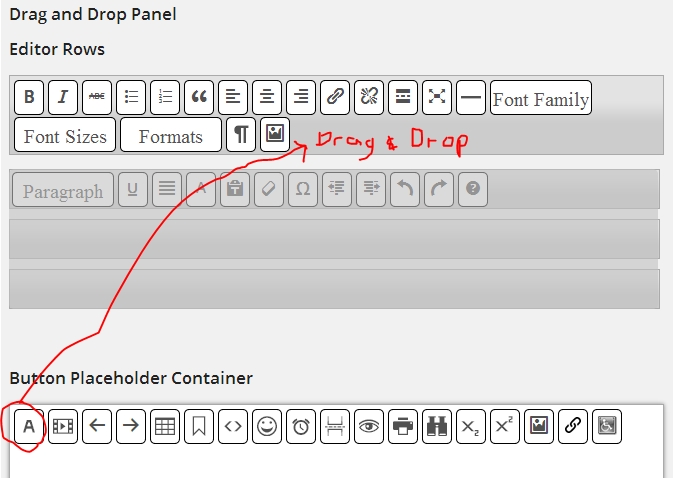
- customize your editing toolbar (there are HEAPS of buttons available to add)
It is a wordpress plugin and is called 'WP Edit' (http://wordpress.org/plugins/wp-edit/)
Want it?
Just go to your website dashboard, click 'plugins', click 'add new' and then type in 'WP Edit'. It should be the first plugin shown.
Activate it and you will see 'WP Edit' appear on the left menu in your dashboard.
Click on it and then start adding in the buttons you want by selecting the button and then dragging it to the format toolbar.
Let me know how you go and if you need any help, pop in a comment below and I'd be happy to assist :)
Join FREE & Launch Your Business!
Exclusive Bonus - Offer Ends at Midnight Today
00
Hours
:
00
Minutes
:
00
Seconds
2,000 AI Credits Worth $10 USD
Build a Logo + Website That Attracts Customers
400 Credits
Discover Hot Niches with AI Market Research
100 Credits
Create SEO Content That Ranks & Converts
800 Credits
Find Affiliate Offers Up to $500/Sale
10 Credits
Access a Community of 2.9M+ Members
Recent Comments
10


I had a lot of trouble adding this plug-in. Not sure why. I finally got it activated so will give it a shot as I would like to have more word processing features. Thanks!
Hi Carla. How'd you go? When you click on the plugin (on the left side menu) you need to drag the buttons you want to have into the toolbar. Did that work?
Yes. Once I got it installed, I dragged the buttons over easy. It just didn't want to install and/or activate, which was strange. I look forward to trying my new buttons on my next post!

Thank you, Thank you, Thank you! I am struggling so much with customizing my site through word press. I'm going right now to download this tool. BTW, if you are familiar with MS Publisher or Front Page, another great plugin is plugnedit.com. You can also get this through the WA dashboard. Click "plugins" and then "add new" and in the search bar, type plugnedit and you will find it. Thanks again!
Awesome! Thanks I'll check it out!
Glad it is helpful :) Let me know if you need any further assistance with the plugin. I use it all the time with my formatting!
See more comments
Join FREE & Launch Your Business!
Exclusive Bonus - Offer Ends at Midnight Today
00
Hours
:
00
Minutes
:
00
Seconds
2,000 AI Credits Worth $10 USD
Build a Logo + Website That Attracts Customers
400 Credits
Discover Hot Niches with AI Market Research
100 Credits
Create SEO Content That Ranks & Converts
800 Credits
Find Affiliate Offers Up to $500/Sale
10 Credits
Access a Community of 2.9M+ Members
Thank you lots Emmae! this is just what I needed