How to Make the Newest Comments Show First in Wordpress Blog


Published on April 23, 2017
Published on Wealthy Affiliate — a platform for building real online businesses with modern training and AI.
Have you ever wanted to rearrange your comments to display the most recent one first? Well I have good news for you - it is very simple to do and you can have your comments in reverse order in as little as 3 seconds.
When I first wanted to do this I was searching for some code or custom CSS, however later discovered I was searching too deep and the solution was right under my nose!
To do this for yourself, go to
Settings > Discussion > Other comment settings
There you will see this:
Ready to put this into action?
Start your free journey today — no credit card required.
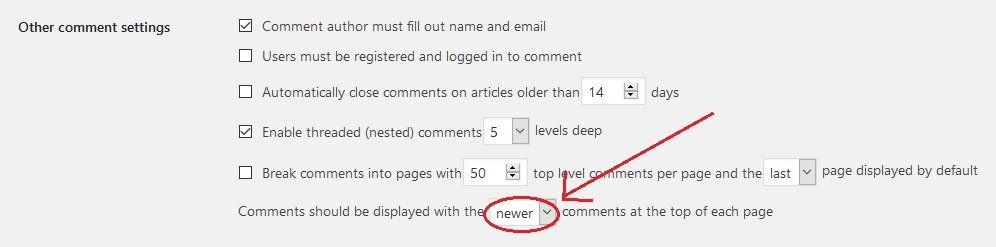
And there you go, your newest comments will now appear first!
WHY THIS HELPS … If a reader scrolls down and sees your very first comment from a year ago or more, it will make your page appear less visited or perhaps inactive, when really that may not be the case at all.
When your newest activity is shown first, your page will look much more "fresh". Also, this prevents anyone [so inclined] from having to scroll through pages and pages of comments to view your most recent or even the most relevant ones.
So there you have it, you can now have your comments section showing in reverse order and your website is going to look so much more fresh.
Have a blessed day,
Jen
Share this insight
This conversation is happening inside the community.
Join free to continue it.The Internet Changed. Now It Is Time to Build Differently.
If this article resonated, the next step is learning how to apply it. Inside Wealthy Affiliate, we break this down into practical steps you can use to build a real online business.
No credit card. Instant access.