Steve's Hot Javascript Training - Introduction - Part 3


Welcome back to the series, fellow readers! As we discussed in the previous article of the series, all the web browsers were covered, except for Opera. We are attempting to find out the version, so that we are all in sync when we do the exercises. You may be perhaps asking yourself what I mean by this. If our web browsers are in sync with the version, there is 100% guarantee that our scripts will work.
WHY DO WE NEED TO BE IN SYNC?
Over time, web browsers add new features. Sometimes that means old functions will still work, however they may not work in the next version (i.e. functions will be discussed in detail in a later article). The newer function is recommended to be replaced with the old function. This is considered deprecation.CAN YOU GIVE ME AN EXAMPLE OF DEPRECATION?
Just to use an example, let’s suppose I use some JavaScript code here:document_write("Your text goes here.”);The code tag doesn't allow me to put a dot in place of the underscore in between document and write. Assume there is a dot between these two words.
You don’t need to understand what this exactly does for now. Just know this is a function that writes to the screen. If this function were to deprecate, this means a new function exists, such as this:
document_writebetterversion(“Your text goes here.”, 2);Woah…back up, horse! What just happened here? All I did was change the function name from “write” to “writebetterversion”. So, what gives my sensei? All I did was change the name, right? Wrong! If you noticed there is a new feature in this function indicated by the 2 next to the comma. Logic will tell it to tab over two spaces to the right without knowing and using HTML syntax. Here’s the result when you use this new function:
Your text goes here. (ahead of 2 spaces, which it won't allow here)WHAT HAPPENS AFTER A FUNCTION OF JAVASCRIPT DEPRECATES?
That’s a good question! After it deprecates, it may not work in the next version of JavaScript. Deprecation usually works in terms of major version revisions.I’M READY TO TEST WITH OPERA NOW. WHERE DO I FIND THE VERSION INFO?
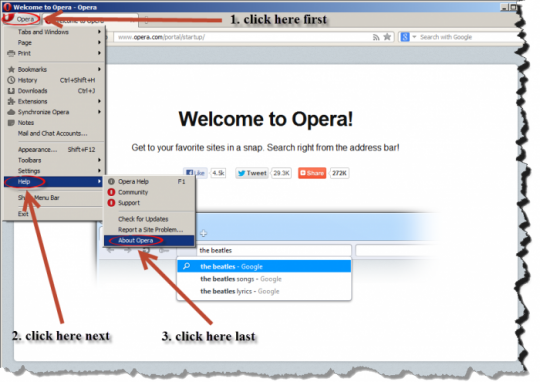
This way is a little bit trickier than most other web browsers.- First, you need to find the menu. The quick-access menu is similar to Firefox, on the left. Select that menu
- Next, choose the Help sub-menu.
- Finally, navigate to “About Opera” all the way down the menu. Here’s what it should look like the following:
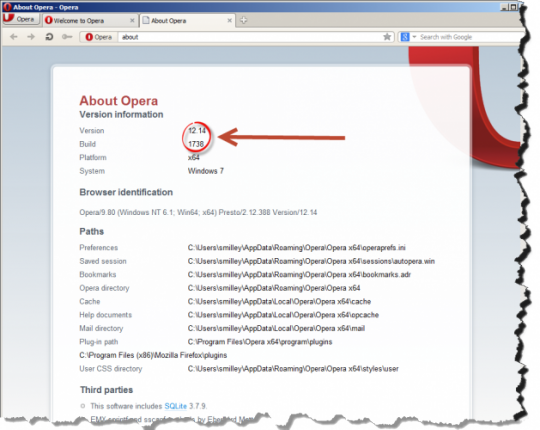
The version shows up in the browser as indicated here:
CONCLUSION
Congratulations on reading through all this and your patience…you can take a drink of water now! Now we are using the right version, or close proximity to it. I decided to skip all the hodgepodge on history unlike other books on technology you may have read. That is my treat to you! However, in the next article, I want to show you what’s possible with JavaScript. Most people don’t know most of the possibilities it can do. I will showcase some neat stuff and then we will get in to the meat and potatoes of writing code! Thanks for reading my articles and if you have any comments, questions, or suggestions, feel free to add them. I will respond!UPDATE: Click here to go to the first part of the demonstration from my Hot JavaScript Training series.
Join FREE & Launch Your Business!
Exclusive Bonus - Offer Ends at Midnight Today
00
Hours
:
00
Minutes
:
00
Seconds
2,000 AI Credits Worth $10 USD
Build a Logo + Website That Attracts Customers
400 Credits
Discover Hot Niches with AI Market Research
100 Credits
Create SEO Content That Ranks & Converts
800 Credits
Find Affiliate Offers Up to $500/Sale
10 Credits
Access a Community of 2.9M+ Members
Recent Comments
11


what does "hook, line, and sinker" mean? Is that an idiom where you live? Just never heard of that expression!
oh wait...I just thought it means you took the bait, right? :)

Hook, Line & Sinker (1930), pretty funny movie, reminding me a bit at the Marx Brothers. I think it means something like fully/completely.
smiley, am here for the ride. Want to know what js can do to help me write a website.
Html code still confuses me, avoid it. Am glad I can just start writing, change the font, drop media into documents and move things around to form a presentation on my mac which may be a detriment.
you're right! I could have taken out that explanation. Some books I've read on other technologies at times use future examples to further explain some beginning concepts, even though you might not understand it right way. I just wanted to stretch those craniums a bit! Thanks for reading my articles!
Nice one again. About deprecation: JS isn't following the open/closed principle? Which means in practice you can still use the deprecated functions, but it's no longer recommended, like for example in Java (following the open/closed principle) you can still use the deprecated window.show(), but you should use window.setVisible(true) instead.
Well, yes you can still use the functions, however they are not recommended in favor of the newer functions. I recently found an article on which ones are deprecated: https://developer.mozilla.org/en-US/docs/JavaScript/Reference/Deprecated_and_obsolete_features
Nice thanks. In Java the IDE just tells you if something is deprecated, but for JS I'm only using Firebug + gVim, so this list is pretty handy.
You do make a good point. There are less JavaScript functions than Java functions that are deprecated, which is why your JS files should run fine. I will say this, though. As far as I know, FIrefox is the most web compliant browser. Chrome is along side with it. Ihternet Explorer cleaned it's act up in Internet Explorer 9. Most browsers should be compliant with the web standards using HTML, CSS, and JavaScript. It seems when you have one competing browser, another tries playing catchup. The one that started as being most web compliant is Firefox, which sprung from the Netscape codebase.
If all this stuff is over your head don't worry about it!
See more comments
Join FREE & Launch Your Business!
Exclusive Bonus - Offer Ends at Midnight Today
00
Hours
:
00
Minutes
:
00
Seconds
2,000 AI Credits Worth $10 USD
Build a Logo + Website That Attracts Customers
400 Credits
Discover Hot Niches with AI Market Research
100 Credits
Create SEO Content That Ranks & Converts
800 Credits
Find Affiliate Offers Up to $500/Sale
10 Credits
Access a Community of 2.9M+ Members
Hello smiley and maraca! It is fishy thing, to catch a fish you need a fish-hook, a fishing line and a sinker or float to keep the hook in place with bait. Which is saying you got me! Look forward to following you both!
This is what I like (i.e. collaboration and sharing)! I want my readers to be successful in JavaScript and even more. :P