Using Monosnap to find dimensions of available space


I've come across a couple of times during image related trainings where you have to guess the pixel dimensions of a space where you want to insert an image. This involves trial and error - and for newbies more error in the beginning before they get the hang of it. :D
Monosnap (https://monosnap.com/) is a free cloud based screenshot tool. It is easy to learn and use and.... as you are selecting the area you want to capture, it shows you the pixel dimensions as shown in this image:
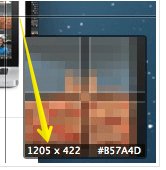
So when you need to find the dimensions of a space in your sidebar (or wherever) where you want to insert an image, all you have to do is take a screen shot of the available space, and you will know the dimensions you have to work with.
Quite easy and cool!
Robin
Join FREE & Launch Your Business!
Exclusive Bonus - Offer Ends at Midnight Today
00
Hours
:
00
Minutes
:
00
Seconds
2,000 AI Credits Worth $10 USD
Build a Logo + Website That Attracts Customers
400 Credits
Discover Hot Niches with AI Market Research
100 Credits
Create SEO Content That Ranks & Converts
800 Credits
Find Affiliate Offers Up to $500/Sale
10 Credits
Access a Community of 2.9M+ Members
Recent Comments
11


I like to use images within my posts and I like to get them as close to 300 x 300 as possible. Of course it never happens because I have been using the snipping tool that comes per-installed with windows.
Had I known that monosnap had this feature, I would have use IT instead :)
See more comments
Join FREE & Launch Your Business!
Exclusive Bonus - Offer Ends at Midnight Today
00
Hours
:
00
Minutes
:
00
Seconds
2,000 AI Credits Worth $10 USD
Build a Logo + Website That Attracts Customers
400 Credits
Discover Hot Niches with AI Market Research
100 Credits
Create SEO Content That Ranks & Converts
800 Credits
Find Affiliate Offers Up to $500/Sale
10 Credits
Access a Community of 2.9M+ Members
Useful. Thanks for sharing.