Getting Ready for Amazon's Update




Getting Ready for Amazon's Update
As we should all know by now, Amazon plans to discontinue the SiteStripe affiliate link options Image and Text+Image from December 31, 2023.
You can refresh your memory at:
https://my.wealthyaffiliate.com/phil1944/blog/has-amazon-really-done-this
I've been busy exploring ways to overcome this issue, but decided that I first needed to update the old, neglected site that I'd been using to better illustrate the currently available options from Amazon and how we are to overcome this issue going forward.
I've now finished the update and have created a training video illustrating all the currently available Amazon affiliate links. You can see it at:
https://my.wealthyaffiliate.com/training/illustrating-amazon-affiliate-links
The next videos will explore "fixing" the Amazon affiliate links. Where plugins are used, I'll cover how easy and effective they are in converting existing links, how easy it is to create new Amazon affiliate links and the overall cost and value for money.
My New Mic
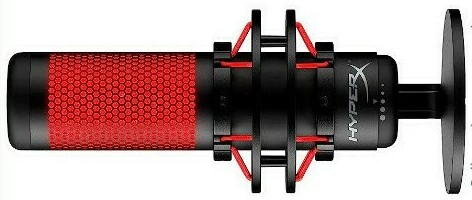 My new microphone arrived (from Amazon!) yesterday. Setting it up was just a matter of plugging it in, so I used it for the voiceover in the new training video.
It seemed to me hugely better than the mic built into my headphones that I used on previous videos in this series.
But I'm not necessarily the best judge of that, so any feedback would be appreciated.
Join FREE & Launch Your Business!
Exclusive Bonus - Offer Ends at Midnight Today
00
Hours
:
00
Minutes
:
00
Seconds
2,000 AI Credits Worth $10 USD
Build a Logo + Website That Attracts Customers
400 Credits
Discover Hot Niches with AI Market Research
100 Credits
Create SEO Content That Ranks & Converts
800 Credits
Find Affiliate Offers Up to $500/Sale
10 Credits
Access a Community of 2.9M+ Members
Recent Comments
46


Thanks for the information, Phil, and thank you in advance for making it easy for us to learn how to fix our Amazon links.
You sound great! This is actually the first time I've heard you, but you sound smooth and articulate. I look forward to your future training.
I'm glad I had a coffee by my side when I watched your video. Phew! That might have been rough.
Dave


Hello Phil,
Thank you for your blog post.
I have just listened to a snippet of your training, and the microphone sounds very clear. I'm listening through headphones which would quickly pick up any bad sound. So sounds like you have made a good choice.
The microphone that I originally purchased just sounds a bit hissy and distant, which is not good enough for YouTube videos. It's important that a voice comes over clearly.
I have the microphone that I don't use sitting on my desk, I guess it's about 18 inches (45 cm) away from my mouth. It's just a small desktop stand. How do you have the microphone positioned, Phil? Obviously, my headset mic is very close to my mouth, and it does give a crystal-clear sound. I would like to be able to achieve this with a desktop microphone.
Enjoy what's left of your day.
Roy
At the moment, I just have it sitting on my desk and speak in its direction from about 15cm away. I'll probably get a boom though as they just look cooler.
That's interesting, Phil, maybe I need to move my microphone a bit nearer.
Is a boom an adjustable stand or something you put at the back of the microphone, Phil? I was just looking online.
Have a great day.
Roy
I might have used the wrong term. I was referring to a stand that clips onto your desk and holds the microphone so that you can position it as close to your face as you like.
I don't think you used the wrong term, Phil. When I looked online a few minutes ago, I expected to see something that fits to the microphone, which probably reflects your voice a bit.
However, it did mainly show those adjustable stands, which are a bit like the old-fashioned adjustable desk-type stands for a light. Although some of the pictures did show something also fitted to the microphone itself.
Roy
It sounds good, Phil! I like the idea of being able to move the microphone and to put it in a comfortable and sensible position.
Roy
I have indeed, Phil! A few years ago we used to try and hide microphones, now it seems the fashion to put them in the middle of the screen and have them as big as possible!!😉
Have a great day.
Roy

See more comments
Join FREE & Launch Your Business!
Exclusive Bonus - Offer Ends at Midnight Today
00
Hours
:
00
Minutes
:
00
Seconds
2,000 AI Credits Worth $10 USD
Build a Logo + Website That Attracts Customers
400 Credits
Discover Hot Niches with AI Market Research
100 Credits
Create SEO Content That Ranks & Converts
800 Credits
Find Affiliate Offers Up to $500/Sale
10 Credits
Access a Community of 2.9M+ Members
Wow, do I have my work cut out for me.
After reading about the prerequisites for Product Advertising API, I guess I will be spending countless hours between now and Dec. 31 to see if I can grasp the methods.
I read where the required knowledge skills start at being familiar with JSON, having a basic understanding of HTTP methods, and then a basic understanding of web services.
I'll either get this done or I'll have to find another method of promoting Amazon products. We'll see what happens.
I'll be exploring plugins that do it for you in the next couple of videos.
Phil, that would be quite helpful. Looking forward to the future videos.
Thanks!
Eric
I hope so, Eric.
I found this one video today that is only 2 weeks old. I think it has to do with the 12/31 deadline.
It may be the solution I have been seeking without the use of a plugin.
I simply went to my website, clicked on a product image, for instance, a bamboo cutting board, located the ASIN identifier and followed the instructions from the video. The result was supposed to be an output of html code that would render the image on my website.
Didn't work for me, but it could have had something to do with my Access Key and my Secret Key information. I am contacting support tomorrow if the issue persists after I try the procedure again tomorrow.
The video is just a little over 4 minutes in length and instructions are pretty clear.
How to add Amazon Images using the API ( No Paid Tools Needed )
https://www.youtube.com/watch?v=X4xnelVnf_o
Eric
Thanks, Eric, I'll work through it.
The problem I've found with any solution that depends on your PA-API requests is that they are dependent on it working, and Amazon has indicated that your requests will fail if you haven't had Amazon sales in the past 30 days.
I actually covered all this in one of my earlier training videos. The problem is that you can have all your PA-API credentials set up correctly (I have) but if you haven't made affiliate sales in the past 30 days, any request to the PA-API returns an error message. Amazon support are very reluctant to tell you this. I had to drag it out of them.
I suspect that even if you've got PA-API requests working that as soon as you have no sales in the past 30 days, they'll stop working. Catch-22 Is Alive and Well at Amazon