Getting Rid of Bubble Man! Part 1


Published on March 26, 2015
Published on Wealthy Affiliate — a platform for building real online businesses with modern training and AI.
Know this guy?
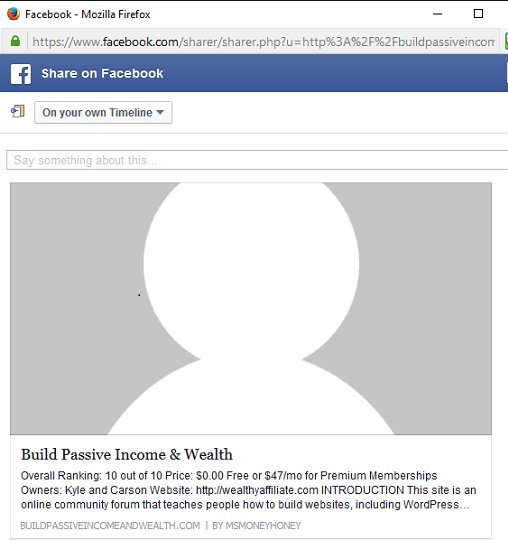
Well, I have a quick little post about something I learned from using the WA program along with WordPress. Currently, I am on Course 4, Lesson 7 - WooHoo! ...Ok, calm down...
I know that going through the Wealthy Affiliate program is both a learning process on WA and building successful blogs, but it's also about learning WordPress, and for many, this is a first.
Although I was somewhat and vaguely familiar with WordPress, I never came across this little menu tab before, and I thought I'd point it out to those at WA just in case they missed it as well.
I haven't yet heard anything about it in the coursework, but it is important when putting up your social share buttons. It has to do with your readers ability to easily share your article with enticing information and a relevant picture when they click on your social buttons to do so.
Ready to put this into action?
Start your free journey today — no credit card required.
All in One SEO Pack
While in WordPress, and editing one of your posts/articles, scroll down below your post. Look for the Title "All in One SEO Pack, and just below that, you'll see two tabs. One for Main Settings and the other is for Social Settings. Ahhh... yes, I see... hmmm. I bet some of you never noticed this before...
The reason I began looking was because when Kyle had instructed, in one of the previous lessons, to share, share, and share alike your posts with Facebook, Twitter, etc. I did, but when I looked at it later, (cue the Jaws music..) I saw the grayed out generic bubble man icon being used as the picture - which is not enticing at all. So, I had made a mental note to try to figure that out at some point in time.
So, one day, when posting one of my fabulous articles full of entertaining information - I happened to catch a glimpse of that little tab! I thought - oh wow, I never noticed this... I wonder what THAAAT's for... So, I clicked on it, and voila! There was the answer to my little mental note. Maybe now I can get rid of "Bubble Man!" ...complete with Jaws music...
The settings on that tab allow you to put in the automatic information when someone clicks on one of your social share buttons. For example, you can input your Title, Description, and you choose your picture that shows up - instead of that grayed out bubble man icon.
If you scroll below, you can also let Facebook know what your site is about, and you can tell Twitter to either provide a summary or one with a picture.
If you have discovered this for yourself - GREAT! But, if you have tried to share your posts, only to check them out later, and you're looking at a grayed out Bubble Man for a picture, this is how you get rid of him for good! (Well, you might want to read https://my.wealthyaffiliate.com/msmoneyhoney/blog/.... )
Feel free to check it out! First go to my Google Plus page and see what I'm talking about. You should see Bubble Man on one of my recent posts to my account.
https://plus.google.com/u/0/107766639174043250507
Now, go to www.BuildPassiveIncomeandWealth.com and click on the social share button as though you will be sharing one of my articles. (unless, of course you DOOOO wish to share one of my fabulous posts!) :) You should see one of the photos I've chosen to go along with that particular article, a Title, and a Description - which would then transfer to your Facebook, Twitter or whatever social media you've chosen.
Bubble Man is no longer there! I win!
That's my two cents for today! Enjoy!
~MMH
(As Mentioned above, there is an updated "Part 2" to this continuing saga...)
Share this insight
This conversation is happening inside the community.
Join free to continue it.The Internet Changed. Now It Is Time to Build Differently.
If this article resonated, the next step is learning how to apply it. Inside Wealthy Affiliate, we break this down into practical steps you can use to build a real online business.
No credit card. Instant access.