Follow and Follow By-All Your Friends In One Place


Published on October 30, 2020
Published on Wealthy Affiliate — a platform for building real online businesses with modern training and AI.


A long time ago, I read a training on following and following back here at WA. I have searched high and low for that training but to no avail. Since it was so helpful for me, I want to share it with you.
You know those emails you get that tells you someone has followed you? So you go into each email individually and follow them back. Or maybe you don't get the emails, so you aren't sure how the numbers on your dashboard keep rising when you do not follow all these new people.
There is a straightforward and easy trick that will keep you from missing all of those people who find you important to them.
I am putting it in a blog because more people read these than they do the training. So here we go, my friends.
Step-By-Step
1. Click on your profile picture and then click on My profile
Ready to put this into action?
Start your free journey today — no credit card required.
2. Look to the left side of your platform, scroll down a bit and click on "my network" then "view all"
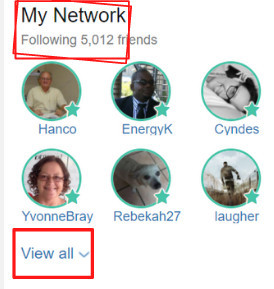 3. Click on the "view all" and at the top you will see a "followed and a followed by"
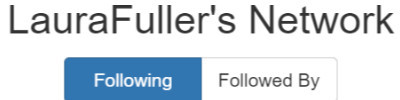
4. Click on the followed by and follow all the people you are not already following. Each person you are not following will have a green "follow" under their name.
And there you have it in a nut shell.
Happy following my friends.
Share this insight
This conversation is happening inside the community.
Join free to continue it.The Internet Changed. Now It Is Time to Build Differently.
If this article resonated, the next step is learning how to apply it. Inside Wealthy Affiliate, we break this down into practical steps you can use to build a real online business.
No credit card. Instant access.