Tip 67 : the dashboard in wordpress


Published on September 18, 2018
Published on Wealthy Affiliate — a platform for building real online businesses with modern training and AI.


The dashboard in wordpress
The dashboard in Wordpress is the stirring wheel of your website. So it is essential for you to know its functions and to understand how it works.
Adding themes and plugins will alter the basic layout. Since some of them have their 'own commands'.
Let us have a look at the dashboard
Once you log into your website, Mine in this case, It looks like this window with my specific theme and plugins:
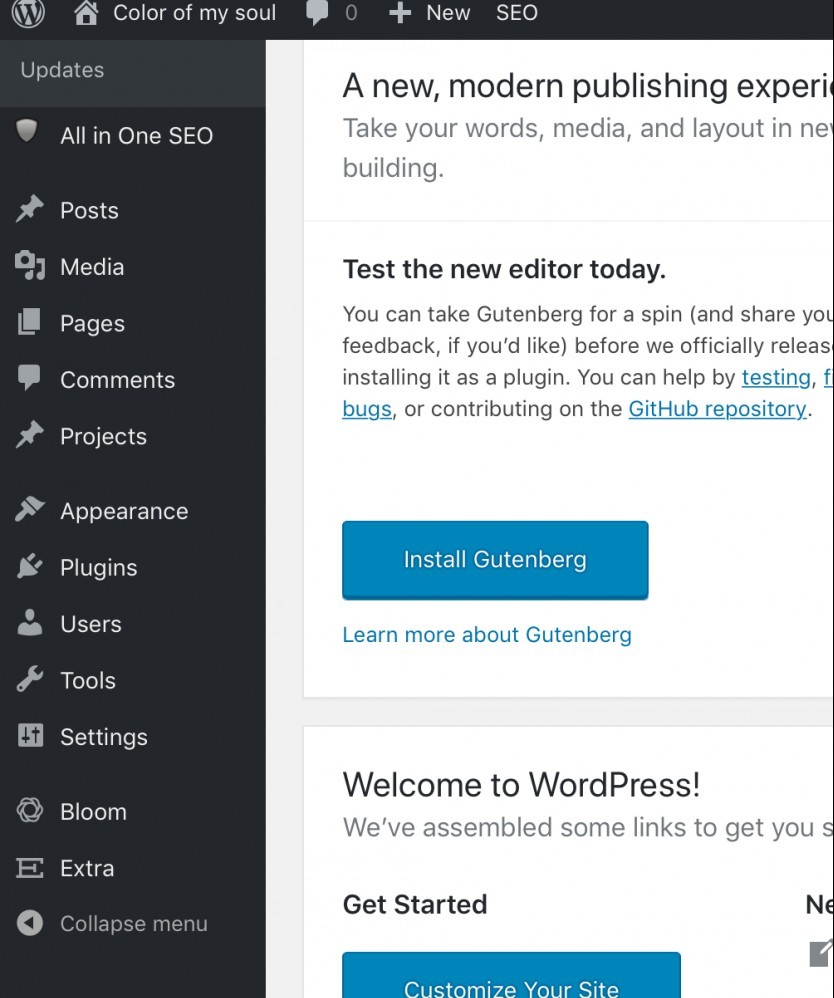
On the left you have several commands. Some (Bloom and Extra) are related to my theme which is Devi, one of the elegant themes. We will not comment them since they are specific to my theme. So, you normally do not have these. But your theme may well add commands for theirs.
Ready to put this into action?
Start your free journey today — no credit card required.
You will also notice the all in one seo plugin. Which once activated shows up here for your convenience.
I will extend on the basic commands in several short and simple trainings.
On the right, you are informed of the new Gutenberg editor. It is a little more complicated than the classic editor, since it allows better formatting, of your text and layout. You can install this if you are familiar with editing of text. If not... the classical editor will do perfect..
2 lesser known commands
How to use widgets in wordpress
Up to you now
So many great WA training all around. Pl. Feel free to add yours...

To your success
Thank you for liking and sharing your questions and insights
Share this insight
This conversation is happening inside the community.
Join free to continue it.The Internet Changed. Now It Is Time to Build Differently.
If this article resonated, the next step is learning how to apply it. Inside Wealthy Affiliate, we break this down into practical steps you can use to build a real online business.
No credit card. Instant access.