Ranked on Google in minutes
When I first started, I was always eager to check my content rankings soon as I published my contents. However, new contents don't always get indexed by Google immediately.
Thanks to another member in WA (thanks Edy), I've learned to get my new contents ranked within minutes. Here's how it's done:
Step 1 - Fetch as Google
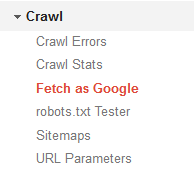
Assuming that you have added your site to Google Search Console (if you haven't, refer to Google's own guide here https://support.google.com/webmasters/answer/60011...), you can go to Crawl > Fetch as Google:
Step 2 - Provide your latest URL

Click FETCH.
Step 3 - Submit your new URL
It should only take a few seconds to fetch your new URL. Once it's done, you'll see the new URL being added below the box:
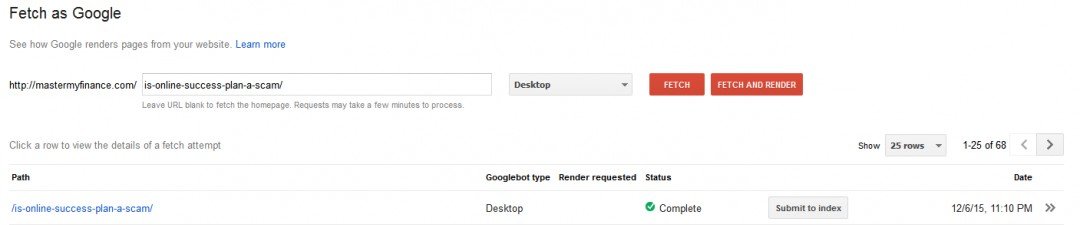
Click "Submit to Index". Choose "Crawl only this URL" when the pop-up appears.
Step 4 - Check your new URL in Google
Wait for a few minutes and fire up an incognito browser. I usually use incognito for this to make sure my browser cache doesn't interfere and that I'm seeing what everyone else is seeing.
Change Google search settings to display 100 results. We could be ranked beyond page 1 and it'll be hard to find your site if you only limit your search results to 10 per page. Type in your keyword.

Edit: I've created a new blog post since then, and it took only 43 seconds before it appeared in search results.

Additional notes:
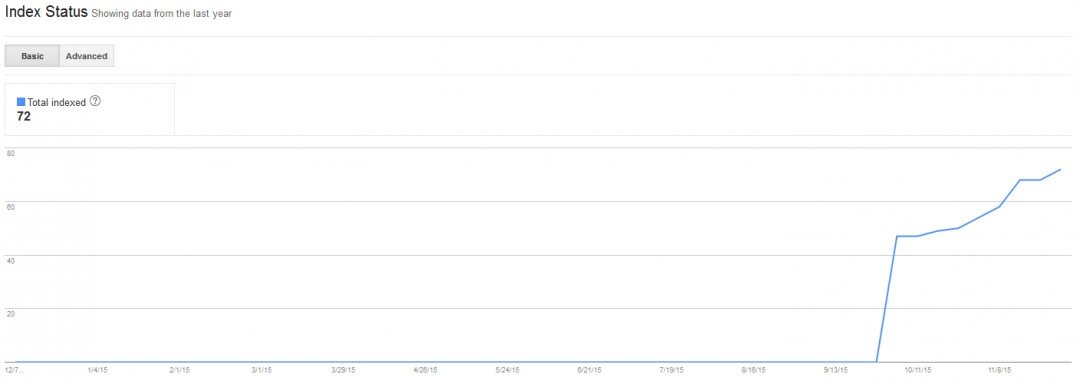
Make sure to check your Google index status every few weeks in search console under Google Index > Index Status.
Join FREE & Launch Your Business!
Exclusive Bonus - Offer Ends at Midnight Today
00
Hours
:
00
Minutes
:
00
Seconds
2,000 AI Credits Worth $10 USD
Build a Logo + Website That Attracts Customers
400 Credits
Discover Hot Niches with AI Market Research
100 Credits
Create SEO Content That Ranks & Converts
800 Credits
Find Affiliate Offers Up to $500/Sale
10 Credits
Access a Community of 2.9M+ Members
Recent Comments
11
Hello Edward. I like your stats and sharing results. Also Pandemonium and others comments, experience, and tips. Insightful and encouraging
This is the type of sharing we newbies in WA need to succeed.
I wish you well and hope to contribute to the community myself soon.
Tiring 12 hour days at work, 2 hour commute, and required IT re-certifications in my off time leave me little time to work on WA now.
I know I have to re-structure my life to be able to dedicate the time.
Thanks for the mention. All the best to you in this new online adventure. We are all in this together. I hope you will find the time to gain new knowledge via WA, and to execute the important lessons learnt. Wishing you every success! - Pam
Hi Edward, I saw the blogpost by Edy too. Just wondering, based on your experience (since you have tried the method and it works for you), are the requirements he stated necessary?
"1. Your website must be a few months old since the first content published.
2. You have Google Analytics set up
3. You have Google Webmaster Tool set up
4. You have Social Sharing Button on your post/page. (G+, Facebook, Pinterest, Twitter, and Reddit)
5. Your content must be at least 500 words with internal links if possible.
6. The topic should be a product review (preferably new one that get released)"
I just started my site, have my site structure up and am populating posts right now but don't have all the above set up. I was considering if I should wait or simply go ahead with the method that both of you used. Thanks in advance! :)
Hi there, the requirements he stated are recommended, but not everything is necessary.
1. New websites won't be ranked immediately. But you can make sure your content is indexed by checking your index status.
2. Google webmaster tool (also known as search console) has to be setup because you submit your new content from there.
3. I didn't share my content via social media.
4. Higher word count (1000 to 1500) and internal links are recommended on page SEO factors. They will help ranking.
5. Newly released products have lesser reviews, thus lesser competing sites and easier to rank.
What you can do is to continue producing contents and fetch by Google everytime it's published. Check your index status every few days to make sure they are indexed by Google.
Wish u all the best and feel free to comment again if there's anything I can help!
Thank you so much for your detailed reply. Really appreciate it!
I'm not familiar with "Google Webmaster Tool" yet, but I will research it to find out more.
I will let you know if I have any more questions, thanks again! :) - Pam
Hi Edward, just wanted to update that I found Kyle's training on Webmaster Tools here Setting Up Google Webmaster Tools It was based on a blogpost by Paulgoodwin Google and Yahoo Bing fetch Did not see Kyle's training on this because it is in Course 5, and I have not even finished Course 3!
Hope either Kyle's training or Paul's blogs are helpful to you too. Cheers - Pam
Thanks this is helpful. I'll make sure to always fetch and render as Google everytime I publish new posts :)
See more comments
Join FREE & Launch Your Business!
Exclusive Bonus - Offer Ends at Midnight Today
00
Hours
:
00
Minutes
:
00
Seconds
2,000 AI Credits Worth $10 USD
Build a Logo + Website That Attracts Customers
400 Credits
Discover Hot Niches with AI Market Research
100 Credits
Create SEO Content That Ranks & Converts
800 Credits
Find Affiliate Offers Up to $500/Sale
10 Credits
Access a Community of 2.9M+ Members
Hi Edward. I will be honest I have tried to do the Google Search Console and having difficulty added the code to the WP site. Can you point me in the right direction from someone who has blogged about it
Hi Steve, here's a guide on how to set it up Intro to Google Webmaster Tools Now Called Google Search Console
Thanks will work through it today
