Set Brand Colors in Canva




So, do you have a specific color scheme for your brand, that you associate with your website, YouTube videos, Pinterest pins, etc?
If so, you can use a feature called Brand Kit in Canva (sorry, Pro version only!)
Then whenever you create something new in Canva, you can quickly change templates and designs to reflect your particular colors.
Let's have a look!
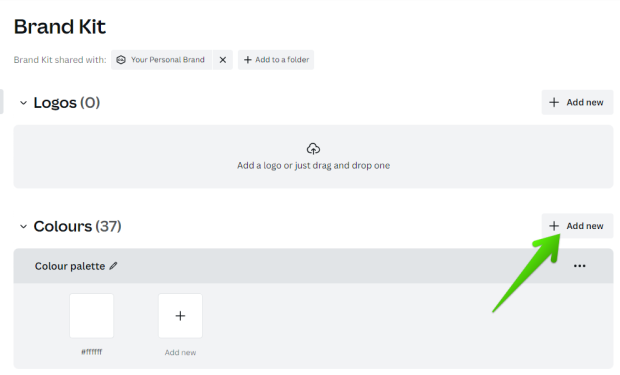
When you enter the Canva homepage, you can see the Brand option on the left.
Then, after clicking this, click Brand Kit, and click on the box.
You now come to the options screen.
 ,
,
Today, we are looking at colors, but if you have a particular font, logo, or photo that you use over and over again, you can also add these.
Next, click Add New, and Add Palette.
Now, search for your preferred colors.
As you can see, Canva also suggests palettes, that have colors that go together.
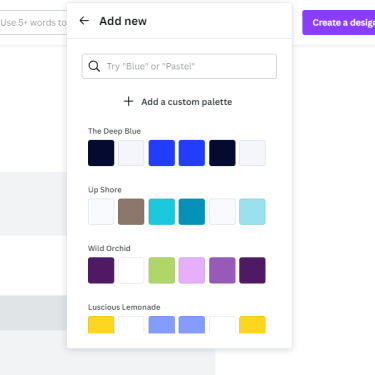
There are hundreds of these, so you can scroll endlessly until you see a combination you like.
Or you can use the search box to either describe your color, or if you know the Hex number of the color you can enter that instead, to get your exact shade.
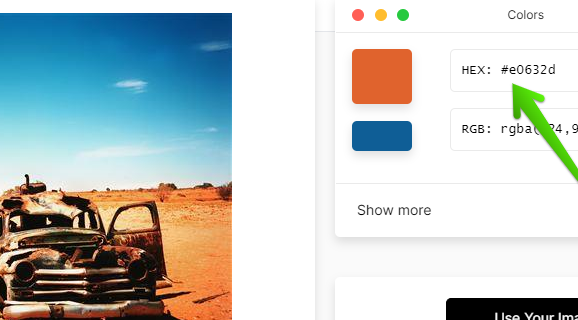
If you don't know the Hex number, use this platform https://imagecolorpicker.com/en
Simply upload one of your pictures, and click the exact spot on the image that is your color.
It will then reveal the Hex number.
For this tutorial, I will go with simplicity and just input Pink, I like the suggestion of the Sweet Orchid palette, so just click on the name of the palette.
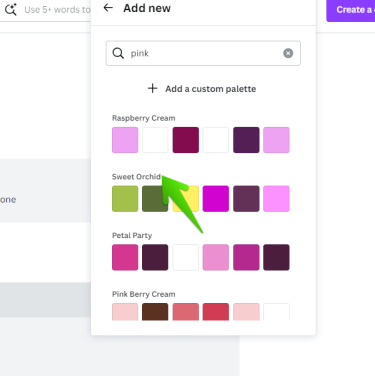
This is now in your Brand Kit, ready to use.
Next time you you want to create a design, let's say that you like a particular template, and want to change the colors.
Here's a template I like, but I want to change the red color.
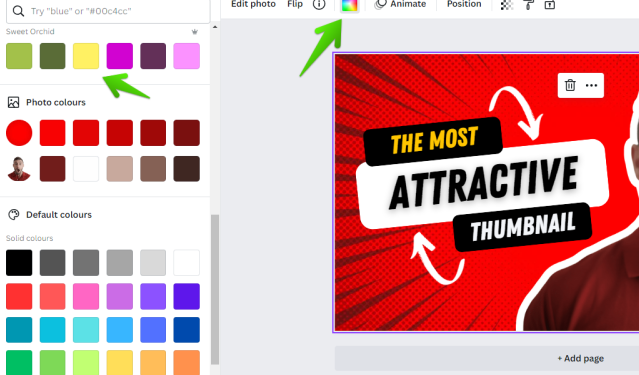
So, click on the area you want to change, click the Color Picker Icon, and you will see your Brand Kit palette on the left.
Pick one of your brand colors and BOOM!
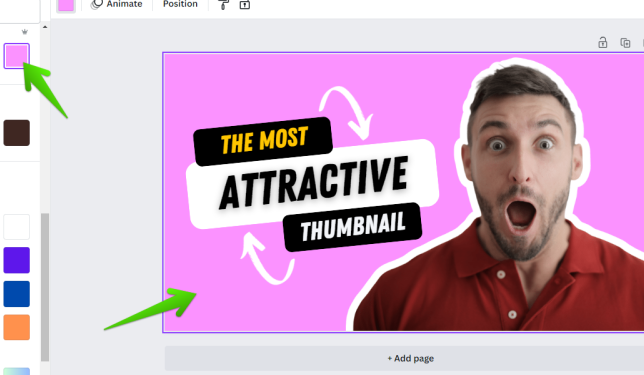
The template is starting to achieve your desired look!
I hope you learned something new and that it saves you time when designing in Canva!
Join FREE & Launch Your Business!
Exclusive Bonus - Offer Ends at Midnight Today
00
Hours
:
00
Minutes
:
00
Seconds
2,000 AI Credits Worth $10 USD
Build a Logo + Website That Attracts Customers
400 Credits
Discover Hot Niches with AI Market Research
100 Credits
Create SEO Content That Ranks & Converts
800 Credits
Find Affiliate Offers Up to $500/Sale
10 Credits
Access a Community of 2.9M+ Members
Recent Comments
10


Certainly learned something new here Diane, but as you say, this is only available for those who have the spare cash lying around in their mattresses and can afford the pro version...
Red is definitely a better COLOUR (not color please) for you!!
Enjoy the rest of your Saturday my friend if you read this before or after visiting the local ale house!!
👍🍷🍻


See more comments
Join FREE & Launch Your Business!
Exclusive Bonus - Offer Ends at Midnight Today
00
Hours
:
00
Minutes
:
00
Seconds
2,000 AI Credits Worth $10 USD
Build a Logo + Website That Attracts Customers
400 Credits
Discover Hot Niches with AI Market Research
100 Credits
Create SEO Content That Ranks & Converts
800 Credits
Find Affiliate Offers Up to $500/Sale
10 Credits
Access a Community of 2.9M+ Members
I use Canva Pro at the moment, and this will be really beneficial as I grow my brand.
https://geometrydashgame.org/