How to Fix the "/feed/" Issue in Your Post URLs


Published on June 16, 2024
Published on Wealthy Affiliate — a platform for building real online businesses with modern training and AI.


Hello Wealthy Affiliate Friends,
I've noticed a recurring issue where the URL of my posts ends with "/feed/" and as a result, Google is not ranking them. After some investigation and troubleshooting, I've found a few effective solutions that can help fix this problem.
Steps to Resolve the Issue1.Inspect Your Links:
Ensure that all your internal links are pointing to the correct URLs of your posts and not their RSS feed versions.
2.Check Your Theme and Plugins:
Review your active theme and plugins to make sure none of them are adding "/feed/" to your post URLs.
Temporarily disable all plugins and re-enable them one by one to identify if any plugin is causing the issue.
3.SEO Plugin Settings:
Ready to put this into action?
Start your free journey today — no credit card required.
If you're using an SEO plugin like Yoast SEO or All in One SEO Pack, verify the settings to ensure they aren't incorrectly adding "/feed/" to your URLs.
4.Review .htaccess File:
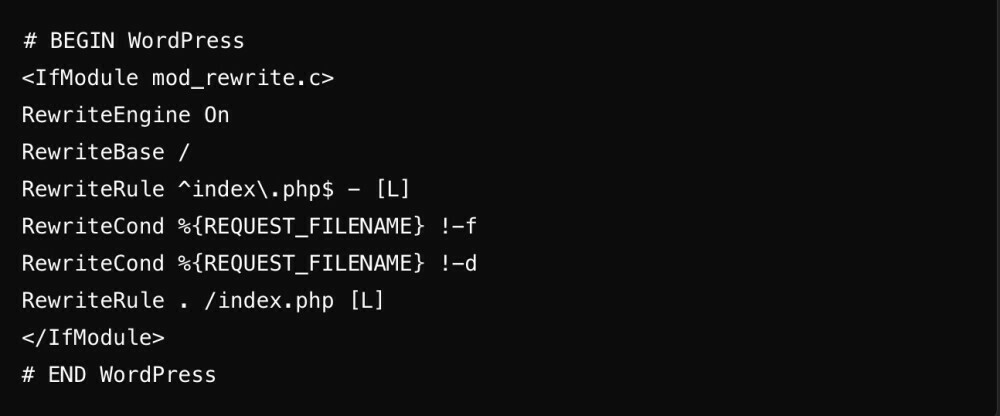
Ensure your .htaccess file is correctly set up and doesn't have any rules that add "/feed/" to your URLs. A typical WordPress .htaccess file should look like this:
 5.Clear Caches:
Clear any caches on your site and browser to ensure that old links are not being served.
6.Submit Correct URLs to Google:
Use Google Search Console to submit the correct URLs for indexing and remove any incorrect URLs with "/feed/" from the index.
By following these steps, you should be able to resolve the issue and improve your site's ranking on Google. If anyone else has faced this issue or has additional tips, please share them in the comments.
Thank you!
Best regards,
Arisara

Share this insight
This conversation is happening inside the community.
Join free to continue it.The Internet Changed. Now It Is Time to Build Differently.
If this article resonated, the next step is learning how to apply it. Inside Wealthy Affiliate, we break this down into practical steps you can use to build a real online business.
No credit card. Instant access.