How to Create a Custom URL on Google Plus


Published on April 24, 2017
Published on Wealthy Affiliate — a platform for building real online businesses with modern training and AI.
Are you wanting to customize your Google plus account and get rid of those unsightly numbers at the end of your URL?
It’s quite easy to do, but first know that Google requires you at least have a profile photo, and that you have either 10 or more followers or your account is at least 30 days old.
You may also change your custom URL up to 3 times per year. But just remember if you do this, all links to your profile from the previous URL will no longer work and will need to be updated if being used.
Ready to put this into action?
Start your free journey today — no credit card required.
To customize your URL, first go to your Google Plus Profile page.
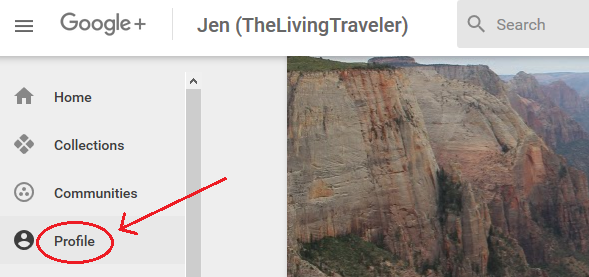
Then click on “About” next to “Edit Profile”.
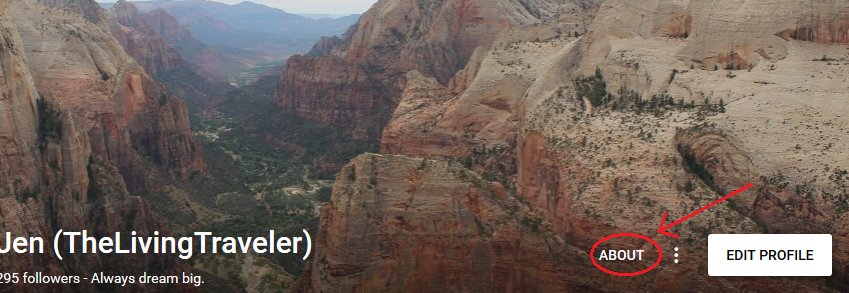
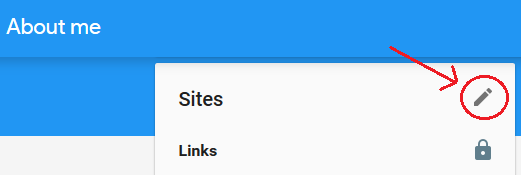
A new window should open up.
Under the Sites section, click on the little pencil in the top right corner.
Next, Sites will expand and you will see in blue "Custom URLs". Below this you is where you can click, edit, and create a custom one of your own.
Below is mine (after the change)... Before yours is changed initially it will show your predetermined ID numbers instead. What mine looks like as it is now changed: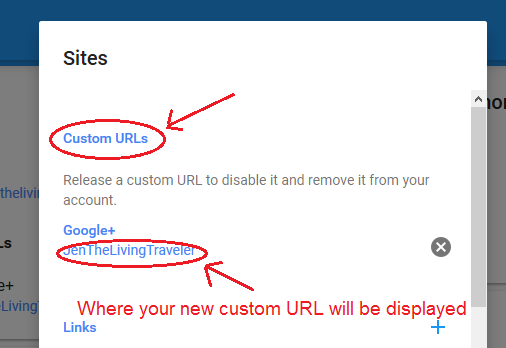
There you have it folks, you can now create a custom URL of your choice on Google plus, which will help tremendously with branding and gaining the trust of your audience!
I hope this has helped you...
Have a blessed day,
Jen
Share this insight
This conversation is happening inside the community.
Join free to continue it.The Internet Changed. Now It Is Time to Build Differently.
If this article resonated, the next step is learning how to apply it. Inside Wealthy Affiliate, we break this down into practical steps you can use to build a real online business.
No credit card. Instant access.