Resizing the video by myself


Published on January 11, 2015
Published on Wealthy Affiliate — a platform for building real online businesses with modern training and AI.
I was recently looking around the Google pages to get to know how to resize the Youtube video on my website. You may realize that copying the link from Youtube and pasting it on your website is one easy thing but the video frame will stretch out to full width of your page, and thus having awkward looking. One of the WordPress tutorials suggests me to install the plugin but I have already eight plugins in my website, and having too many plugin will result in slower page loading. So I try this and that on my page with the attempt to resize the video and fortunately I am succeeded in doing this. This is not going to be the most effective approach but since I can’t find any better alternative for this solution so I carry on using this technique so far. Here is how I do it step by step.
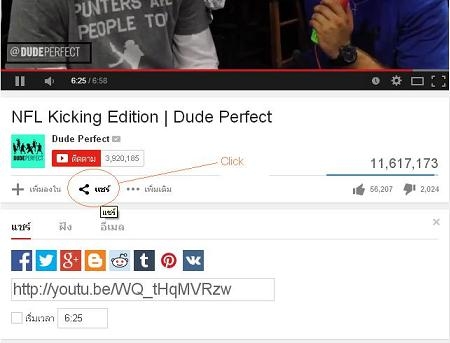
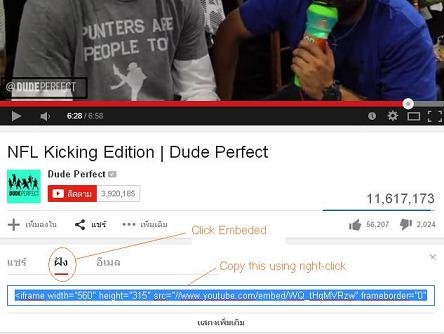
Ready to put this into action?
Start your free journey today — no credit card required.
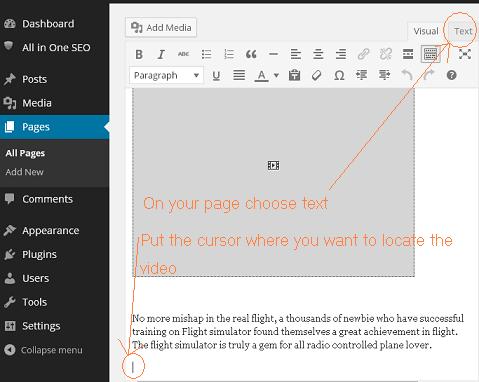
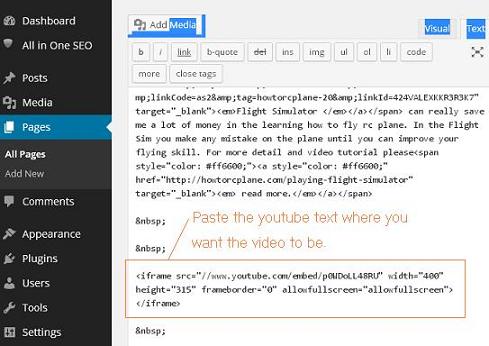
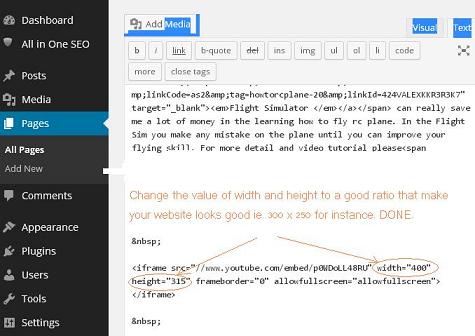
I never have problem using this procedure but if you have any question please kindly drop me a line.
Share this insight
This conversation is happening inside the community.
Join free to continue it.The Internet Changed. Now It Is Time to Build Differently.
If this article resonated, the next step is learning how to apply it. Inside Wealthy Affiliate, we break this down into practical steps you can use to build a real online business.
No credit card. Instant access.