Pinterest Traffic: Reality Check for Small Blogs (And Why I Still Pin Anyway)

blog cover image
11
23
2.1K followers

Pinterest always looked like a goldmine for bloggers. Everywhere I turned, someone was sharing a "how I went from zero to 100,000 monthly pageviews with Pinterest" story, usually paired with screenshots full of dreamy traffic spikes. As someone running a small blog with a lot of hope and a love-hate relationship with SEO, Pinterest seemed like a shortcut worth trying. The sheer potential of visual search, plus all the buzz about viral pins and easy visibility, felt pretty irresistible when I was just starting out.

Once I started pinning for real, the reality hit a little differently. Algorithms changed, best practices kept shifting, and it turned out that growing with Pinterest isn't exactly a magic button—especially if you run a small blog without a big social following or a design team on hand. What began as an optimistic adventure quickly became a patience game. Here’s what that ride really looked like for me, what I learned, and why I’m not giving up on those little red and white pins anytime soon.

Why Pinterest Looked So Promising for Bloggers

Scrolling through blogging Facebook groups or listening to podcasts back when I started, Pinterest was hyped up as one of the best ways for new bloggers to grab real traffic, sometimes in just a few months. Stories were everywhere about pins taking off, email lists jumping, and blogs hitting Mediavine numbers seemingly overnight. Pinterest felt like the spot where small blogs could actually keep up with bigger sites, since search was more visual and not so much about long-term authority.

I kept reading advice like "all you need are great pin graphics" or "just post regularly and you'll see a steady climb." With that kind of reassurance, it’s easy to buy into the idea that Pinterest could cover where Google left off, reach some early readers, and maybe even make my stats graph head in the right direction for once.

Expectations vs. Reality: My Pinterest Traffic Story

Before pinning anything, you could say I had Pinterest dreams. I really pictured that if I posted a mix of vertical pins, joined some group boards, and spent a while in Canva, I'd start to see my traffic bump up in just a few weeks. I made pins for every blog post and thought seasonal roundups would take off around the holidays.

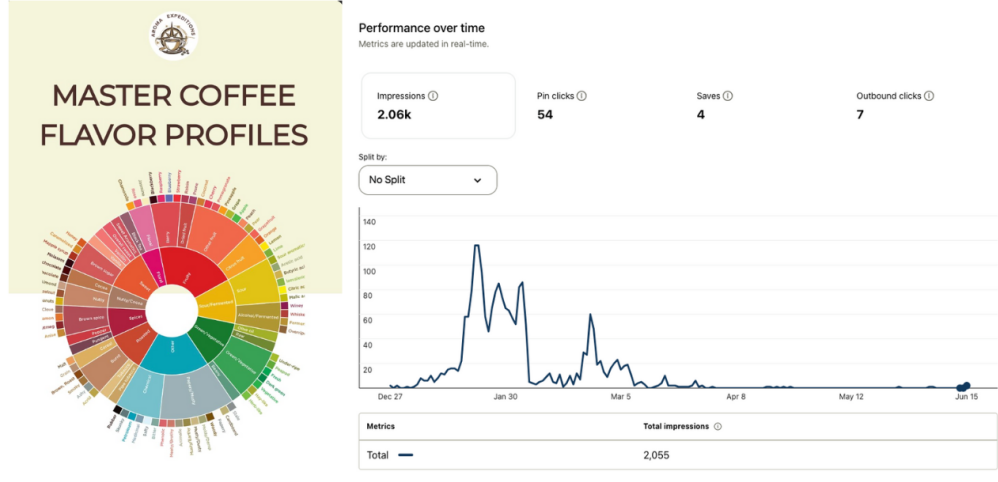
And, believe it or not, at first things did move—my account grew rapidly, and at one point, my pins were hitting over 120 daily impressions and racking up more than 2,000 total impressions in just a few months. But then… Pinterest happened. The infamous algorithm change rolled out, and just like that, my account’s reach started to plummet. What was once a chart full of hopeful spikes has slowly flattened out, and these days, my daily impressions are almost back to zero.
Here’s what the real numbers look like:

  • Total impressions: 2,055
  • Pin clicks: 54
  • Saves: 4
  • Outbound clicks: 7
  • Most popular pin: A super basic “coffee flavor wheel” that, for some reason, outperformed every fancier pin I made.

It’s humbling to look at the chart—what started as an exciting, fast climb quickly turned into a lesson in managing expectations. (You can see the infamous “cliff” in my analytics screenshot above!)

Coffee flavor wheel graphic titled "Master Coffee Flavor Profiles" with the Aroma Expeditions logo, alongside a Pinterest analytics chart showing a spike and then a steep decline in impressions over time.

The Pinning Process: What Worked (and What Didn’t at All)

Pin Design: Pins with bright, clear photos and bigger text got more saves, but not always more clicks. Pins that looked spammy or like cookie-cutter templates didn’t seem to perform at all.

Timing: Pinning around seasonal topics (holidays, recipes, back-to-school) sometimes gave a boost, but Pinterest trends are unpredictable. Sometimes, a Halloween pin in July did better than an actual holiday post in October.

Niche: Some blogging niches honestly do get better results. DIY, recipes, and travel pins usually offered a longer "tail" of slow-growing clicks. More technical content didn’t perform as well for me, likely because the audience is smaller or less interested in visuals.

Workflow experiments:
I also tried out these tactics:

  • Making multiple pins per post. While it increased variety, it often just meant more effort with similar results.
  • Manual pinning versus using schedulers like Tailwind. I didn’t see much of a difference—Pinterest’s algorithm definitely has its own agenda.
  • Joining group boards. Most didn’t make a difference, maybe because older boards can get filled with spam or go stale.

The biggest surprise? Sometimes the strangest, most basic pins would unexpectedly get traction, while ones I spent hours designing sat ignored. I’ve learned to batch-design pins in Canva on a Sunday with coffee in hand and just roll with it—way less stressful than chasing daily pinning “rules.”

Why I Still Pin (Even If It’s Not a Massive Traffic Source)

For a while, I thought about quitting. But even with the slow growth, I noticed a few other benefits that kept me coming back:

  • Branding: Having a Pinterest board with fresh pins makes a blog look more polished, even if you’re still small. Sometimes, new visitors stumble on my blog through older pins and send a quick note.
  • Content Organization: Sharing my own posts on Pinterest makes it easy to organize and find my main content. It’s like a handy archive, especially for referencing older posts at a glance.
  • Visual Fun: Designing pins in Canva became its own little creative escape. I actually enjoy testing new looks, styles, or colors—even if most of them aren’t viral hits.
  • Community: There’s a small but active Pinterest community, and sometimes teaming up or sharing others' work leads to new blogger connections.
  • The occasional surprise: Every so often, a random pin sends a fresh batch of visitors or gets a new subscriber. It’s a reminder that Pinterest isn’t totally done as a traffic source. (And yes, I still get a little jolt of hope every time I hit publish on a new pin.)

Lessons for Fellow Small Bloggers (My Best Advice)

  • Set realistic expectations. Pinterest is a long game these days, especially for small sites. Quick wins are rare, and timing is as much about luck as strategy.
  • Pin sustainably, not constantly. I like to make pins in batches, then schedule them out. This keeps things low-stress and means I don't burn out chasing "daily pinning" routines.
  • Focus on quality over quantity. Pinterest works best when your posts genuinely help, solve a problem, or inspire. Don’t make pins for posts that don’t matter to you.
  • Watch for patterns. Sometimes, certain styles, topics, or color combos really pop. Be open to switching it up and cutting what’s not working, even if you thought it would.
  • Use keywords in pin titles and descriptions. Even if your traffic is slow, well-made pin writing pays off. Descriptions with smart keywords help your pins stick around longer, especially for evergreen topics.

Bottom line: pinning isn't just about big numbers or comparing yourself to larger bloggers. It's an extra way to show off your content, highlight your brand, and maybe, once in a while, see a spike in traffic. I give Pinterest a place in my workflow, just not the top spot. That takes off a lot of the pressure and keeps it enjoyable.

Your Turn: Share Your Pinterest Wins (or Woes)

If you’re pinning for a small blog, I’d really love to hear how it’s working for you. What pin styles or strategies have paid off? Has Pinterest given your traffic a boost (or a headache)? Drop your stories and advice below so we can swap notes on what actually works. If you want to connect or share some favorite pins, I’m always up for it!

Bonus points if you share your weirdest pin fail or miracle story—I promise, no judgment. We’ve all been there!


11
23

Join FREE & Launch Your Business!

Exclusive Bonus - Offer Ends at Midnight Today

00

Hours

:

00

Minutes

:

00

Seconds

2,000 AI Credits Worth $10 USD

Build a Logo + Website That Attracts Customers

400 Credits

Discover Hot Niches with AI Market Research

100 Credits

Create SEO Content That Ranks & Converts

800 Credits

Find Affiliate Offers Up to $500/Sale

10 Credits

Access a Community of 2.9M+ Members

By continuing, you agree to our Terms of Service and Privacy Policy
No credit card required

Recent Comments

23

Hey Sonia,

Useful post, thank you.

Pinterest is great because your pins can get a lot of exposure without a huge following, so that helps a great deal. In the beginning, there's little or limited response, but over time, it gets better, and Pinterest rewards consistency.

My Pinterest regimen is a bit hardcore. I do 13 pins per day, which I try to prepare in one session for 7 days, just under 100 pins, which takes me around 5 hours, but then they are set for a week and churn out 1 every hour from 10am-10pm.

As hard as that has been and there's been lots of burning the midnight oil, it is totally worth it as I get a lot of traffic from Pinterest to my website - 16k of outbound clicks in the last 90 days, which is great for my website traffic.

I also recall reading a blog from Vitaliy saying that Pinterest's click-through rate is highest, so it's worth putting the time into that platform.

Thanks for the ideas and tips.
Cherie

2

Hi Cherie,

Wow, your Pinterest workflow is next-level! I’m so impressed by your consistency—and those results speak for themselves. Nearly 100 pins a week and 16k outbound clicks in 90 days is amazing. You’re living proof that hard work (and a smart batching system) can really pay off on Pinterest.

I totally agree that it takes time to see real traction, and you’re right—Pinterest does seem to reward the ones who stick with it. Your “churn out a pin every hour” routine puts my batch sessions to shame!

Thanks so much for sharing your results and for being such a great support. Here’s to more midnight oil and more Pinterest wins for both of us!

Sonia

1

Hey Sonia,

Thank you for your encouragement and this post/discussion. It's interesting to see other approaches too.

As you quite rightly said - "It's an extra way to show off your content, highlight your brand", and another avenue to drive traffic to our websites, so that we're not reliant on just one traffic source.

Also, as you noted, Keywords are literally key.

Like @Suomii1, I also monitor Pinterest Trends and look for high-trending keywords in my niche. I'll then take a relevant article to those Pinterest trends and paste it into Chatgpt and ask for a keyword-rich Pinterest script based on that article and relevant hashtags too - you can't underestimate the value of trending hashtags. I then use that script for my pins.

So all bases are covered with a keyword-rich script based on Pinterest trends pertinent to my article.

And yes, results are promising, despite the hard graft, and so long as I keep consistent, I believe I will continue to see good traffic flow.

Thanks once again, great discussion and ideas being shared.

Here's to more Pinterest success.
Cherie

2

Hi Cherie,

I love hearing how you’ve fine-tuned your Pinterest process—sounds like you’ve really mastered the “work smarter” approach! Using ChatGPT for keyword-rich scripts and tracking trends is such a great strategy. You’re right, hashtags and those trending keywords really do make a difference.

I totally agree that the key is having multiple traffic streams—keeps things a lot less stressful in the long run! Your results are seriously inspiring, and your consistency is something I definitely admire.

Thanks again for sharing your insights. Here’s to more Pinterest wins and more website traffic for us both!

Sonia

1

I work almost daily on Pinterest because I am using it also a "creative hub" and "trend analysis" for my design collections.

Honestly speaking, your impressions are low, so you could ask yourself which area of the pins you need to improve. Based on my experience, evenif you have the perfect visuals, the most important thing to refine are keywords.

My general tip is using a tool as "Pinclicks" which gives you the monthly volumes of each keywords.
You can select the ones with more traffic and you will see an improvement on every metric.

1

Hi Suomii,

Thanks for chiming in and sharing your workflow—sounds like you’ve really made Pinterest work for you as a creative hub and for trend research.

My goal with this post was to show the real story, not just the highlights. I think it’s important for newer bloggers to see both the wins and the slowdowns, since Pinterest can be such a rollercoaster for small sites.

I agree that keywords make a difference, and I have been refining that part of my process. For now, though, I’m keeping my Pinterest efforts lean and focusing more on overall content creation.

I appreciate your perspective and the tip about Pinclicks—definitely something I’ll keep in mind if I decide to ramp things up.

Sonia

1

Yes I appreciated the intent of your post.

But...let me underline once more...for those who will read your post, that Pinterest - as any social platform - for those who want to run a business (not just an hobby), must have a professional strategy and use professional tools, if you want to see the real good results.

So, it is important to underline that - if you treat it like an hobby - you will get lower results than your expectations.

If you treat it as a BUSINESS, investing in the right tools that give you the exact volume of what people are looking for, and you do a correct visual work, your results steadly will grow in few months.

Hi Suomii,

Thanks for clarifying your perspective.

You’re absolutely right—Pinterest can deliver very different results depending on your goals and the level of investment in tools and strategy. For many business owners, going “all in” makes sense. For others, it’s just one part of a broader workflow or simply a creative outlet.

That’s why I wanted to share my honest experience and numbers, so people can see the reality of both approaches and set their own goals accordingly.

Thanks again for joining the discussion.

Sonia

1

Hi Sonia!

Your post led me to review my Google Analytics and Pinterest Analytics as well. I am glad to see that lately, 2/3 of my website traffic is direct and 1/3 organic.

Some of that traffic comes from Pinterest. I can post two images of a similar nature and topic: one will have 750 impressions in two months, and the other barely any.

It is interesting to see what people respond to: things like why you don't want to buy a certain product, or do a certain thing.

I keep experimenting.

1

Hi Howard,

That’s awesome—you’re really digging into the numbers! I totally get what you mean about those mystery pins. Sometimes the ones I’m sure will flop suddenly take off, while others just… sit there.

It’s always a bit of a guessing game. Love that you’re experimenting and paying attention to what your audience actually responds to—sometimes those “what NOT to do” topics are the biggest hits!

Keep testing—who knows which pin will surprise you next?

Sonia

1

Enjoyable read packed full of helpful information. Excellent post.

Michael

1

Glad you found it helpful, Michael!

Pinterest definitely keeps things interesting. If you have any of your own pin wins (or fails), feel free to share; I'm always up for swapping stories with a fellow blogger.

Sonia

1

I will keep this in mind, and thank you!

1

Thank you for the lesson, it's like Pinterest is the best because most people are talking about it. I have to try it as well.

1

Thanks, Acken!

Pinterest is definitely worth a try, especially if you enjoy a bit of experimentation. Just remember—it’s a journey, not a quick fix. If you jump in, let us know how it goes!

Sonia

See more comments

Join FREE & Launch Your Business!

Exclusive Bonus - Offer Ends at Midnight Today

00

Hours

:

00

Minutes

:

00

Seconds

2,000 AI Credits Worth $10 USD

Build a Logo + Website That Attracts Customers

400 Credits

Discover Hot Niches with AI Market Research

100 Credits

Create SEO Content That Ranks & Converts

800 Credits

Find Affiliate Offers Up to $500/Sale

10 Credits

Access a Community of 2.9M+ Members

By continuing, you agree to our Terms of Service and Privacy Policy
No credit card required

2.9M+

Members

190+

Countries Served

20+

Years Online

50K+

Success Stories

The world's most successful affiliate marketing training platform. Join 2.9M+ entrepreneurs building their online business with expert training, tools, and support.

© 2005-2025 Wealthy Affiliate
All rights reserved worldwide.

🔒 Trusted by Millions Worldwide

Since 2005, Wealthy Affiliate has been the go-to platform for entrepreneurs looking to build successful online businesses. With industry-leading security, 99.9% uptime, and a proven track record of success, you're in safe hands.