How to create and display a visual sitemap in Wordpress


Published on June 19, 2019
Published on Wealthy Affiliate — a platform for building real online businesses with modern training and AI.


Recently I received another interesting question from one of my clients. She was looking for a simple method of creating a visual sitemap on her Wordpress website.
Needless to say, there is a solution ...
But let's start with the basics ... It's a well-known fact: when it comes to SEO and search engine visibility, sitemaps are essential components ... And there are three types of sitemaps namely XML, HTML, and Visual sitemaps. Obviously, each type has its own purpose ...
The "regular" XML sitemap is created for search engines. It uses the XML markup language to represent the structure and the contents of your website. The search engines and the crawling bots can read the XML sitemap in order to prioritize and adjust the crawling rate for your site. They are essential for your SEO efforts because they make it easier for Google (and other search engines) to find your site's pages ...
On the other hand, the HTML sitemap will be used by your readers ... Basically, an HTML sitemap is an organized, well-structured list of all your pages. It's like an actual map that will help your users to easily and efficiently navigate your site ... through clickable hyperlinks. Here's an example:

Ready to put this into action?
Start your free journey today — no credit card required.
Needless to say, having an HTML sitemap is always a good idea ... After all, we are creating content for humans and not for search engines! Our primary goal is to make our site accessible for our visitors and we need to use different ways and methods to make our site "operable" and more user-friendly ...
If you want, you can easily create a simple HTML sitemap following my tutorial:
Why and how to create an HTML sitemap page in Wordpress without coding
But here's the thing ... While the HTML sitemap is great to display your site’s content structure, sometimes it isn’t the ideal option ... Sometimes you'll want to display the clean hierarchical layout of your different pages and sections, and this is where a visual sitemap comes in handy. A visual sitemap will allow you to display levels, items, child-items, and sibling-items in a tree-like structure. Here's an example:
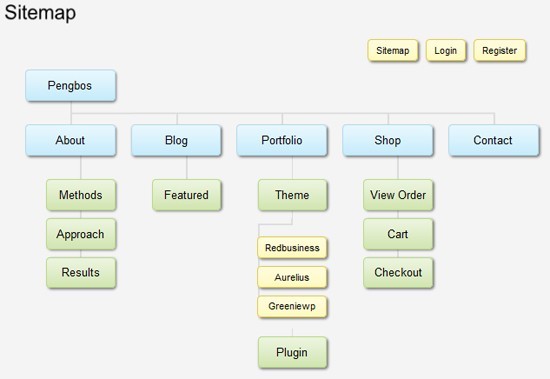
And it's incredibly easy to create a nice visual sitemap in Wordpress ... So I've decided to create a short tutorial to show you how easy it is ...
Interested?
Here it is:
How to create and display a visual sitemap in Wordpress
Enjoy it!
Share this insight
This conversation is happening inside the community.
Join free to continue it.The Internet Changed. Now It Is Time to Build Differently.
If this article resonated, the next step is learning how to apply it. Inside Wealthy Affiliate, we break this down into practical steps you can use to build a real online business.
No credit card. Instant access.