WA Content Creator AI vs. ChatGPT: My Take on Two Powerful Writing Tools (and How to Get the Best fr
Hi everyone!
After extensively testing Wealthy Affiliate’s AI Content Creator and ChatGPT, I wanted to share my opinion of how each tool stacks up for content creation and which I turn to depending on the task at hand. Spoiler: I love having both in my toolkit, but they shine differently.
First, when I returned to WA at the beginning of the year after being away for a long time, I was amazed at all the changes and new tools. The content creation AI was an excellent addition. The lessons on using AI for so many things have been great and helpful in so many ways. I'm actually starting to get comfortable using AI, which I never thought would happen. I love using AI. I've gotten so I log into ChatGPT daily, ask questions, and learn stuff every time.
Wealthy Affiliate AI Content Creator: Integrated & Efficient
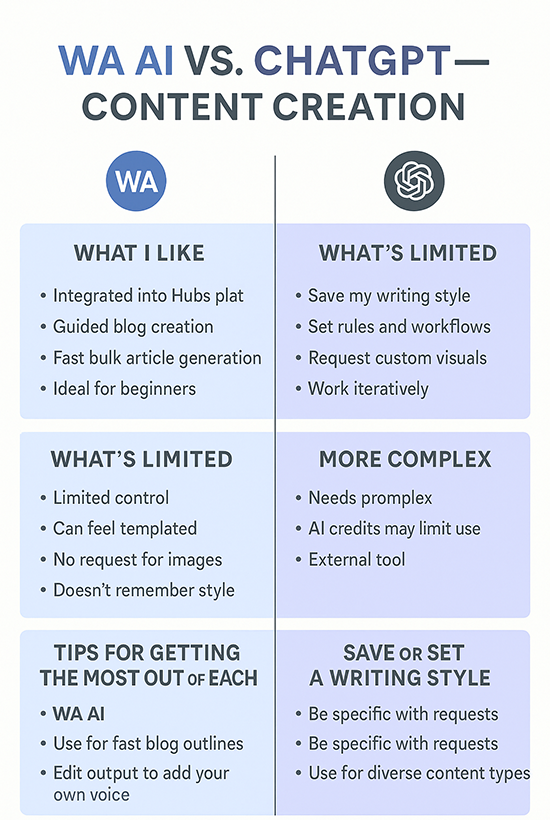
What I like:
- Seamlessly built into the Hubs platform
- Guided blog creation with prompts, outlines, and structure
- Fast bulk article generation (up to 10 posts at once!)
- Great for beginner bloggers who want speed and direction
What’s limited:
Less control over tone or creativity
Can feel templated or “samey” if you don’t edit
No option to request custom headers, infographics, or visual assets
Doesn’t remember *my voice* or style from post to post
🤖 Why I Use ChatGPT for Creative & Branded Content
I love using ChatGPT because I can:
- Save my writing style (yes, my own voice!)
- Create rules and workflows (like Shirley-style blog tone)
- Ask for custom blog headers, infographics, and social captions
- Request structured formats, downloadable files (Word, PDF, txt)
- Work iteratively: ask for rewrites, adjust tone, clarify points
This makes ChatGPT perfect for:
- Polished blog posts that match *my* tone
- Visual assets for social sharing
- Ebooks, lead magnets, or personalized affiliate marketing materials
- Outlines and creative brainstorming
Tips for Getting the Most Out of Each Tool
🟩 WA Content Creator AI
- Use it for fast niche blog outlines or topic starters
- Always edit the output to add your tone, voice, and personal touches
- Pair it with keyword research inside WA for best SEO potential
- Great for building a content base quickly on your site
ChatGPT
- Save a writing style or define one you like (e.g., casual, witty, expert)
- Be specific: Tell it to use headers, bullets, CTAs, and even image prompts
- Use it for design elements (infographics, ebook covers, etc.)
- Perfect for repurposing content across formats—like blog > email > social
🎯 Final Thoughts
WA’s content creator is great for quick, structured blogging—especially if you're just getting started and want to publish consistently. But when it comes to customization, visuals, or maintaining a consistent brand voice, I personally turn to ChatGPT. In fact, I find I'm not using all my 10,000 points like I did at first.
You don’t have to choose just one—use both where they shine.
Want tips on using ChatGPT for your blog? Drop a comment—I’m happy to share some of my favorite prompts.
Tell me your experience with using both to create content, I'm curious.
Cheers,
-Shirley Dawson
Join FREE & Launch Your Business!
Exclusive Bonus - Offer Ends at Midnight Today
00
Hours
:
00
Minutes
:
00
Seconds
2,000 AI Credits Worth $10 USD
Build a Logo + Website That Attracts Customers
400 Credits
Discover Hot Niches with AI Market Research
100 Credits
Create SEO Content That Ranks & Converts
800 Credits
Find Affiliate Offers Up to $500/Sale
10 Credits
Access a Community of 2.9M+ Members
Recent Comments
22
To be honest, in the beginning, when WA content creator AI was introduced, I was using the credits and later, because of my night shift job... I am not able to work on my online business.
Just now started to work on my free time, and your post inspired me, and I feel bad that I wasted all these years without using the WA content creator...
Also, the comparison of WA content creator and Chat GPT is very useful.
For sure, I will take advantage of the WA content creator. Thanks for the inspiring post!
Thanks for clarifying your experience about the use of WA Content Creator and ChatGPT, Dawson! To be honest, I haven't tested out the WA Content Creator as I wasn't around here for quite a long period of time. But I'll test it out now that I'm back in the community and definitely come back to share my experience.
Israel
I agree with you, Shirley. The WA Content Creator is great for writing a first draft, especially if you tell it what you want included. And it's much easier editing something than writing from scratch. I then add some of my own stories or experience and give it all to Quill, my ChatGPT, to write in my voice.
That sounds pretty much like what I usually do. I always do an outline first, even if it does cost 100 points in WA, and then edit the outline if I know enough to do that. With ChatGPT, it's easier for me to change the outline, and I can always ask it to add or change something before my final edit. -Shirley
Hi Shirley!
I do find that if I use a customized template within the AI writer, I get AI images added along with my structured content. I also give it specific actions before creating my content. It seems to remember my style and adds a more personal take on my content.
I give it lots of content bullet points that I want included too, and it follows that very well, but it absolutely doesn't get my voice for my parenting site. It keeps claiming that I did this and I did that which is absolutely not true. All I want to say it that doing this or that might be helpful. I just give the whole text to 'my' ChatGPT who changed it all to my voice.
And I tend not to use the images I get either. Although they are not 'wrong', they are just soulless. Like a tidy room with some pot plants and nice lighting. No child playing with toys or reading a book in sight.
Yes, I agree. Some niches can have a generic voice and can have images of just objects, but with a parenting site I need a warm, supportive voice and images that parents can quickly relate to.
Just like humans 'You can't please everybody all the time'. The AI can't either.
See more comments
Join FREE & Launch Your Business!
Exclusive Bonus - Offer Ends at Midnight Today
00
Hours
:
00
Minutes
:
00
Seconds
2,000 AI Credits Worth $10 USD
Build a Logo + Website That Attracts Customers
400 Credits
Discover Hot Niches with AI Market Research
100 Credits
Create SEO Content That Ranks & Converts
800 Credits
Find Affiliate Offers Up to $500/Sale
10 Credits
Access a Community of 2.9M+ Members

Hi Shirley — I loved reading your comparison! You really nailed the strengths of both platforms. Like you, I use both WA’s AI and ChatGPT regularly, and I agree they shine in different ways depending on the task.
I’ve actually built a little dream team of 9 custom GPTs, each designed for a specific part of my affiliate and content strategy:
Affiliate Blog Post GPT – helps write SEO-friendly affiliate posts
Presell Report Creator GPT – structures persuasive, value-packed reports
Email Sequence GPT – writes full autoresponder series and broadcast emails
Lead Magnet Maker GPT – turns ideas into opt-in freebies fast
Social Snippets GPT – creates posts and captions from blog content
Repurpose-It GPT – transforms blog content into emails, shorts, and more
Mini Funnel GPT – maps out lead magnet-to-offer funnels with copy ideas
Promotional Strategy GPT – gives ideas on how to get traffic without relying on SEO
Your AI Sidekick Coach GPT – my own personal coach for using AI smarter every day!
Each one is like having a specialist assistant that understands my tone, my audience, and the specific goal I’m working on.
Totally agree with your point about saving your writing style and working iteratively — that’s where ChatGPT shines brightest. And like you, I still use WA’s Content Creator when I want a quick outline or to knock out bulk content fast.
If anyone wants help creating their own set of GPTs for specific tasks, I’d be happy to share what’s worked for me.
Thanks again for such a clear and honest breakdown!
–Mike
Wow, Mike, it's like you have hired an entire team of assistants. I, for one, would be very interested in how you set this up, especially how you initiate each team's "AI" to start their specific work and how much you have to include in that prompt. Thankts for sharing this with us. - Shirley
How to Build a ChatGPT AI Assistant
Pick a Platform –I Use OpenAI ChatGPT in the top right corner you will see your account icon click that and go down to customize chatGPT. a form will pop up to let you shape you GPT to do what you want.
Define Its Purpose – What will it do? (e.g., customer support, marketing help, coding )
Train or Customize – Add custom instructions, upload files, or use APIs to connect tools.
Test & Refine – Prompt it, adjust tone, tweak responses.
👉 Use platform.openai.com or ChatGPT’s “Custom GPTs” to build fast