How to Use AI to Create Stunning Infographics That Actually Work



AI and Creating Stunning, Shareable Infographics.
Learn what makes a good infographic and how to get started—even if you're not a designer.
Why Infographics Still Matter
Infographics are one of the most powerful ways to present complex information quickly and visually. Whether you're explaining a process, breaking down data, or sharing quick tips, a well-crafted infographic can:
- Increase engagement
- Drive shares and backlinks
- Build authority and trust
But not everyone is a graphic designer… and that’s where AI comes in.
How AI Makes Infographic Creation Easy
Thanks to AI tools, you no longer need advanced design skills to make professional infographics. Here’s what AI can do for you
1. Turn Text into Design
AI tools like Canva, Visme, or Designs.ai can convert bullet points or blog content into infographic layouts in seconds.
2. Suggest Visual Hierarchies
AI understands the importance of flow. It can help you prioritize which elements should be bold, where to use icons, and how to group information.
3. Auto-Generate Icons and Charts
AI tools can match icons to your content automatically, or turn spreadsheets into graphs without you lifting a finger.
4. Create On-Brand Graphics
Upload your brand colors, fonts, and logo—AI tools will apply them to your designs consistently across projects.
What Makes a Good Infographic?
No matter how you create it, a *great* infographic should follow these core principles:
1. Simplicity
Avoid clutter. Stick to 3–5 key points and focus on clarity over flair.
2. Visual Flow
Your reader’s eye should move naturally from one section to the next. Use headings, arrows, or numbered steps.
3. Readable Fonts
Use bold titles and large, legible body text. Avoid overly fancy fonts.
4. Consistent Color Scheme
Limit to 2–3 main colors. Contrast helps highlight important data.
5. Branding + CTA
Always include your website, blog name, or call to action. Infographics get shared, so make sure credit comes back to you!
AI Tools to Try for Infographic Creation
| Tool | Best Feature | Website
| Canva | AI design suggestions + templates | https://www.canva.com |
| Visme | Data visualization & animations | https://www.visme.co |
| Designs.ai | AI-powered infographic assistant | https://www.designs.ai |
| Piktochart | Converts data into beautiful visuals | https://piktochart.com |
Pro Tip for Affiliate Marketers
Want to promote a product or tutorial? Use an infographic as a lead magnet or content teaser. It’s a smart way to attract interest before linking to a full blog post, video, or affiliate offer.
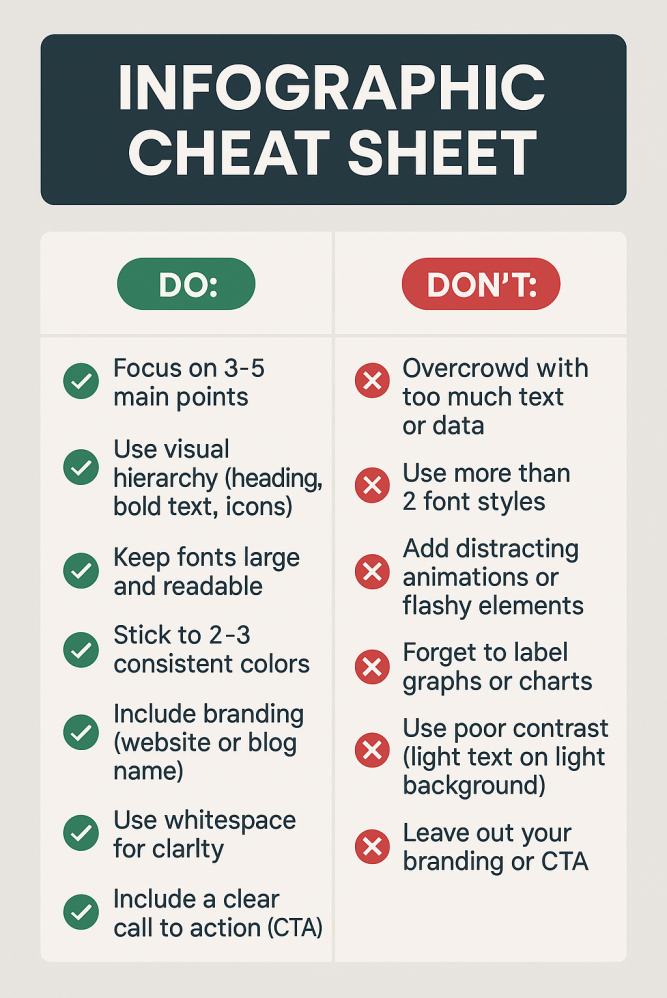
DO's and DON'Ts
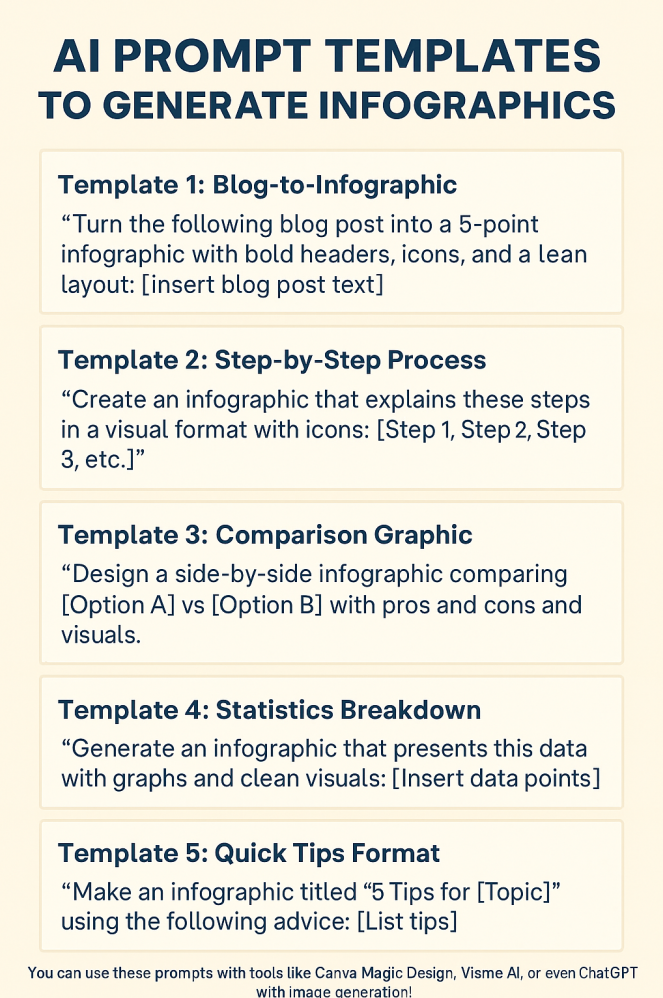
AI Prompt Template's
Join FREE & Launch Your Business!
Exclusive Bonus - Offer Ends at Midnight Today
00
Hours
:
00
Minutes
:
00
Seconds
2,000 AI Credits Worth $10 USD
Build a Logo + Website That Attracts Customers
400 Credits
Discover Hot Niches with AI Market Research
100 Credits
Create SEO Content That Ranks & Converts
800 Credits
Find Affiliate Offers Up to $500/Sale
10 Credits
Access a Community of 2.9M+ Members
Recent Comments
12


Thanks for sharing, Shirley! I will give this a try in one of my next website posts. I use ChatGPT, so I will see how it does. Images with text have been challenging for me using ChatGPT.

Yes, sometimes, the ChatGPT AI creates images that cut off text or part of the graphic, and it has to redo them, sometimes several times, before it gets it right. - shirley

Thank you Shirley. I love that you created an infographic that demonstrates your points. And the additional sites, apart from Canva, will no doubt be useful to many.
Isabella

This is super helpful—thank you for sharing, Shirley!
I especially appreciate the AI prompt templates you included. That’s such a game-changer because half the battle with AI is knowing what to ask to get the best results.
I’ve been exploring different ways to create more engaging content, and infographics are definitely on my list. Your post makes it feel way less intimidating, and I can already see how this can elevate blog posts and social media.
Do you have a favorite AI tool for infographics that you personally lean towards, or do you switch it up depending on the project?
Thanks again for the valuable insights—definitely bookmarking this one!

See more comments
Join FREE & Launch Your Business!
Exclusive Bonus - Offer Ends at Midnight Today
00
Hours
:
00
Minutes
:
00
Seconds
2,000 AI Credits Worth $10 USD
Build a Logo + Website That Attracts Customers
400 Credits
Discover Hot Niches with AI Market Research
100 Credits
Create SEO Content That Ranks & Converts
800 Credits
Find Affiliate Offers Up to $500/Sale
10 Credits
Access a Community of 2.9M+ Members
Thanks Shirley for sharing these awesome tips on using AI to create stunning infographics:)
I tried a few of the platforms you mentioned, yep they work great. Also, big thanks for the helpful prompts.
Your infographic cheat sheet is fantastic, spot on with spelling and no errors. Just curious, which AI tool did you use to create it?
I use ChatGPT almost always. - Shirley