Amazon Seller Central Account for Amazon Product Listing


Published on August 31, 2016
Published on Wealthy Affiliate — a platform for building real online businesses with modern training and AI.
To all my fellow Wealthy Affiliate members, striving to grow your online presence with Amazon, this is a quick post to help Amazon FBA/wholesaling newbies with listing their product on Amazon. Think of it as an Amazon Seller Central support resource.
If you are currently selling on Amazon, or plan to sell products through Fulfillment by Amazon, then it will serve you well to understand what to do when you set up your Amazon Seller Central account.
Amazon Seller Central merchant, you'll use the platform to enable you to list your products to be sold on Amazon, as well as helps you to monitor your performance so you can literally answer the question: Is Fulfillment by Amazon worth it... Your performance metrics will let you know based on the products that you have chosen to sell. Remember, it is also up to you to market and promote your product listings, which will increase your success rates as an Amazon wholesaler or as your business sells your very own private label products.
To learn how to sell your own "brand" product line on Amazon fba online, read http://20minutesofmetime.com/amazonfba to get the gist and determine if it's really something you can see yourself taking on to generate additional income online (outside of the basics like making money with ads on your website or affiliate sales Amazon allows folks to take part in.).
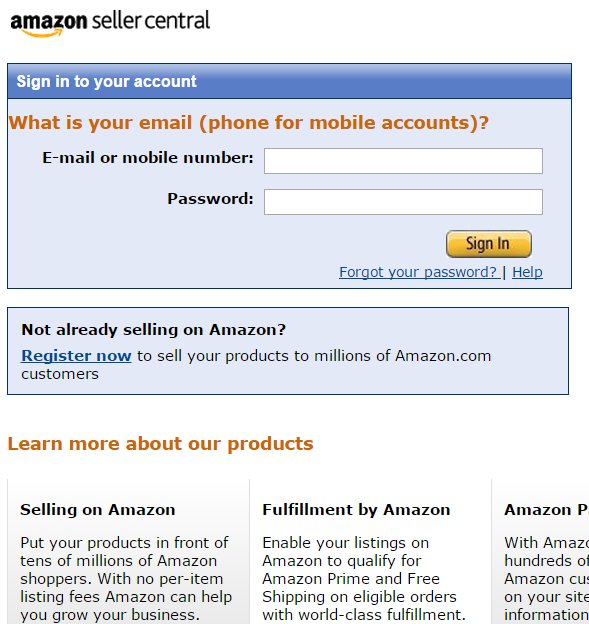
When you want to post a listing in your Seller Central account
Okay, so now you have your product ready. It should already be at the Amazon fulfillment center ready for shipment out to customers who buy from you.
- In the INVENTORY tab, go to Add A Product
- Type the name of the product.
- Click search to search for products that are the same as yours or closest to it
- Create a new product
- You now want to search the categories after the name of the product is keyed in
- Under the CATEGORIES menu, select the category that most closely relates to your product
- Enter all of the info that the screen is requesting
- IMPORTANT! Notice at the bottom it requires a UPC Barcode. Private label products will not have a UPC Barcode at all until you give it one. Here, I tell you step-by-step how to get a UPC code if you don't already have one. http://20minutesofmetime.com/amazonfba
- For your Product Name, try to make the name captivating so that it stands out against your competitions similar product listings
- When you finish up completing the necessary info, click Continue. Continue. Continue. Then pat your head and rub your belly at the same time. (Smile)
- Now your product should be listed!
- Give yourself a pat on the back
Ready to put this into action?
Start your free journey today — no credit card required.
On Another Note...
Setting Things Up: Your Amazon Seller Central Support SETTINGS
- In Seller Central, login
- Go to SETTINGS in the top right corner
- Choose, "I authorize each return request" (so that if someone wants a return, you know about it first)
- In the Your Return Mailing Label section, select, "I would like Amazon to provide an unpaid mailing label" (this means that your customer will be responsible for paying the return shipment costs. This option is most suitable if you are listing more expensive or heavier products like electronics. You can use your discretion here. If you want to pay the return shipping costs, you can-- which is actually a good idea if your business philosophy is based on providing great customer service!
- The section titled, Your Returns Instructions"-- Here you let the buyer know your return instructions. If you want to limit excessive operating costs for your Amazon e-commerce business, you should probably require a restocking fee between 5%-20%. Amazon has a requirement that buyers cannot be charged more than 20% can be charged for restocking fees. IN THIS SECTION type something like: There is a 15% restocking fee that is included on all returns. No exceptions.
- RHA Settings: Amazon
- Shipping: I just make sure that I am using the FREE Economy option, so I check that off and leave all other shipping options blank. With the FREE Economy shipping option, buyers will receive their package within 4-7 BUSINESS days and you are not bogged down with time consuming shipping calculations. This is especially important if you are trying to build your Amazon sales in way that will allow you to eventually set it and forget it (with the exception of monitoring your product performance every week.)
NOTE ON THE EMAIL SETTINGS:
Make sure that you customize your emails so that you receive only what is important to you in terms of notifications from Amazon Seller Central account and Amazon Seller Central support messages.
Question: What does Fulfillment by Amazon mean exactly?
Answer: That people like you/businesses/Amazon sellers simply utilize Amazon to ship, handle returns and customer service to the people who are buyers of products listed on Amazon under your business/ Amazon Seller Central account.
If you want a step-by-step guide on how to sell with Fulfillment by Amazon, check out the post I outlined to make it easy. http://20minutesofmetime.com/amazonfba
In that article, I go over everything from the importance of packaging to fba labels for UPC codes (barcodes).
I hope that this was helpful!
As always, all the best,
Nerissa S.
For those who are curious (like me), check out this info about my participation the the Wealthy Affiliate program... http://www.wealthyaffiliate.com?a_aid=0b741a2d
Share this insight
This conversation is happening inside the community.
Join free to continue it.The Internet Changed. Now It Is Time to Build Differently.
If this article resonated, the next step is learning how to apply it. Inside Wealthy Affiliate, we break this down into practical steps you can use to build a real online business.
No credit card. Instant access.