How to activate emoji screen keyboard Windows 10

32
44
13.2K followers

Emoji screen keyboard for Social Media

Step 1

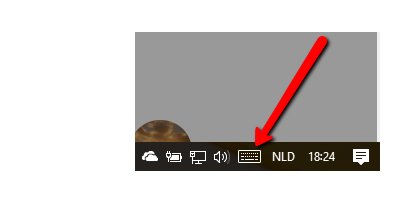
Right click on the task bars below

Step 2

Choose for Show screen keyboard

Step 3

Click on keyboard icon in the bar

Step 4

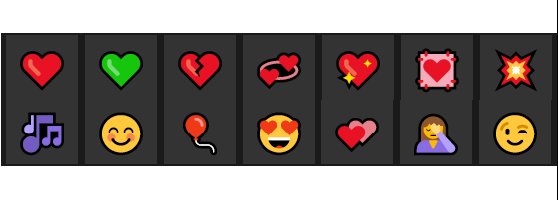
Shift over from normal keyboard to smiley keyboard/ click on smiley

........................................^........^...........^........^...........^............^........^..............

Step 5

....^..... Shift around for different emoji's

Step 6

Check it out on Social Media:)

32
44

Join FREE & Launch Your Business!

Exclusive Bonus - Offer Ends at Midnight Today

00

Hours

:

00

Minutes

:

00

Seconds

2,000 AI Credits Worth $10 USD

Build a Logo + Website That Attracts Customers

400 Credits

Discover Hot Niches with AI Market Research

100 Credits

Create SEO Content That Ranks & Converts

800 Credits

Find Affiliate Offers Up to $500/Sale

10 Credits

Access a Community of 2.9M+ Members

By continuing, you agree to our Terms of Service and Privacy Policy
No credit card required

Recent Comments

44

Hi Loes, thanks for the info. Irv.

1

My pleasure sharing Irv.☺

1

OIC That's so cute ❤

1

Not every one of those is working here, only the heart, Marion

1

Yeah, the rest disappeared :)

1

I will use them when the time is right.
Thanks Loes!

1

Looks great on Social Media Mark

1

Thank you Loes; I really hadn't given it much thought (I don't use a lot of emojis), but I could use them every once in a while.

1

You can do that Mickey ♥

1

Unfortunately, most of my work is on a Windows 7 system.

1

Don't know if that system has this too

1

Not that I am aware of (haven't really looked 'coz I don't use them much.)

1

Thanks Loes Victory on the symbols...Lower right alt button next to the spacebar and numbers on the right!

1

So it works for you? ☼

1

Yep. Got it! ☻

1

♥ alright ♥

1

Awesome! Thanks, Loes, I am making the change right now from my laptop!

1

♫ Lovely ♥

I learn something new everyday. Thanks! Debbie

1

So do I, new discovery ☺

1

well done again
I'm still windows 7

1

I am not sure if it works there too PB

1

Such a fun lesson, and now the movie is out, Thanks Loes!

1

☼ Thanks ♥

1

:):) How did you make the "sun" and the "heart" ?

1

{[Tutututut]} ♫

1

Nice. Thanks!!

1

Well done Loes

1

Thanks Linah:)

1

You're welcome Loes

See more comments

Join FREE & Launch Your Business!

Exclusive Bonus - Offer Ends at Midnight Today

00

Hours

:

00

Minutes

:

00

Seconds

2,000 AI Credits Worth $10 USD

Build a Logo + Website That Attracts Customers

400 Credits

Discover Hot Niches with AI Market Research

100 Credits

Create SEO Content That Ranks & Converts

800 Credits

Find Affiliate Offers Up to $500/Sale

10 Credits

Access a Community of 2.9M+ Members

By continuing, you agree to our Terms of Service and Privacy Policy
No credit card required

2.9M+

Members

190+

Countries Served

20+

Years Online

50K+

Success Stories

The world's most successful affiliate marketing training platform. Join 2.9M+ entrepreneurs building their online business with expert training, tools, and support.

© 2005-2025 Wealthy Affiliate
All rights reserved worldwide.

🔒 Trusted by Millions Worldwide

Since 2005, Wealthy Affiliate has been the go-to platform for entrepreneurs looking to build successful online businesses. With industry-leading security, 99.9% uptime, and a proven track record of success, you're in safe hands.