Editing the translation of the source text with the Loco Translate Plugin
Published on October 6, 2017
Published on Wealthy Affiliate — a platform for building real online businesses with modern training and AI.
Hi guys!
It's been awhile... ;) I am too busy with my offline job unfortunately, but I am always in the background of WA ;)
And today I discovered something helpful for me and I want it to share with you:
I changed my theme recently (it's a free theme: from Spacious to ColorMag from ThemeGrill for those who want to know it ;)).
Now, under my posts it shows the related articles - that's what I wanted! And the source text "You may also like" is fine, but it's a German website and there was a spelling error in the translation and I wanted to edit it.
The theme support recommended me to use the Loco Translate Plugin and I just wanted to let you know that I was able to edit the phrase with only a few clicks!
It looks like you can edit every translation of the source text of your theme, your plugins and even WordPress! And you can choose different languages.
You can have a look at the features of the Plugin here:
https://localise.biz/wordpress...
Ready to put this into action?
Start your free journey today — no credit card required.
Here's a screenshot of the source text I changed:
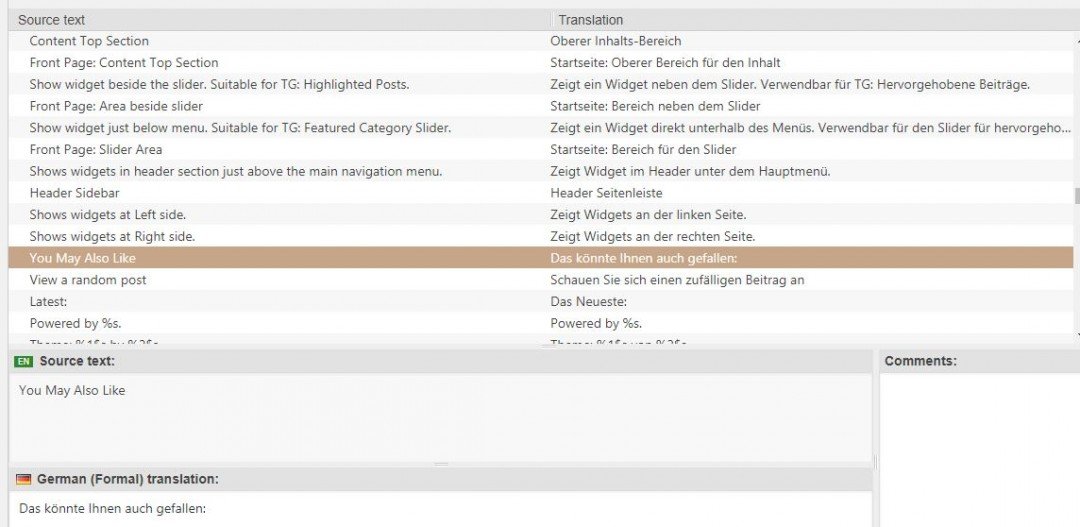
You May Also Like was translated like this: Das könnte ihnen auch gefallen - I changed it into: Das könnte Ihnen auch gefallen: Ihnen with a capital letter and a colon at the end.
I am not an expert of it and don't know how to use all the features, yet, but I wanted to let you know it in case you have the same issue.
Do not confuse it with the translation of your blog posts, with this Plugin you can only change the translation of the source text which is the text given by your theme, Plugin of WordPress (examples: You May Also Like, Categories, Older Comments, Archives, The URL is invalid and so on...).
Have a great time!
Gerlinde
Share this insight
This conversation is happening inside the community.
Join free to continue it.The Internet Changed. Now It Is Time to Build Differently.
If this article resonated, the next step is learning how to apply it. Inside Wealthy Affiliate, we break this down into practical steps you can use to build a real online business.
No credit card. Instant access.