Tip 37: use Privacy Settings in Wordpress


Published on May 18, 2018
Published on Wealthy Affiliate — a platform for building real online businesses with modern training and AI.

Much of a do around privacy and cookie settings...
Since I posted my training on EU cookies, the ball has been rolling a lot.
Yes, it is a must! No way out...
Today wordpress launched an update with privacy settings.
How do you do that?
Ready to put this into action?
Start your free journey today — no credit card required.
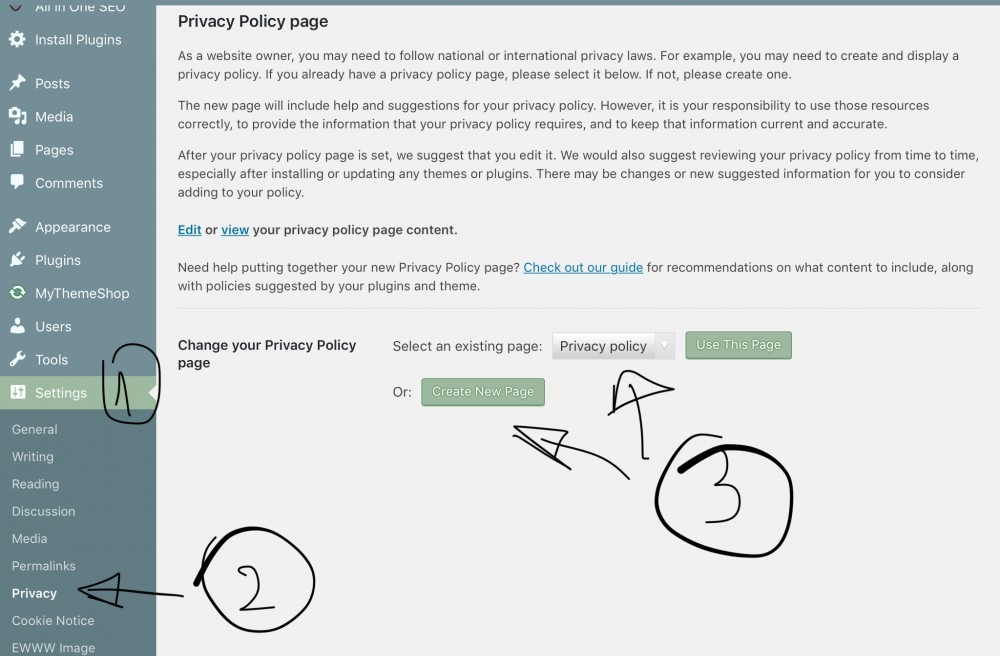
Go To your wordpress dashboard>settings>privacy
Make a new page or use an existing one.
And adapt your menus if necessary.
Generating of privacy page can be done with templates in site content.
Simple!
Training about EU cookie is here : https://my.wealthyaffiliate.com/training/EU-cookies
And many other places... feel free to add yours...
However, for some this will NOT be enough. Dig here: https://bit.ly/2s2hRur
Share this insight
This conversation is happening inside the community.
Join free to continue it.The Internet Changed. Now It Is Time to Build Differently.
If this article resonated, the next step is learning how to apply it. Inside Wealthy Affiliate, we break this down into practical steps you can use to build a real online business.
No credit card. Instant access.