Tip 30 : use gravatar

blog cover image
22
26
8.8K followers


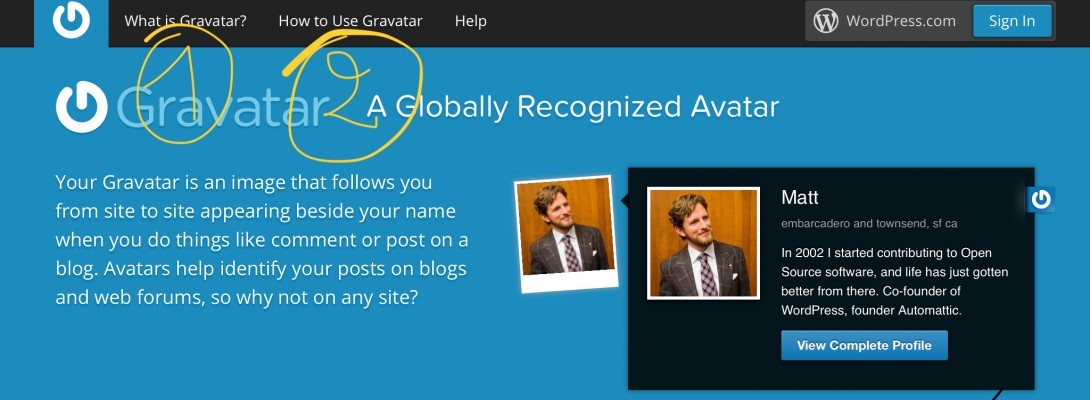
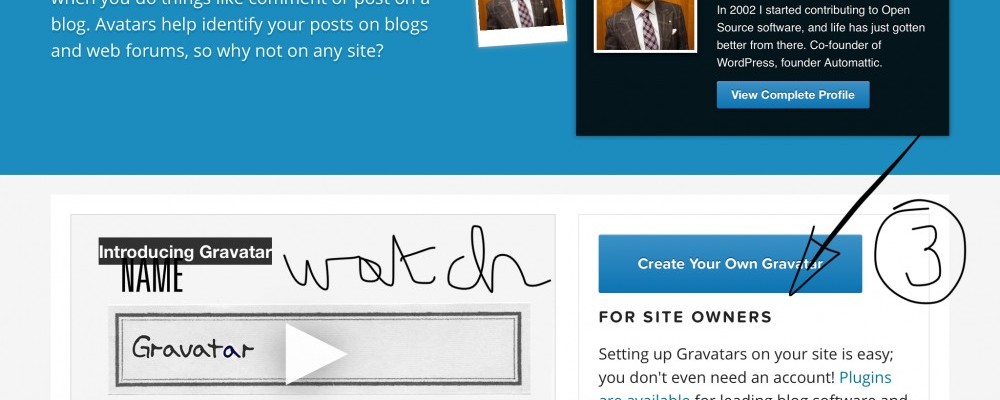
This is the screen when you go to the gravatar site:

(1) is what is gravatar?
(2) is how to use it
(3) create your own gravatar

How to do that?

  • Go to gravatar : https://en.gravatar.com/
  • Read 1) and 2) and watch the video
  • Create a new account wIth gmail or wordpress 3)
  • Add an image
  • Confirm the email sent to you
  • Done

What for?

  • Use the gravatar mail in the profile of your Wordpress site
  • Use it in feedback and comments

You can add as many mails as you like.


More training around. This is the essence

Questions?


PS:

for those who do not know, gravatar is a way to validate your identity on the web.


:-)

22
26

Join FREE & Launch Your Business!

Exclusive Bonus - Offer Ends at Midnight Today

00

Hours

:

00

Minutes

:

00

Seconds

2,000 AI Credits Worth $10 USD

Build a Logo + Website That Attracts Customers

400 Credits

Discover Hot Niches with AI Market Research

100 Credits

Create SEO Content That Ranks & Converts

800 Credits

Find Affiliate Offers Up to $500/Sale

10 Credits

Access a Community of 2.9M+ Members

By continuing, you agree to our Terms of Service and Privacy Policy
No credit card required

Recent Comments

26

Fleeky,
So many questions about gravatar. Why isn't there any training about it? Or is there?

Chuck

1

Hi Chuck,

Since it is not WA related, best is to go to the gravatar website for further information and guiding. Just follow my above instructions...

Good luck

1

Thank you, Fleeky for the like and comment

1

Most welcome
Just let know when stuck...

Thanks - good tip and steps to take!

Dallas

1

Took me a wHile to find out

Thanks Fleeky!

Wayne

1

Hi Wayne!

1

Now I have a "Gravatar", excellent post Please tell me If I want to change my picture How can update. Many Thanks!!

1

Hi Claudio

Delete your old one and upload a new or
Just add a new picture and then on the mail you want it to go wIth (in case you have several)

In one of my simple trainings i explain how to make a mailadress and forward it to your main adress wIthout having to check a new mailbox.

It means you can make a specific mail for your site and add that mail to gravatar too with your logo for example...

That is also a way to keep private from public...
Hope this helped a little. Let me know if stuck...

2

Here is the training for the forwarded mailbox:

1

Many thanks, A complete information you give me!

1

:-)

1

Thanks, Fleeky. Very simple, indeed. I will have to do this.

Wayne

1

Yes... and then in your worspress site, make sure to add tht mail or another that you make specifically for your site with your logo.

Just make forwardmail, add it to gravatar, done

If stuck let me know

1

for the forwarded mailbox look here'

Thanks, I may take you up on the help.

Wayne

1

Ok

1

easy peasy!

1

Yep

Nice:)

1

Ty doc!

1

Great, and thanks for this, Fleeky!

1

:-)

1

Another excellent tutorial...

1

Thank you Nadja, coming from you i am humbled...

See more comments

Join FREE & Launch Your Business!

Exclusive Bonus - Offer Ends at Midnight Today

00

Hours

:

00

Minutes

:

00

Seconds

2,000 AI Credits Worth $10 USD

Build a Logo + Website That Attracts Customers

400 Credits

Discover Hot Niches with AI Market Research

100 Credits

Create SEO Content That Ranks & Converts

800 Credits

Find Affiliate Offers Up to $500/Sale

10 Credits

Access a Community of 2.9M+ Members

By continuing, you agree to our Terms of Service and Privacy Policy
No credit card required

2.9M+

Members

190+

Countries Served

20+

Years Online

50K+

Success Stories

The world's most successful affiliate marketing training platform. Join 2.9M+ entrepreneurs building their online business with expert training, tools, and support.

© 2005-2025 Wealthy Affiliate
All rights reserved worldwide.

🔒 Trusted by Millions Worldwide

Since 2005, Wealthy Affiliate has been the go-to platform for entrepreneurs looking to build successful online businesses. With industry-leading security, 99.9% uptime, and a proven track record of success, you're in safe hands.