Tip 114 how to add a subdomain to an existing domain ?


Published on February 25, 2019
Published on Wealthy Affiliate — a platform for building real online businesses with modern training and AI.


How to add a sub domain to an existing domain
Some of us have several interests and niches. Others have a personal website. You can always use one of your existing domains and add a sub domain. Let me show you how.
What is a sub domain?
A simple example:
- Siterubix.Com = domain
- Fleek.siterubix.com = sub domain
How to add a sub domain to your domain ?
Go to the menu on your left in your WA dashboard > websites > site domains.
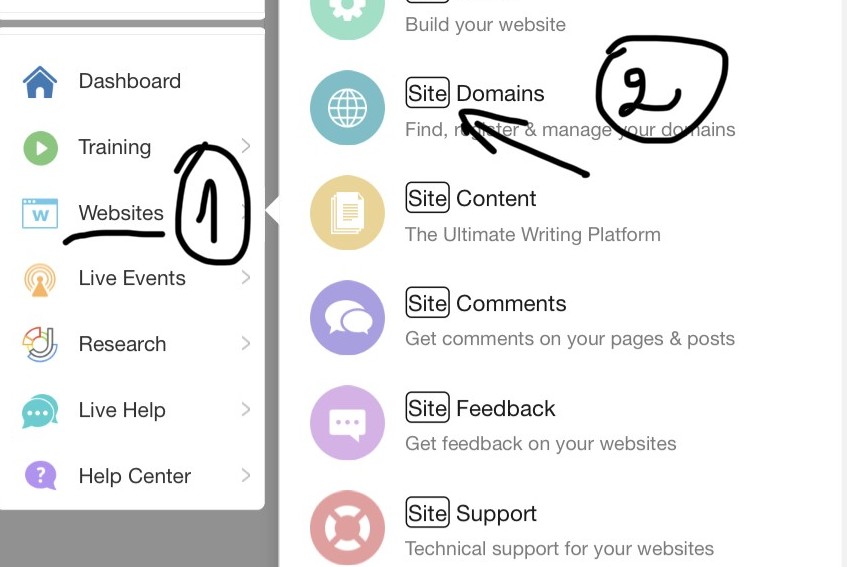
The menu that unfolds looks like this:
Ready to put this into action?
Start your free journey today — no credit card required.
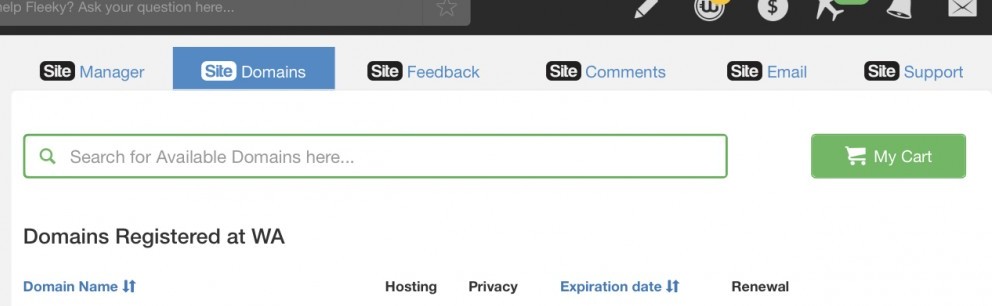
just scroll down until you find add sub domain and click on it.
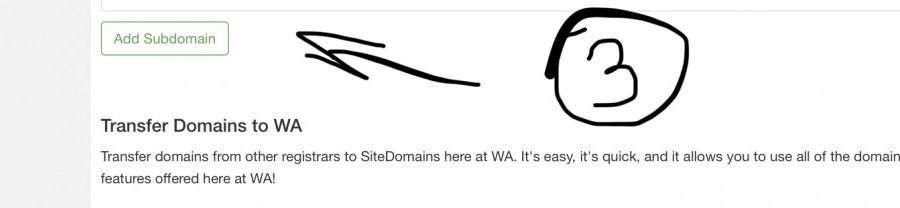
Then add the name of your sub domain and create it.

OK. You are done now and ready to set up your new website.
For more
If you do not know how to create a domain and how to set up wordpress, just have a look at two of my training on the subject
Hope this helps a little. So yes, no need to buy a bunch of new domains. And the good news, it adds to your SEO. Good luck.

Thank you for liking, comments and shares
And if you are stuck, let us know. Thank you!
Share this insight
This conversation is happening inside the community.
Join free to continue it.The Internet Changed. Now It Is Time to Build Differently.
If this article resonated, the next step is learning how to apply it. Inside Wealthy Affiliate, we break this down into practical steps you can use to build a real online business.
No credit card. Instant access.