How To Share WA Content With A Tracking ID



A few days ago a question was asked in the community in regards to using a Tracking ID on our WA Affiliate Links so one could track where a potential referral came from. Though I had answered the question at the time, I want to now elaborate and give you a quick visual step-by-step procedure.
HOW TO SET YOUR TRACKING ID
As you probably already know, we can all share content created here by others on social media and on our websites, if relevant. What do I mean by relevant? If your website is about cosmetic essentials, you wouldn't be sharing a WA blog or training having to do with SEO or AI.
However, when sharing on social media or in an email, you don't have to be relevant to a specific niche. In these cases, and where the shared content is relevant, you want to make sure the WA content is from your affiliate link to that content. For example, let us say you want to share Kyle's Boot Camp lesson.
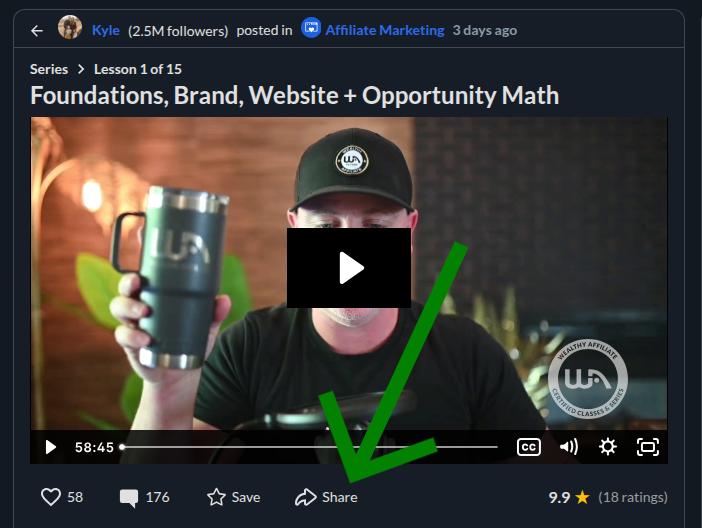
Just under the title and media window of the post you will see the share button. It's to the right of the Like, Comment and Save icons. See Image above. Click on Share so you can get your affiliate link. Why is this important? So that if someone joins WA through your shared post, you get the referral.
Now if you decide to share your affiliate link to this post in more than one location such as Facebook, X (Twitter), email, a relevant website, etc., if you should get a referral you probably would like to know which posting gave you the referral. In the image below I set my Tracking ID as BOOTCAMP-01.
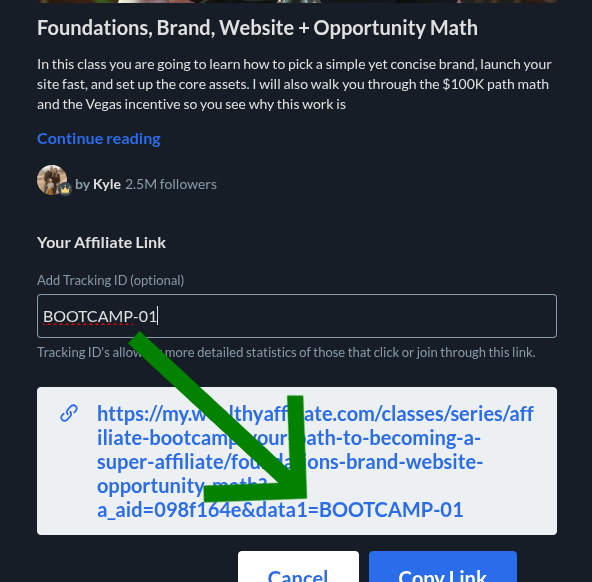
Normally your affiliate link to this post would end with your affiliate ID. However, when you add a Tracking ID, it will appear AFTER your affiliate ID. As you can see in the above image I typed BOOTCAMP-01 in the field that says "Add Tracking ID (Optional)" and it appears after my affiliate ID as "&data1=BOOTCAMP-01"
Now I would just copy the entire affiliate link and share it on social media, email or a relevant website. You can also add a Tracking ID to your main WA Affiliate link in the same manner as the above example. Click on the WA Affiliate Program link in the left side navigation menu. Then click on the Links tab in the above menu.
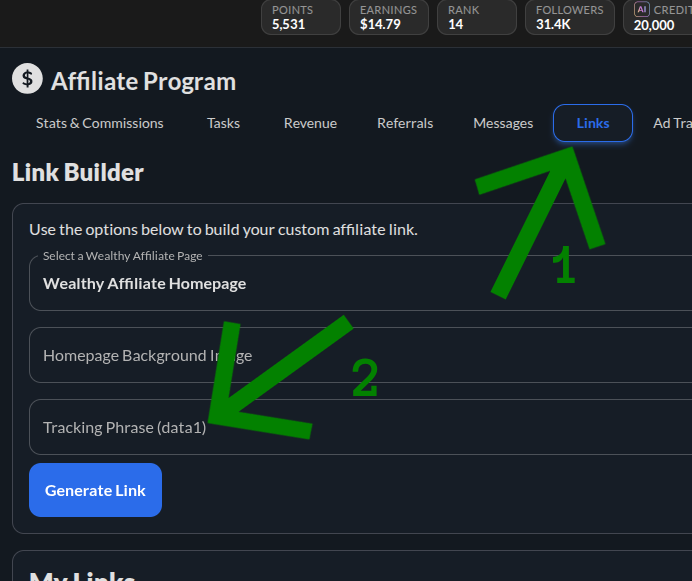
The Tracking ID screen looks different here, see below image, but getting your affiliate link with tracking is the same. Once on your Affiliate Program Stats screen click the link tab (#1) and it will bring up the custom Link Builder. Then in the appropriate area (#2), type in your Tracking ID and click "Generate Link" button.
WHERE TO SEE WHICH TRACKING ID YOUR REFERRAL CAME FROM
While on the same WA Affiliate Program Stats Screen, scroll down until you see the section that says "Entrance Stats" to see where your referrals come from. The top two will more likely be the same as I have, which are the two main entrance points for most WA referrals, WA Website Homepage & Guest Join Form V2.
As you can see in the below image, you will see the affiliate link in the left column, then the Tracking ID in the second column (#1) arrow. Then moving right you will see Referrals & Sales for the day and the month. Then the All-Time stats for Referrals (#2) arrow and Sales (#3) arrow. Notice these do not have Tracking ID's.
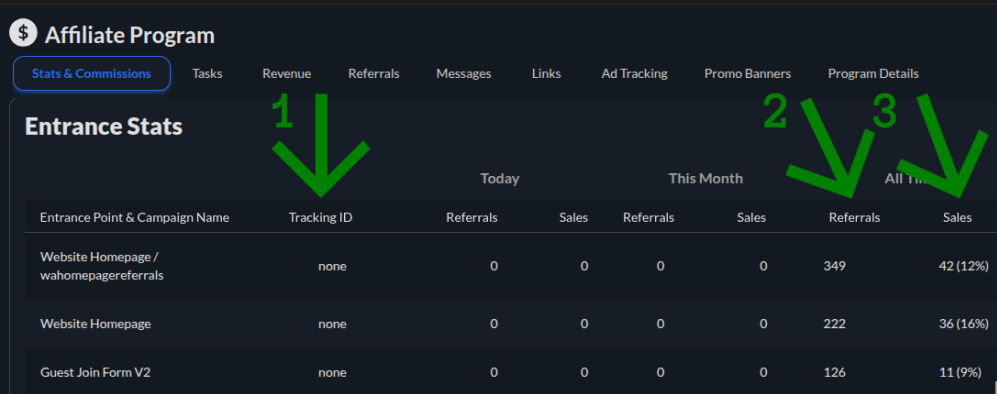
Though you can add a Tracking ID to your WA Website Homepage, it will not appear near the top of this list. Scroll down this list and you may see a "Load More" button to continue down the list. If you have never gained a referral, you may not see this button. Continue scrolling down until you see a Tracking ID link.
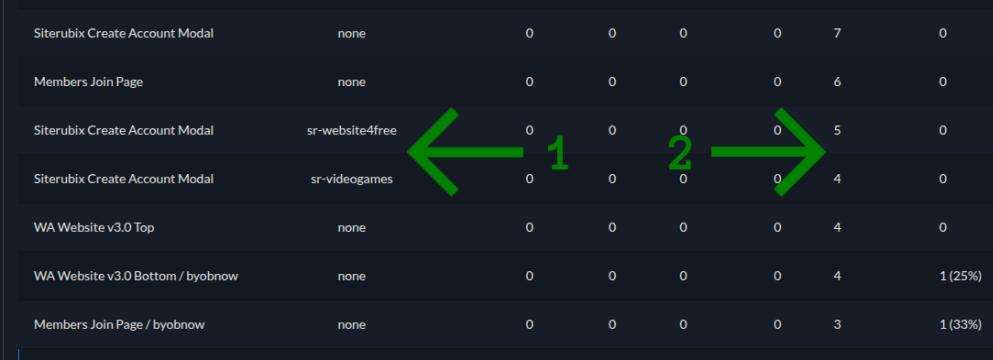
As you can see in the image above, I have two links that have Tracking ID's attached to them, "sr-website4free" and "sr-videogames" (#1) arrow. Though I did not receive any Premium Sales from these links, I did receive 5 referrals from the first link and 4 referrals from the second link (#2) arrow.
Just to review, I showed you how to add a Tracking ID to both WA content posts and your personal WA Affiliate Links. Then I showed you where to see which Tracking ID links are doing well and where your referrals come from. If you still have any questions or comments, please leave them below.
Join FREE & Launch Your Business!
Exclusive Bonus - Offer Ends at Midnight Today
00
Hours
:
00
Minutes
:
00
Seconds
2,000 AI Credits Worth $10 USD
Build a Logo + Website That Attracts Customers
400 Credits
Discover Hot Niches with AI Market Research
100 Credits
Create SEO Content That Ranks & Converts
800 Credits
Find Affiliate Offers Up to $500/Sale
10 Credits
Access a Community of 2.9M+ Members
Recent Comments
16


Thank you for writing this post, Boomergp
You have shared very valuable information on tracking ID links, I have not used this simply because before reading your post I had no idea how or why I should use this.
Knowing where your referrals come from is extremely valuable for where to spend your time promoting
Jeff

You are welcome Jeff! It was my pleasure to share this with you and the community.
You are correct in your understanding of the importance in knowing where your referrals are coming from.

Awesome! I actually learned about tracking IDs, or what is known as "cookies," in class recently, and how it is used in data to determine not just where our customers come from, but if there are more from that platform or particular area (location) that may be interested in our products or services as well.
Exactly! That is another way of describing and understanding what a Tracking ID is and what it is used for.
Thank you Ms. Kids for sharing this knowledge here. May you have a great week ahead!
It's still appreciated because many people here, myself included, will learn new things from the comments of others.

As a visual learner, i appreciate the time you took to put this awesome educational content together, and then sharing it😀😀
You are welcome Terry. As I said to Michael below, I'm a big fan of using visuals when describing a step-by-step process. It was my pleasure to share this, seeing how I had some people ask about this earlier.

I did not even have to read it to see it contains value with your visuals.
I did however go back and read it and it is a great walk through with great visual aids.
Michael
Thanks Michael!
I am a big fan of using visuals to explain a step-by-step procedure. It makes it easier to understand and for people who may just skim through the content.
Rob
See more comments
Join FREE & Launch Your Business!
Exclusive Bonus - Offer Ends at Midnight Today
00
Hours
:
00
Minutes
:
00
Seconds
2,000 AI Credits Worth $10 USD
Build a Logo + Website That Attracts Customers
400 Credits
Discover Hot Niches with AI Market Research
100 Credits
Create SEO Content That Ranks & Converts
800 Credits
Find Affiliate Offers Up to $500/Sale
10 Credits
Access a Community of 2.9M+ Members
Thankful
Welcome