How to fix Dangerous Message for your site

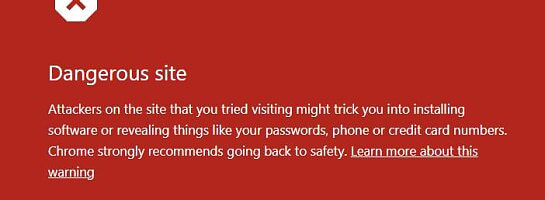


Occasionally, new sites may experience a Message from Google Chrome displaying a warning for your site.
This is a false positive and can easily be fixed by you.
Here is Carson's response on how to do this
If you want to save this to your favorites for future use, if someone else has the same issues.
From Carson:
I understand that you’re seeing a red warning screen from Google that says “Dangerous site ahead” when visiting your website. I want to assure you that this is a false positive, and there is no problem with your website.
Our team has thoroughly scanned your site and confirmed that there are no malicious or dangerous files present. Sometimes, Google’s automated systems mistakenly flag clean websites due to overly cautious detection mechanisms. This does happen from time to time, and fortunately, Google is usually very quick to respond when notified of the error.
To resolve this, we recommend submitting a false positive report to Google, which typically clears the issue within a short timeframe.
Here’s how to request a review from Google:
1. Visit the Google Search Console Safe Browsing page:
https://safebrowsing.google.com/safebrowsing/report_error/
2. Enter your site’s URL and any required details.
3. In the comment section, you can paste the following message:
“We have scanned the website and there are no malicious or dangerous files. This is a false positive and we request that this warning be removed promptly.”
4. Submit the form.
Once submitted, Google typically reviews the site and removes the warning almost immediately.
Thanks for your patience and understanding.
Best regards,
Carson
By following this advice from Carson, it will quickly be resolved. Also note this is only happening if you are on Google Chrome and not other browsers.
In the meantime
 ,
,
Join FREE & Launch Your Business!
Exclusive Bonus - Offer Ends at Midnight Today
00
Hours
:
00
Minutes
:
00
Seconds
2,000 AI Credits Worth $10 USD
Build a Logo + Website That Attracts Customers
400 Credits
Discover Hot Niches with AI Market Research
100 Credits
Create SEO Content That Ranks & Converts
800 Credits
Find Affiliate Offers Up to $500/Sale
10 Credits
Access a Community of 2.9M+ Members
Recent Comments
104


Good morning Andre,
Thank you for the heads-up, I'm sure that will help many members.
I have heard members mention this issue and I have seen it happen myself, I think it does also fix itself after a few days. However, no one wants to go to a website that says dangerous site, so it's good to know about this fix.
Have a great week.
Roy

Thanks Roy and moist welcome.
Yes more so since Google decided to play safe a bit more than normal.but WA has everyone convered and Carson gave us a solution we can fix ourselves.
Thank you, Andre.
Unfortunately, I'm sure it's one of those rather alarming messages from Google that causes users to be alarmed, and rightly so, especially new members. It's great that Carson has everyone covered.
Have a wonderful day.
Roy
Thanks Roy yes for those totally new it may seem alarming but as you state we have Carson covering what is needed to clean this issue away.
That's so true, Andre, I couldn't agree with you more.
It's great that Kyle and Carson are always trying to keep on top of the game!
All the best to you.
Roy
Yes it is Roy and noticed a wonderful member helped a newbie earlier today with the same issue and she shared this post so worth it.
This is good news, Andre, as members can almost be scared off by this sort of message, or just find it too daunting. This should help to bring clarity and reassurance, etc.
Roy


Hey Andre,
Thank you for the link and information. I have saved it under my bookmarks just in case.
Thanks Hein, always great to know where it is when we need it fo others.
Enjoy your special dinner at the posh restaurant and bon appétit
Andre
See more comments
Join FREE & Launch Your Business!
Exclusive Bonus - Offer Ends at Midnight Today
00
Hours
:
00
Minutes
:
00
Seconds
2,000 AI Credits Worth $10 USD
Build a Logo + Website That Attracts Customers
400 Credits
Discover Hot Niches with AI Market Research
100 Credits
Create SEO Content That Ranks & Converts
800 Credits
Find Affiliate Offers Up to $500/Sale
10 Credits
Access a Community of 2.9M+ Members
To fix the “Dangerous site ahead” warning on Chrome:
It’s usually a false alarm.
Report it to Google here: https://safebrowsing.google.com/safebrowsing/report_error/
Add this note: “No malicious files found. Please remove this false warning.”
Google will review and remove it quickly.
This affects only Chrome users.
Thanks for sharing this tip. Next time when one of my sites face this, I will surely try it.
Paul.
I have more than a few of these messages coming up. UGH! ...also thankful they watch for us.