Featured image problem


Hey guys, i changed my theme on blockchaindudes.com, and now i have the double image problem, see this:
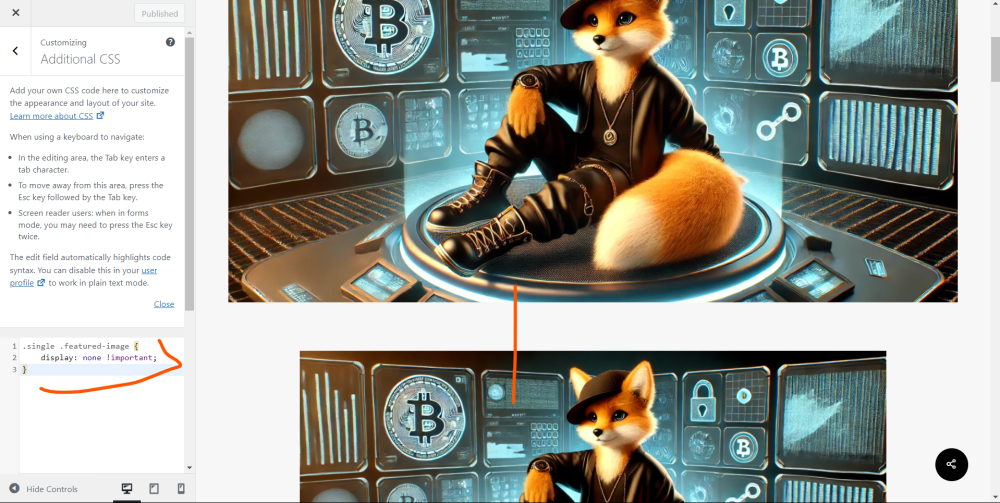
someone know ho to fix it?
Join FREE & Launch Your Business!
Exclusive Bonus - Offer Ends at Midnight Today
00
Hours
:
00
Minutes
:
00
Seconds
2,000 AI Credits Worth $10 USD
Build a Logo + Website That Attracts Customers
400 Credits
Discover Hot Niches with AI Market Research
100 Credits
Create SEO Content That Ranks & Converts
800 Credits
Find Affiliate Offers Up to $500/Sale
10 Credits
Access a Community of 2.9M+ Members
Recent Comments
9


i would do as another member did and ask ai to help - it gave the right code to remove the featured image at the top....
according to copilot this may work
.post .wp-post-image {
display: none;
}

wondered whether it would ....
personally i would go through siteorigin css plugin to find the classes to remove it...
you could try the !important; at the end of the none
but don't expect it to work...
this is mine
.single-post. post-featured-img page-header-bg-image{
display:none !important;
}

Go to your back office click appearance then customize.
From there scroll down the bottom till you see CSS then copy and paste the following and click update
.single .featured-image {
display: none !important;
}
You can also refer to Kyle's blog on this below which shows the same code to put in Adding Featured Images to Your Website (and Avoiding Duplication) Andre
Can you copy and past the code here as it is hard to read from your image. Plus to me it looks like added spaces between the words.
Also what theme are you using I use GeneratePress and the code I have works perfectly
.single .featured-image {
display: none !important;
}
i am using salient theme (mag salient)
See more comments
Join FREE & Launch Your Business!
Exclusive Bonus - Offer Ends at Midnight Today
00
Hours
:
00
Minutes
:
00
Seconds
2,000 AI Credits Worth $10 USD
Build a Logo + Website That Attracts Customers
400 Credits
Discover Hot Niches with AI Market Research
100 Credits
Create SEO Content That Ranks & Converts
800 Credits
Find Affiliate Offers Up to $500/Sale
10 Credits
Access a Community of 2.9M+ Members
GPT is great for giving you code to customize your theme. Just tell it in detail what's happening, give it your theme name, and give it the CSS code that isn't working so it can come up with a new solution.