What Is llms.txt File?


Published on June 23, 2025
Published on Wealthy Affiliate — a platform for building real online businesses with modern training and AI.


What Is llms.txt and Why It Might Matter to Your Website’s Future
Lately, there’s been some buzz in our Wealthy Affiliate community around something called llms.txt. What is it? Do we need it? How does it help?
Let’s break it down in plain language so you can decide if it’s worth adding to your site.
What Is an llms.txt File?
An llms.txt file is a small, server-side text file that helps AI tools, especially large language models (LLMs) like ChatGPT, Claude, or Gemini, better understand your website.
Think of it like a cheat sheet or map. Instead of forcing an AI to fumble through your site’s cluttered HTML (menus, popups, tracking code, etc.), the llms.txt file offers a clean summary and direct links to the most important parts of your site. It’s built specifically for AI crawlers, not for human readers or search engine bots.
So if you’ve ever asked ChatGPT to “summarize what my site does,” and got a jumbled or generic answer, this might be why. Without context, AI struggles. And llms.txt is designed to solve that.
Why This Matters in 2025 and Beyond
Large language models are becoming essential tools for how people discover and interact with content. They’re no longer just chatbot party tricks; they’re built into search engines, voice assistants, research platforms, educational apps, and more.
Here’s why that’s important:
- LLMs enable natural communication between humans and machines.
- They summarize, translate, and generate content across multiple industries.
- They automate tasks and increase productivity.
- They improve accessibility, especially across language and literacy barriers.
But they have limits.
AI tools don’t browse your site like Google. They don’t read it like a person either. They try to “understand” it during a live request, and that can fail if your content is buried in code, spread out across multiple pages, or not formatted in a clean, readable way.
That’s where llms.txt comes in; it gives them the key information upfront, in a way they can digest.
Okay, So How Do You Create One?
If you want to build an llms.txt file, it’s easy. Here’s how you can do it manually:
- Open a basic text editor like Notepad (Windows) or TextEdit (Mac).
- Add a short summary of your website: what it’s about, who it’s for, and what kind of content it offers.
- List clean, direct links to important pages like:
- Your About page
- Blog or resource hub
- Documentation (if you have any)
- Markdown or plain text versions of content, if available
- Save the file as llms.txt.
- Upload it to the root of your website (i.e., https: //yourdomain. com/llms.txt).
But that last part is where it gets tricky for us at Wealthy Affiliate.
No cPanel? No Problem: Use a Plugin
Since Wealthy Affiliate hosting doesn’t give us direct cPanel or FTP access, you’ll need a plugin to add server-level files like llms.txt.
Ready to put this into action?
Start your free journey today — no credit card required.
I personally recommend using the WPCode plugin. It’s simple, reliable, and doesn’t require messing with your theme files or risking errors.
Here’s how to do it with WPCode:
- Install and activate the WPCode plugin from the WordPress repository.
- Go to Code Snippets > + Add Snippet.
- Choose “Add Your Custom Code”, then select PHP as the code type.
- Paste the following code (I can help you write this part if needed).
- Save and activate the snippet.
A couple of notes: The snippet must be PHP, and the Settings must be set to Run Everywhere.
Here is What ChatGPT Says:
Two Ways to Add an llms.txt File to Your WordPress Site
If you want AI tools like ChatGPT to understand your website better, adding a llms.txt file is a smart move. Below are two beginner-friendly methods — no cPanel required if you're using managed WordPress hosting (like Wealthy Affiliate).
Here Are Examples: to create your own for your site, ask ChatGPT to create the llms.txt file for you. It should give you the code and directions again on how to apply it. If it does not, ask for instructions.
Method 1: Dynamic llms.txt via WPCode (No File Upload Needed)
This method uses a small PHP snippet to serve the llms.txt content directly. It’s perfect for Wealthy Affiliate users and other platforms without root access.
✅ Best For: Managed WordPress users
🚫 No file upload needed
🔌 Requires plugin: WPCode
Steps:
- Install & activate the WPCode plugin.
- Go to Code Snippets > Add Snippet > Add Your Custom Code (PHP).
- Paste the following:
add_action('init', function() {
  if ($_SERVER['REQUEST_URI'] === '/llms.txt') {
    header('Content-Type: text/plain');
    echo "Site: ExampleSite\n";
    echo "Summary: ExampleSite is a demo site showcasing affiliate marketing and AI tools.\n";
    echo "About: https://examplesite. com/about/\n";
    echo "Start Here: https://examplesite. com/start-here/\n";
    echo "Blog: https://examplesite. com/blog/\n";
    echo "Resources: https://examplesite. com/resources/\n";
    exit;
  }
});
- Save and activate the snippet.
Your llms.txt is now live at https: //examplesite. com/llms.txt.
Method 2: Upload a Static llms.txt File (Classic Way)
This is the traditional method: you create a real file and upload it to your site’s root folder. If you don’t have cPanel access, you’ll need a File Manager plugin.
✅ Best For: Sites with FTP or file manager access
📄 Creates an actual file
🔌 Suggested plugin: WP File Manager
Steps:
- Open a text editor like Notepad or TextEdit.
- Paste this into a new file:
Site: ExampleSite
Summary: ExampleSite is a demo site showcasing affiliate marketing and AI tools.
About: https: //examplesite. com/about/
Start Here: https: //examplesite. com/start-here/
Blog: https: //examplesite. com/blog/
Resources: https: //examplesite. com/resources/
- Save it as llms.txt.
- Use WP File Manager to upload it to your site’s root folder.
- If root is blocked, upload it to /wp-content and link to it manually.
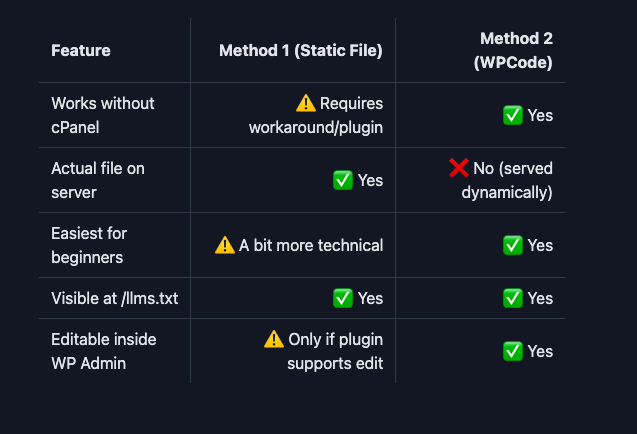
Which Should You Use?
Final Tip
If you're using Wealthy Affiliate or similar hosting, Method 1 using WPCode is the fastest and safest way to get started. You don’t need file upload access, just copy, paste, and go.
Want help writing your actual llms.txt content? Just ask GPT! It can generate a version tailored to your site.
That’s it, you’ve now served a live llms.txt file from your site, even without cPanel.
Final Thoughts: Do You Need This? (READ ME!!!!)
Right now, no major AI company officially “uses” llms.txt files. OpenAI, Google, and Anthropic don’t crawl or prioritize them. This isn’t a ranking factor or a mandatory setup (yet).
But think of it like Schema.org back in the early days. It wasn’t required, but the people who implemented it early gained an edge, more accurate search results, better presentation, and richer AI experiences.
If you’re building a long-term affiliate business, staying ahead of the curve matters. llms.txt is a small, no-risk addition that could improve how AI tools represent and explain your content in the future.
And more importantly, it helps you control the narrative.
Instead of hoping an AI summarizes your site correctly, you can guide it clearly and directly.
Note: RankMath and Yoast Premium Plugins offer this automatically if enabled; however, it is blocked by managed servers. Hence, the reason for posting this!!! Furthermore, this is an advanced skill, if you are new or do not understand the methodology behind this, DO NOT ATTEMPT!!
HAVE A AMAZING DAY!!!
Share this insight
This conversation is happening inside the community.
Join free to continue it.The Internet Changed. Now It Is Time to Build Differently.
If this article resonated, the next step is learning how to apply it. Inside Wealthy Affiliate, we break this down into practical steps you can use to build a real online business.
No credit card. Instant access.