Still testing Gemini, and It's Outstanding


Published on April 4, 2026
Published on Wealthy Affiliate — a platform for building real online businesses with modern training and AI.


Seen this Ad on Facebook, and I asked Gemini to take a look,
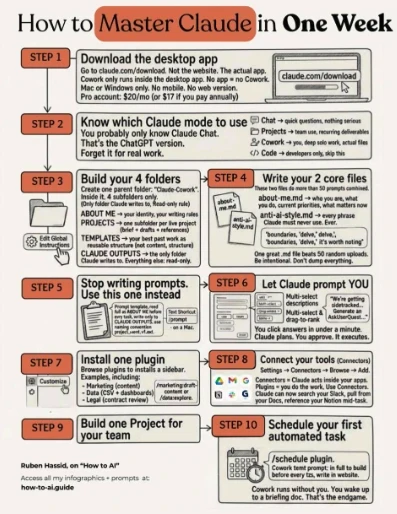
I asked Gemini for advice and a fact check. Here is exactly what I got back from Gemini word for word.
Based on the features and capabilities of Anthropic’s Claude (as of mid-2024), this infographic is highly inaccurate and largely fabricated.
While it uses the Claude brand name and correct pricing, the author has invented an entire ecosystem of features, modes, and interfaces that do not actually exist in the native Claude web or desktop apps.
This appears to be "engagement bait" commonly found on platforms like LinkedIn or X (Twitter), designed to sound authoritative so users will click the link at the bottom to buy a course or join a mailing list.
Ready to put this into action?
Start your free journey today — no credit card required.
Here is a breakdown of why this infographic is misleading:
🔴 Completely Fake or Invented Features
- "Cowork" Mode (Steps 1 & 2): There is no feature, mode, or toggle in Claude called "Cowork." The author seems to have made this up entirely.
- Reading/Writing to Local Folders (Steps 3 & 5): The standard Claude desktop and web apps cannot natively read from or write to folders on your local hard drive (like a "CLAUDE OUTPUTS" folder). You must manually upload files to Claude, and manually copy/download its outputs.
- Interactive UI Prompts (Step 6): The infographic shows Claude generating interactive dropdown menus, drag-to-rank modules, and multi-select boxes for you to click. Claude is a text-based chat interface; it cannot generate clickable HTML forms inside the chat for you to fill out.
- A Plugin Store / Sidebars (Step 7): Claude does not have a plugin store, nor can you install third-party plugins to create sidebars in the desktop app.
- Connectors/Integrations (Step 8): While Anthropic has introduced some integrations for high-tier Enterprise plans, standard Pro users do not have a "Settings -> Connectors" menu that allows Claude to seamlessly search your Slack or Notion mid-conversation.
- Automated Scheduling (Step 10): Claude has no native scheduling feature or /schedule plugin. You cannot tell the Claude app to run tasks by itself while you sleep. Doing this requires custom coding using the Anthropic API and external scheduling software.
🟡 Misleading Information
- "No mobile. No web version." (Step 1): This is completely false. Claude is most famously used via its web version (claude.ai), and Anthropic released official iOS and Android apps in 2024.
🟢 The Few Things it Gets Right
Mixed in with the fiction is a little bit of true information, which is what makes graphics like this confusing for beginners:
- Price: A Claude Pro account is indeed $20/month.
- Projects exist: "Projects" (Step 2) is a real, highly useful feature for Pro/Team users that allows you to upload custom instructions and a knowledge base of files.
- Using Markdown (.md) files for context: Step 4 suggests writing an about-me.md and an anti-ai-style.md file. Uploading documents like this into a Claude Project is actually an excellent way to get better, more personalized writing out of the AI.
Verdict: Do not try to follow this guide. You will end up looking for buttons, folders, and plugins that do not exist. To learn how to actually master Claude, stick to Anthropic’s official documentation or look up tutorials specifically focused on real features like Claude Projects and Claude Artifacts.
Gem can see past the fluff and give you the answers to tough questions. The more I use it, the more I like it.
Share this insight
This conversation is happening inside the community.
Join free to continue it.The Internet Changed. Now It Is Time to Build Differently.
If this article resonated, the next step is learning how to apply it. Inside Wealthy Affiliate, we break this down into practical steps you can use to build a real online business.
No credit card. Instant access.