Schema, The Hot Topic At The Moment
Within the Wealthy Affiliate community, one topic keeps rising to the surface: schema markup. And it’s no wonder why. As search engines and AI continue to evolve, so does the need for clarity, structure, and optimization.

Why Schema Is Making Noise Right Now
Search engines aren't just crawling pages anymore; they’re trying to understand them. Schema markup gives them the context they need.
Think of it like giving Google a roadmap:
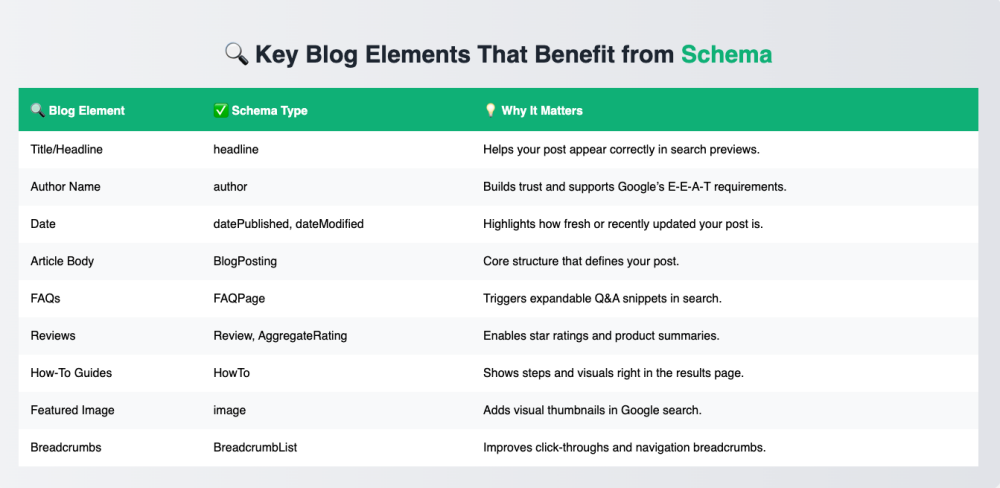
- Here's the headline.
- Here's the author.
- This section is an FAQ.
- That part? It’s a review.
Without schema, your content is just... content. With schema, it's structured knowledge.
Structured knowledge helps people find answers faster by organizing information in a way that search engines can instantly understand and deliver in rich, relevant results.
What Is Schema Markup?
Schema is a type of structured data. You add it to your blog's HTML to help search engines interpret your content correctly. Instead of guessing, Google and other AI tools know exactly what each piece of your content means.
And that means better visibility in search, often through rich snippets, FAQ blocks, ratings, and more.
Why Wealthy Affiliate Members Should Care
AI is getting smarter by the day. If we want to stay ahead of the curve, we need to grow in tandem with it.
Schema is a small step, but it plays a big role.
"Adopt the learn or get left behind mentality."
The truth is, AI isn't going away. It’s adapting, and fast. Learning these small but powerful tools like schema now means:
- More visibility for your content.
- Better engagement from users.
- Higher chances of showing up in voice search, AI-generated answers, and featured snippets.
Getting Started: Use What’s Relevant
Not every post needs every schema type. But here’s a smart rule of thumb:
- If you’re doing product reviews, use Review and Product.
- If you’re answering questions, use FAQPage.
- If your post is instructional, use HowTo.
- If you just want clean basics, start with BlogPosting.
And always validate your schema with tools like:
Final Thought: Schema Is Part of the Bigger Picture
If you’re a content creator, affiliate marketer, or SEO student, schema is not optional anymore. It’s a low-hanging fruit with a high return.
Structure leads to understanding. Understanding leads to visibility.
Start learning it now while the tools are free, the tutorials are fresh, and the community is buzzing. Because what we’re building together at Wealthy Affiliate isn’t just blogs, it’s digital assets designed for the future of the content we create.
Join FREE & Launch Your Business!
Exclusive Bonus - Offer Ends at Midnight Today
00
Hours
:
00
Minutes
:
00
Seconds
2,000 AI Credits Worth $10 USD
Build a Logo + Website That Attracts Customers
400 Credits
Discover Hot Niches with AI Market Research
100 Credits
Create SEO Content That Ranks & Converts
800 Credits
Find Affiliate Offers Up to $500/Sale
10 Credits
Access a Community of 2.9M+ Members
Recent Comments
33
Hi Fleeky
I ask ChatGpt the same question earlier today after reading this and Eric's short video plus I use Rankmath the free version here is what it stated plus other options
Best Plugins for Schema Markup (General Use)
1. Rank Math SEO (✅ You're already using this!)
Free version includes Article and FAQ schema.
Very beginner-friendly if you're using the block editor.
Automatically adds schema to posts and pages.
Lets you manually choose a schema type per post (in the editor sidebar).
No need to install anything else if you're happy with its built-in options.
✔️ Best if you want built-in SEO + schema in one.
🧠 Other Top Schema Plugins (For Advanced Use or Extra Types)
2. Schema & Structured Data for WP & AMP (by Magazine3)
Supports 35+ schema types: articles, reviews, recipes, courses, etc.
Lets you manually insert or automate schema.
Works well with AMP and other plugins.
✔️ Best if you need very specific or custom schema types not covered by Rank Math.
3. Schema Pro (Premium)
Made by the creators of Astra theme.
User-friendly interface with schema templates.
Automatically maps content to schema.
Great for non-techy users needing complex schema like Product, Review, Job Posting, etc.
✔️ Best if you want point-and-click setup for complex schema (but it's paid).
👁 Bonus: Plugins to View or Test Schema (Not Add It)
4. View Page Source + Chrome Extensions
Use the View Page Source in your browser (Ctrl+U).
Or install a Chrome extension like:
“Schema Markup Validator” or
“Structured Data Testing Tool” (unofficial tools but handy)
✔️ Best if you just want to see what's already on the page.
💡 Final Recommendation for You:
Since you're using Rank Math (free) and the block editor, you're already in a great position. Stick with Rank Math for now — and just supplement it with the Rich Results Test tool for verifying schema.
If one day you want more advanced schema types (like Products, Events, or Courses), then a plugin like Schema Pro or Schema & Structured Data for WP could be useful.
Hope that helps also with Rankmath using the block editor you don't need the paid version but if you are using the classic editor then you do according to chat
Thank you Andre,
Using rankmath as well and very happy with the plugin.
However... Sometimes it gives false errors in the seo analysis, especially regarding www and non-www settings.
I then check with this A free tool:
https://toolsaday.com/seo/www-redirect-checker
Best of day
✨ Fleeky
Most welcome and with Rankmath you don't need to give it coding as using they Tool they add it in automatically plus I asked Chat and you can easily get Chat to check if all is well with the coding Rankmath give. All you do is give Chat the url and they can also check it for you and you can also get Google to check as stated above by Chat
I loved your two powerful remarks:
1. Without schema, your content is just... content. With schema, it's structured knowledge.
2. Structure leads to understanding. Understanding leads to visibility.
Best,
Yes you might have loved what Michael stated so you copied and pasted his wording and posted it as a question to make it look as your. That is duplicate copy and not allowed and has been reported.
https://my.wealthyaffiliate.com/zeruman/question/why-schema-is-making-noise-right-now-and-whats-schema-markup
Some great info here! Schema is a must for anyone who is writing content.
Thanks for highlighting this!
Thank you for explaining this and for the links. I have never used Google's Rich Results Test or Schema. I'll look into it - one more thing for my ever-growing list. 🙂
Eric just released a great Video on FAQ with schema. You should watch it as well. Schema is on fire at the moment. This ChatGPT Hack Instantly Creates FAQ Schema for SEO Boosts
Thanks a lot. I have just watched it. Will now try it on ChatGPT and see how I get on.
See more comments
Join FREE & Launch Your Business!
Exclusive Bonus - Offer Ends at Midnight Today
00
Hours
:
00
Minutes
:
00
Seconds
2,000 AI Credits Worth $10 USD
Build a Logo + Website That Attracts Customers
400 Credits
Discover Hot Niches with AI Market Research
100 Credits
Create SEO Content That Ranks & Converts
800 Credits
Find Affiliate Offers Up to $500/Sale
10 Credits
Access a Community of 2.9M+ Members

On the principle there are no stupid questions - and I am a newbie - is Schema something we are completing in the web page like in a template, or is it just a checklist of the tings we should be ensuring we are covering in our posts? 🙃🙃
i would not worry too much about this at the start - get used to how to setup a site and get into the habit of creating content and planning your next few posts...
you can always go back and add a faq section with schema....this can be one of the updates to early posts in 6 months or so...
get the basics in place first and expand later - don't try to do too much or you will stall thinking you have missed something....
Great Answer here. Thanks!
Tks - that makes sense. Will do.
That's a great question. In some cases I think we can manually add certain schema to our content. But, I believe that certain Wordpress themes automatically integrate schema markup when we write a post. I use Kadence, and that theme does for sure.