AI apostophy and quotation marks issues


Published on August 19, 2025
Published on Wealthy Affiliate — a platform for building real online businesses with modern training and AI.


Hello everyone,
I wanted to bring to your attention an issue with the Wealthy Affiliate AI writing platform, where quotation marks are displayed as a mixture of straight and curly. Articles I have written within the AI section have created these marks and highlighted them because they are inconsistent.
Currently, this setting cannot be changed within the Wealthy Affiliate AI tool because it defaults to American English. However, I was able to find the setting within my premium Grammarly account.
Ready to put this into action?
Start your free journey today — no credit card required.
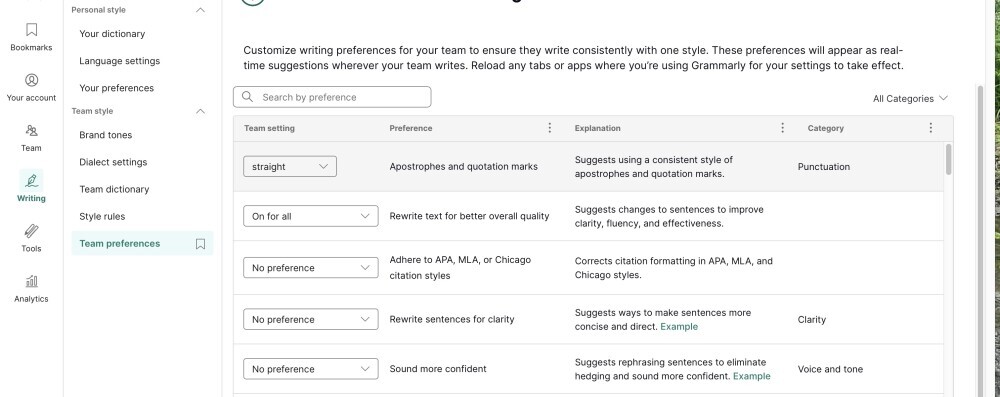
Click on the 'writing logo' tab on the left-hand side, scroll down until you see Team Preferences, and at the top of the team settings, there will be the 'apostrophe and quotation marks' box with 'explanation' and 'category'.
On the left-hand side, you will see a drop-down box that gives you the option to choose either straight, curly, or no preference.
Hope this helps anyone who has had the same issue.
Louise
Share this insight
This conversation is happening inside the community.
Join free to continue it.The Internet Changed. Now It Is Time to Build Differently.
If this article resonated, the next step is learning how to apply it. Inside Wealthy Affiliate, we break this down into practical steps you can use to build a real online business.
No credit card. Instant access.