Update to Wordpress 6.8.3


Published on October 1, 2025
Published on Wealthy Affiliate — a platform for building real online businesses with modern training and AI.


Wordpress 6.8.3 Update
Why You Should Update Your WordPress with Each New Release (And Have a Laugh While Doing It)
Ah, WordPress updates!
The necessary evil that every website owner must face. You might think, "If it ain't broke, don't fix it," but let me tell you, ignoring those updates is like ignoring a fire alarm because you’re too busy enjoying your popcorn. Here are some funny yet compelling reasons to keep your WordPress site updated with each new release.
1. Security = The Digital Bodyguard
Imagine your website as a fancy nightclub. If you don’t update, it’s like leaving the door wide open for hackers to waltz in and steal your data. Every update is like hiring a new bouncer who knows all the latest moves to keep the troublemakers out. So, unless you want your site to become the hottest spot for cybercriminals, hit that update button!
2. Bug Fixes = The Pest Control
Bugs in software are like those pesky cockroaches that show up uninvited. You can try to ignore them, but they’ll multiply and ruin your party. Each update squashes those bugs, ensuring your site runs smoother than a freshly waxed floor. So, unless you want your website to resemble a horror movie set, keep those updates coming!
3. New Features = The Cool Toys
Ready to put this into action?
Start your free journey today — no credit card required.
Every new release comes with shiny new features that can make your site more user-friendly and visually appealing.
It’s like getting a new toy every time you update! Who doesn’t want to play with the latest gadgets? If you don’t update, you’ll be stuck with the digital equivalent of a flip phone while everyone else is rocking the latest smartphone.
4. Performance = The Speed Demon
Updates often come with performance enhancements.
Think of it as giving your website a caffeine boost. It’ll load faster, run smoother, and keep your visitors from tapping their fingers impatiently while waiting for your page to load. If you want your site to be the Usain Bolt of the internet, you better keep it updated!
5. Compatibility = The Social Butterfly
New updates ensure that your site plays nice with the latest plugins and themes.
It’s like making sure your introverted friend knows how to mingle at a party. If you don’t update, your site might end up in awkward situations where it just doesn’t get along with the cool kids (a.k.a. new plugins).
6. Avoid the “Oops” Moment
Ever had that heart-stopping moment when you realize your site is down, and it’s because you forgot to update?
It’s like realizing you’ve been wearing your shirt inside out all day. Updating regularly means you can avoid those embarrassing “oops” moments and keep your site looking sharp.
Ready? GO
So, there you have it! Updating your WordPress site is not just a chore; it’s a way to keep your d ital presence secure, functional, and fabulous. Plus, it gives you a great excuse to take a break from your usual routine and click that update button. So go ahead, embrace the updates, and keep your website in tip-top shape... because nobody wants to be the last one to the party!
✨ Fleeky
PS
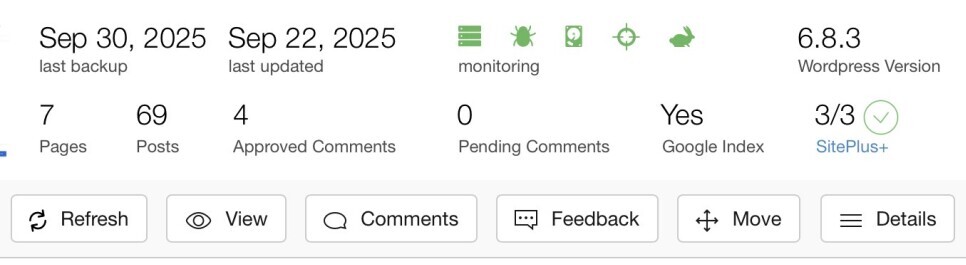
Do you have the latest release?
You can check that in your SiteManager...
Share this insight
This conversation is happening inside the community.
Join free to continue it.The Internet Changed. Now It Is Time to Build Differently.
If this article resonated, the next step is learning how to apply it. Inside Wealthy Affiliate, we break this down into practical steps you can use to build a real online business.
No credit card. Instant access.