Content Creation Workflow at WA


Published on September 15, 2025
Published on Wealthy Affiliate — a platform for building real online businesses with modern training and AI.

🧵 My Content Creation Workflow at WA
From Word Woes to Web Flow
A fellow member recently asked a great question about writing and publishing content:
“Do you create your post copy in the WA HTML editor?
I made a big mistake recently starting web post editing within Microsoft Word. When I went to publish, it was really difficult because of the proprietary Microsoft HTML. Even "Save as HTML Filtered" did not help.
What is the most efficient HTML editing platform that you use? Do you start in the WA editor and then publish as draft, to finish it up in the WordPress Block Editor? Any input would be appreciated. Thanks!”
I love questions like this because they touch on real-life creator pain points ... especially when you're bouncing between tools.
Here’s how I handle it.
🛠️ My Workflow for WA + WordPress Publishing
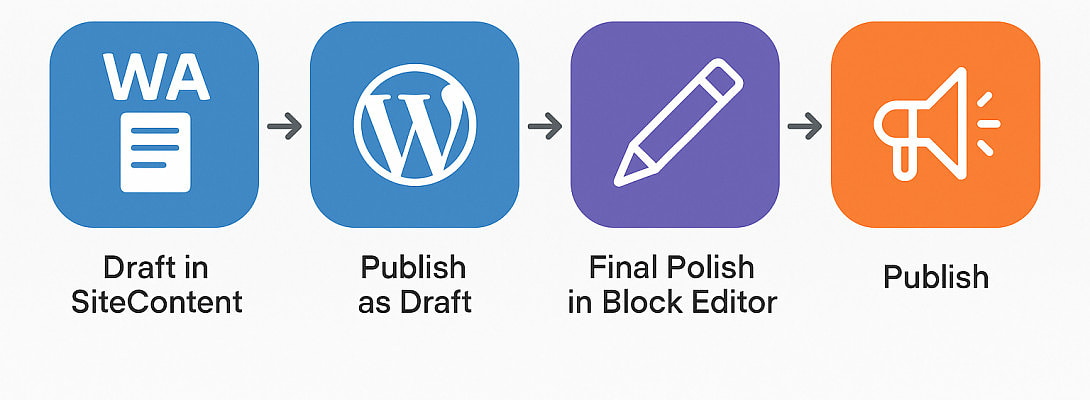
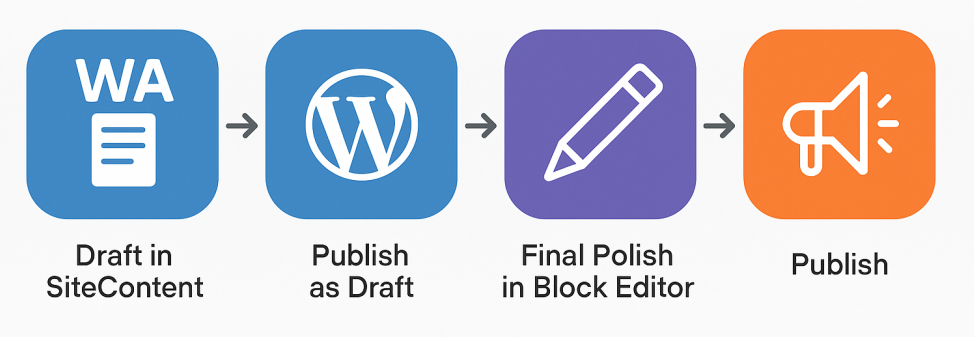
1. Draft in SiteContent
I almost always begin directly in the WA SiteContent editor. Why?
- It’s clean, distraction-free
- It avoids messy code injection
- It autosaves, spellchecks, and tracks goals
- And best of all ... it syncs directly with WordPress
I write everything in plain text, using SiteContent’s basic formatting (headings, bullet lists, bold/italic, etc.). No need for complex styling at this stage.
2. Publish as Draft to WordPress
When the draft is ready, I hit Publish.
This sends a clean version of the article straight to my connected WordPress site.
Ready to put this into action?
Start your free journey today — no credit card required.
From there, I either edit and save again, or set the article back to draft in WordPress instead of leaving it live.
3. Final Editing in WordPress Block Editor
Once in WordPress, I open the draft using the Block Editor (Gutenberg) and:
- Add featured images
- Embed videos or custom HTML
- Insert affiliate links or shortcodes
- Adjust SEO meta (if needed)
- Add internal links, CTAs, or visual enhancements
The SiteContent editor keeps things simple and clean, while the WordPress editor lets me fine-tune.
Why I Avoid Word (and Similar Editors)
Microsoft Word, while great for offline writing, generates bloated, proprietary HTML that wreaks havoc when pasted into any web editor. Even using “Save as Filtered HTML” still leaves behind a lot of junk code.
This can:
- Break your layout
- Mess with font and spacing
- Introduce invisible glitches
Alternatives If You Work Offline
If you prefer writing offline, I recommend:
- Google Docs (use plain formatting)
- Notepad++, VS Code, or Sublime Text (if you’re comfortable with basic HTML)
But still ... avoid Word. It’s a formatting minefield for bloggers!
🚀 TL;DR ... My Preferred Flow
WA SiteContent → WordPress Draft → Final Polish in Block Editor → Publish
It’s fast, clean, and keeps my posts tidy and reader-friendly.
Hope this helps anyone struggling with messy formatting or publishing workflows. Feel free to share your own process in the comments. We all learn from each other!
Happy writing ✍️
Fleeky 🏵️
(Lover of clean code, messy creativity, and blogging in flow)
PS
Make sure to try Site Content and do not miss out on the 20th anniversary offer!
Share this insight
This conversation is happening inside the community.
Join free to continue it.The Internet Changed. Now It Is Time to Build Differently.
If this article resonated, the next step is learning how to apply it. Inside Wealthy Affiliate, we break this down into practical steps you can use to build a real online business.
No credit card. Instant access.