Image Care Required - Google Don't Like Junks


Published on January 9, 2019
Published on Wealthy Affiliate — a platform for building real online businesses with modern training and AI.

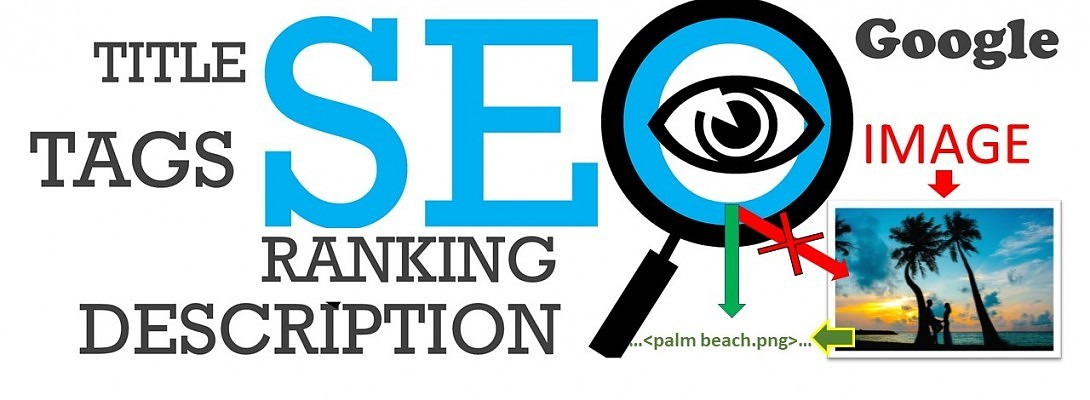
Image care is essential if we want traffic in our sites. 'Image care' means optimization of the visual contents in our posts.
I am an image lover. I love to read the posts with lovely images, and thus like to include beautiful images in my own posts (of course related to the content). I guess, many (almost everyone) of us like the same.
In my early days, when I just started writing blogs, I did some horrible mistakes with all the images in my posts. There were a little errors with the text content too, which I could modify when received the helping hand of the community here in WA. You can check out the blog by Marshall Adler through the given link bellow. This one is pretty good to optimize your text contents.
https://my.wealthyaffiliate.com/emarketingguy/blog/landing-p....
Horrible Mistakes I Did with the Images
I just uploaded the images and inserted them to the post; and did nothing further. As a result, Google's bot probably scanned the pages and threw them away from ranking. Actually, search engine can read the words in the text content but fails to visualize the images, unless there are Alt tags with the images. In my case, images had no Alt tags, I just left the required fields blank. Thus, search engine treated those images as blanc space, because Google bot did not find any relation between the text content and the images. In this way, Image can affect the ranking of a website.
Ready to put this into action?
Start your free journey today — no credit card required.
So, Image Care Required
We need to take care of few things when inserting an image in our posts:
- Before insert the image in the post we must fill the Alt texts, (1) title, (2) Alt text, (3) Description.
- Title should contain keyword phrase (or only keyword phrase).
- Alt text must be a 'keyword phrase' rich FULL SENTENCE.
- It's better to place the images in the right side of your text, because Google bot scans from top left.
- Avoid inserting images in bullet area. Google bot scans bullet area vey fast and do not like any disturb there.
- Never include an image which is directly NOT related to the content.
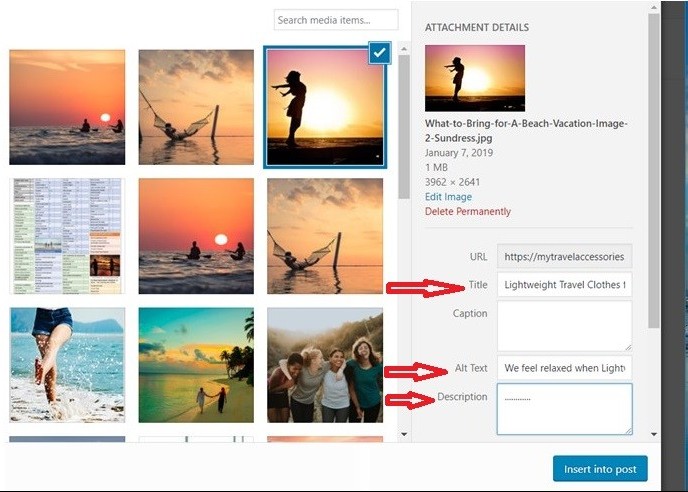
So, these are the easy steps for initial optimization of the images. A screen shot has been included here for simplicity.
Let's see how to edit a post in Wordpress while inserting an image.
Select an image need to be inserted (from add media), then select the saved one, or upload an image, then simply fill the boxes marked with red arrow (in the image). Then click to ‘insert into post’.
That's all for the image care today.
Thanks a lot for your visit.
Best wishes.
Share this insight
This conversation is happening inside the community.
Join free to continue it.The Internet Changed. Now It Is Time to Build Differently.
If this article resonated, the next step is learning how to apply it. Inside Wealthy Affiliate, we break this down into practical steps you can use to build a real online business.
No credit card. Instant access.