How Do I Remove an Uninvited Node?

3
11
3.9K followers

While going through some older posts I just noticed this uninvited node. Nothing shows in the code under the "Text" tab in editor but it does show when using "Inspect Element" on the published page in the browser.
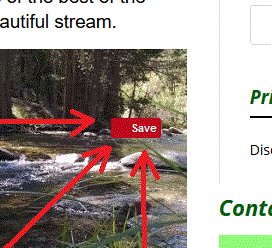
I'd appreciate any help ya' can give me! Ain't gettin' educated fun???

3
11

Join FREE & Launch Your Business!

Exclusive Bonus - Offer Ends at Midnight Today

00

Hours

:

00

Minutes

:

00

Seconds

2,000 AI Credits Worth $10 USD

Build a Logo + Website That Attracts Customers

400 Credits

Discover Hot Niches with AI Market Research

100 Credits

Create SEO Content That Ranks & Converts

800 Credits

Find Affiliate Offers Up to $500/Sale

10 Credits

Access a Community of 2.9M+ Members

By continuing, you agree to our Terms of Service and Privacy Policy
No credit card required

Recent Comments

11

Hi sometimes I notice as Pinterest gives that save and may be it is asking to pin that image - not sure.

1

Yah, I think you and Marion have it right in that it has something to do with Pinterest. I'm just not sure how to actually locate the node and access it in a way that I can delete it.

It looks a lot like the Pinterest pin button. Do you have the Pinterest addon for your browser? A screenshot of the code or a link to the post in question could help.

1

Exactly what I was thinking! Just checked and there's no addon for Pinterest though I do have it and used it a lot.

1

That is so weird. What happens when you click on the image or the Save box? I'm thinking it's your theme or a plugin causing this.

1

In editor I can actually erase "Saved" but the red button is not effected at all.

Could be the theme Marion. I did disable all the plugins and cleared my cache. Not sure if one image is worth worrying about as long as it's not a widespread issue.

Thank ya' for your help!

1

That's strange as I too got that and didn't think much.

1

I can usually figure these things out through just Googling them but this one is a stubborn little bugger!

Just be careful with your site and back up as the appearance gets disturbed then it is hard to get back . I am afraid to do anything now . I probably guess the word press issue as our sites do get back up each day automatically. Just for your information as you can find from someone who knows better wordpress.

1

Thanks partner, I think I'm just going to rebuild the page and see if I can get rid of it that way.

See more comments

Join FREE & Launch Your Business!

Exclusive Bonus - Offer Ends at Midnight Today

00

Hours

:

00

Minutes

:

00

Seconds

2,000 AI Credits Worth $10 USD

Build a Logo + Website That Attracts Customers

400 Credits

Discover Hot Niches with AI Market Research

100 Credits

Create SEO Content That Ranks & Converts

800 Credits

Find Affiliate Offers Up to $500/Sale

10 Credits

Access a Community of 2.9M+ Members

By continuing, you agree to our Terms of Service and Privacy Policy
No credit card required

2.9M+

Members

190+

Countries Served

20+

Years Online

50K+

Success Stories

The world's most successful affiliate marketing training platform. Join 2.9M+ entrepreneurs building their online business with expert training, tools, and support.

© 2005-2025 Wealthy Affiliate
All rights reserved worldwide.

🔒 Trusted by Millions Worldwide

Since 2005, Wealthy Affiliate has been the go-to platform for entrepreneurs looking to build successful online businesses. With industry-leading security, 99.9% uptime, and a proven track record of success, you're in safe hands.