WordPress 7.0 Is Coming — Don’t Panic If Things Go Wobbly


Published on May 13, 2026
Published on Wealthy Affiliate — a platform for building real online businesses with modern training and AI.

Hi one and all,
I just received an email about the impending WordPress 7.0 update, and I thought I'd share the overview with all WA members.
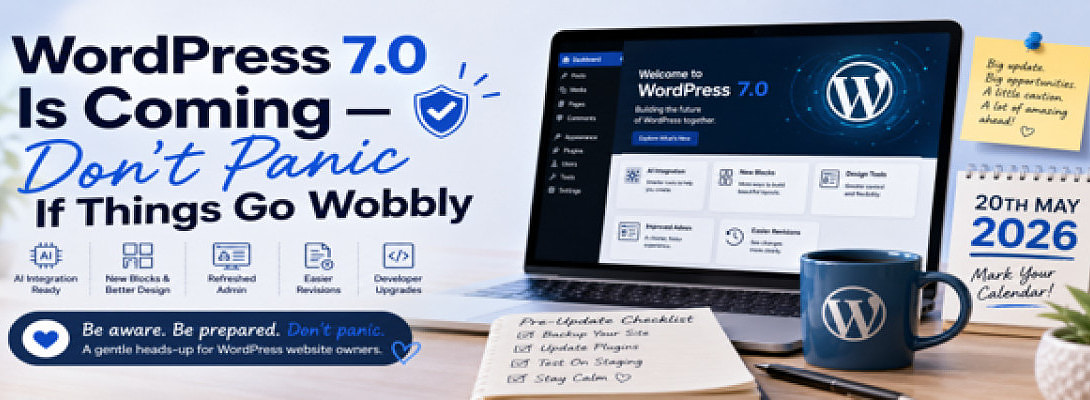
WordPress 7.0 is currently scheduled for release on 20th May 2026, after being pushed back from its earlier April date while the WordPress team worked on stability and performance improvements.
And from what I’ve been reading, this is not just a tiny “click update and carry on” sort of release.
This looks like a big one.
So, I wanted to write this as a gentle heads-up — especially for anyone fairly new to WordPress who might suddenly find something on their site behaving strangely after the update.
Because I’ve been there...
TL;DR
WordPress 7.0 is due on 20th May 2026 and looks like a major update, especially with new AI groundwork, admin changes, and improved design tools.
Most sites will likely update perfectly fine.
But as with any large WordPress release, some plugins or features may temporarily misbehave until developers release compatibility updates.
So:
✔️ back up your site (thankfully, being hosted at WA means this is automatically done regularly)
✔️ update plugins
✔️ don’t panic if something suddenly acts oddly
Sometimes updates need a little settling-in time.
My Own WordPress Update Lesson
When WordPress 6.0 came around, I had a very frustrating experience with my site.
As far as I knew, I hadn’t changed anything major. I hadn’t added a load of new plugins. I hadn’t been poking around in code. Everything should have been ticking along as normal.
But suddenly, I couldn’t properly access my image details in WordPress, and things just didn't 'feel' right.
That meant I couldn’t easily:
- resize images
- add alt text
- edit title descriptions
- manage image details properly inside the editor
For a content site, especially one using lots of images, that was a problem.
At first, I had no idea what had caused it, and I had a couple of rather frustrating days trying to work around it.
With help from Site Support and a rather painful process of elimination, I eventually discovered that four plugins didn’t like the WordPress 6.0 update.
I had to deactivate them all, then reactivate them one by one while testing the site each time to figure out which plugins were knocking out formatting and breaking processes.
Once I narrowed it down, I then had to find alternatives that worked properly with the newer version of WordPress.
Painful? Yes.
Useful learning curve? 100% yes.
And that’s exactly why I’m writing this blog - because it would have been very helpful to know the likely cause sooner, without quite so much blood, sweat, tears, and late into the night plugin detective work.
What’s Coming With WordPress 7.0?
From all reports, WordPress 7.0 looks like a major step forward, not just a routine update.
Here are the main beginner-friendly highlights.
1. WordPress Is Moving Towards Built-In AI
This is probably the biggest headline.
WordPress 7.0 is laying the groundwork for AI to work more naturally inside WordPress. That does not mean your site will suddenly start sending everything to AI tools automatically.
Note: WordPress will not send prompts or data to AI services by default without your consent and setup.
But it does mean WordPress is building a more standard way for websites, plugins, and AI tools to communicate.
In simple terms?
WordPress is preparing for a future where AI can help with things like:
- creating content drafts
- suggesting excerpts
- helping with images
- assisting with alt text
- supporting plugins that use AI features
That could become very useful for bloggers, affiliate marketers, shop owners, and anyone managing a lot of content — although, as with most major WordPress changes, I suspect there may be a few teething problems along the way while plugins and developers catch up.
2. New Blocks And Better Design Tools
WordPress 7.0 is also expected to bring new and improved blocks.
Some of the more useful ones include:
- a new Breadcrumbs block
- a new Icon block
- better image controls
- responsive grid improvements
- more control over individual blocks
- custom CSS support for specific blocks
- the option to show or hide blocks depending on device size
That last one could be especially helpful.
For example, you may eventually be able to show one version of a section on desktop and a different version on mobile, without needing an extra plugin or complicated CSS.
Ready to put this into action?
Start your free journey today — no credit card required.
For beginners, that could make page design much easier over time.
3. The WordPress Admin Area Is Getting A Refresh
The WordPress dashboard is also being modernised.
That means menus, buttons, transitions, and general admin screens may look and feel a little different after the update.
This is not necessarily a bad thing, but expect change.
In fact, it should hopefully make WordPress feel smoother and more consistent.
But if you log in after the update and think:
“Hang on… this looks different…”
Don’t panic.
It likely will be different, for all the right reasons.
4. Revisions Should Become Easier To Understand
One interesting improvement is around revisions.
Instead of just comparing blocks of text, WordPress 7.0 is expected to make revisions more visual. That means it should become easier to see what changed between versions of a post or page.
For anyone who edits a lot of content, this could be genuinely helpful.
Especially if, like me, you’ve ever opened revisions and thought;
“Right… but which of these tiny edits is the one that’s just broken my formatting?”
5. Developers And Plugin Makers Have A Lot To Adjust To
Now, this is where the warning bit comes in.
WordPress 7.0 includes some very large changes behind the scenes, including updates around blocks, APIs, the editor, admin tools, and the new AI-related infrastructure.
Long-term, that is exciting.
Short-term?
Some plugins may not love it immediately.
And that is the part beginners especially need to be aware of — it certainly threw me off in the past.
Whenever WordPress releases a major update, plugin developers suddenly need to make sure their tools still work correctly with the new version. Most developers move quickly, but there is often a short period where certain plugins, themes, or features may behave oddly until compatibility updates are released.
That does not necessarily mean your site is broken.
It also does not mean you have done something wrong.
Sometimes it simply means a plugin and the new WordPress version are temporarily disagreeing with one another behind the scenes.
That is exactly what happened to me during the WordPress 6.0 rollout.
So if, after the 20th May release, something suddenly starts acting strangely — perhaps images stop behaving properly, a plugin feature disappears, formatting looks odd, or the editor suddenly develops a personality disorder — try not to panic immediately.
The first thing to consider may simply be:
“Could this be related to the WordPress 7.0 update?”
Because very often, the answer will be yes.
A Few Sensible Precautions Before WordPress 7.0 Arrives
With a major update like this, I do think it’s worth taking a few sensible precautions beforehand.
I would recommend some simple steps:
- making sure your site backup is current (WA does this for websites hosted with them)
- updating plugins before the WordPress rollout
- checking whether your key plugins are actively maintained
- avoiding large redesigns right around update week
- keeping an eye on plugin support forums after release
And perhaps most importantly:
If something suddenly behaves strangely after the update, don’t instantly assume your hard work is lost.
Major WordPress releases often create temporary compatibility hiccups while plugin developers catch up.
Usually, fixes follow fairly quickly.
Sometimes it’s simply a matter of waiting for a plugin update rather than spending six hours questioning your entire existence and reinstalling things you probably didn’t need to touch in the first place.
Again, not speaking from experience there at all.
Things To Watch For After The Update
After WordPress 7.0 arrives, keep an eye out for anything unusual, such as:
- images not opening properly
- editor tools disappearing
- blocks behaving oddly
- formatting looking different
- plugins showing errors
- pages loading strangely
- your admin area feeling glitchy
- features that worked yesterday suddenly not working today
If that happens, don’t instantly assume your site is broken.
It may just be part of the update settling in.
Updates Can Feel Like “Downdates”
I often joke that some updates feel more like downdates.
You update something expecting improvement, and suddenly, something that worked perfectly yesterday decides it's not going to play ball today.
But that is part of working with WordPress.
Major updates often bring short-term bumps, then WordPress follows up with smaller releases such as 7.0.1, 7.1, 7.2 and so on. These usually smooth out bugs, improve compatibility, and tidy up any issues that appear once millions of sites start using the new version.
So if things feel a little bumpy at first, don’t assume disaster.
WordPress has been through many major changes before.
Final Thoughts
WordPress 7.0 looks like a big step forward.
The AI integration alone suggests WordPress is preparing for a very different future — one where websites, content tools, plugins, and AI systems work together in a more structured way.
For those of us building websites, blogs, affiliate sites, and online businesses, that could open up some really interesting possibilities.
But with a big update comes a little caution.
So my message is simple:
- Be aware.
- Be prepared.
- Don’t panic.
If something doesn’t behave properly after 20th May, it may simply be the WordPress 7.0 update causing a plugin conflict or temporary issue.
And if that happens, you are not alone.
I learned that lesson the hard way with WordPress 6.0 — and hopefully this heads-up saves someone else a few hours of confusion.
Have you had plugin chaos after a major WordPress update before? Share in the comments, our hard lessons learned can help others in the future.
Keep on keeping on.
Cherie 😊
Share this insight
This conversation is happening inside the community.
Join free to continue it.The Internet Changed. Now It Is Time to Build Differently.
If this article resonated, the next step is learning how to apply it. Inside Wealthy Affiliate, we break this down into practical steps you can use to build a real online business.
No credit card. Instant access.