Making Sense of Google Search Console Page Indexing


Published on February 5, 2026
Published on Wealthy Affiliate — a platform for building real online businesses with modern training and AI.


If you’ve ever opened Google Search Console and felt your heart sink at the “Pages” report — you’re not alone.
- Red warnings.
- Hundreds of “Not indexed” URLs.
- Cryptic labels like Crawled – currently not indexed.
It’s easy to think:
“Something must be seriously wrong with my site.”
In most cases, it isn’t.
Today, I spent a few hours auditing my own site’s indexing reports, and what I learned is something every website owner should understand:
- Most of what you see in GSC is noise — not necessarily danger.
Here’s how I learned to separate the two.
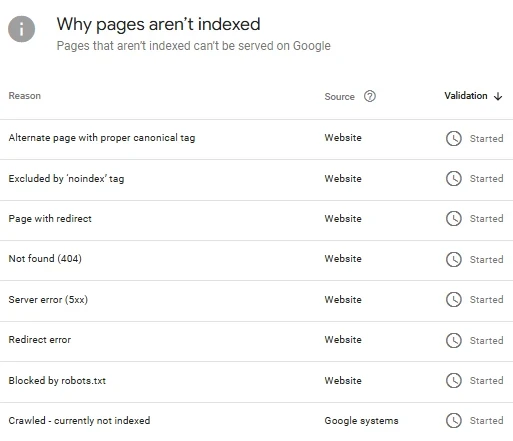 This is the “Why pages aren’t indexed” section in Google Search Console — it looks alarming at first, but most of these statuses are completely normal.
1️⃣ Start With “Not Found (404)” — But Don’t Panic
The first scary-looking section is usually:
- Not found (404)
This looks bad at first glance, but when I dug into mine, most were:
- Old “coming soon” pages
- Mistyped URLs
- Old comment links
- Plugin paths
- Bot-generated junk
Only one or two were real mistakes — and they were easy to fix.
What to do:
✔ Fix genuine broken internal links
✔ Redirect old URLs if needed
✔ Ignore plugin/bot paths
Once fixed, Google clears these over time.
2️⃣ “Crawled – Currently Not Indexed” Is the One to Watch Closely
This is the only section I now monitor weekly.
It usually contains:
- New posts
- Recently updated posts
- Pages Google is still evaluating
Some are already indexed — GSC just hasn’t caught up yet.
What to do:
✔ Check real articles
✔ Inspect URL
✔ Request indexing (when needed)
✔ Ignore feeds, parameters, and junk
You don’t need to fix everything here — just manage it.
If you see the same important page stuck here for weeks, that’s when deeper investigation is needed.
3️⃣ “Alternate Page with Proper Canonical Tag” Is Usually a Good Sign
This one sounds technical and worrying:
- Alternate page with proper canonical tag
But in most cases, it’s actually positive.
Why?
Because it means Google has found two similar pages and you’ve told it which one is the “main” version.
For example:
- With and without a trailing slash
- HTTP vs HTTPS
- With tracking parameters
- Paginated or filtered versions
Instead of indexing duplicates, Google follows your canonical tag and focuses on the main page.
That keeps your SEO clean.
So this status usually means:
✔ Google understands your site
✔ Your canonicals are working
✔ Duplicate content is being handled properly
That’s exactly what you want.
What to do:
✔ Inspect one or two examples
✔ If they point to the correct main page → leave them alone
4️⃣ “Excluded by Noindex” Is Usually Working As Intended
This one looks alarming:
Excluded by ‘noindex’ tag
But most of mine were things like:
- Category pagination
/category/ice-creams/page/2/ - Feeds
/homemade-vanilla-ice-cream/feed/ - Author pages
/author/cherie/page/3/ - Archive pages
/category/seasonal/page/5/
All deliberately noindexed.
Why?
Because these pages don’t add unique value to Google.
They’re mostly:
- Repeating the same posts in different layouts
- Paginated lists of content
- Duplicate versions of main pages
If Google indexed all of them, it would:
- Waste crawl budget
- Create duplicate content
- Weaken your main pages
So WordPress and SEO plugins correctly tell Google:
“Index the main content — not these supporting pages.”
That’s good SEO.
It keeps your site clean and focused.
When I first saw this, I thought something was wrong.
In reality, it meant my SEO setup was doing its job.
Ready to put this into action?
Start your free journey today — no credit card required.
What to do:
✔ Check a few examples
✔ If they look like these → /category/seasonal/page/5/ - leave them alone
5️⃣ “Page with Redirect” Means Your Redirects Are Working
I had several listed here. At first glance, it's concerning.
Then I tested them.
They all redirected cleanly to live pages.
That’s exactly what Google wants.
What to do:
✔ Click a few
✔ If they land correctly → ignore
This is a success report, not a failure or something to worry about.
6️⃣ Server Errors (5xx) Are Often Temporary or Historical
My list showed a handful of 5xx errors.
At first, this sounds serious — server errors suggest your site wasn’t available.
But in many cases, it’s much less dramatic than it sounds.
Why?
Sometimes Google tries to crawl a page at the exact moment when:
- Your server is briefly busy
- Your host is under load
- A cache is refreshing
- A plugin is updating
- A temporary timeout occurs
The page might be unavailable for just a few seconds.
Google records it.
Then moves on.
By the time you check, the page is already working again.
That’s what I found with all of mine:
- The pages were live
- They were indexed
- They were functioning normally
- GSC just hadn’t updated yet
So what looked like a “server problem” was often just bad timing.
What to do:
✔ Inspect the URL
✔ Check that it loads normally
✔ If it’s live and indexed → ignore
Only worry if the same page keeps showing errors repeatedly.
7️⃣ “Blocked by robots.txt” Is Usually Normal
I had one blocked URL:
/wp-admin/
That’s exactly where it should be - blocked.
Why?
Because this area is for site owners and admins — not visitors and not search engines.
It contains:
- Login pages
- Dashboard tools
- Settings panels
- Internal controls
None of that should ever appear in Google search results.
Blocking it:
✔ Improves security
✔ Prevents wasted crawling
✔ Keeps private areas private
So when you see something like this blocked, it’s a good sign — it means your site is protecting itself properly.
8️⃣ Comments, Feeds, and Parameters = Background Noise
A huge portion of my “problem URLs” were things like:
- ?replytocom=456
- /post-name/feed/
- /page/3/
- /tag/vanilla/
- /category/recipes/page/4/
These are part of how WordPress organises and delivers content.
Google crawls them.
Then ignores them.
That’s perfectly normal.
Why?
Because these URLs don’t contain new content.
They usually show:
- The same post, just linked to a comment
- A stripped-down feed version
- A paginated list of posts
- A filtered version of existing content
From Google’s point of view, they’re duplicates.
If Google indexed all of them, your site would be full of repeated pages competing with each other.
So instead, Google:
✔ Crawls them to understand your site
✔ Decides they’re not worth indexing
✔ Focuses on your main pages instead
That’s good for your rankings.
It keeps your real content strong and visible.
Other Page Statuses You May See (Perfectly Normal and Manageable)
Depending on your site and setup, you might also see:
- Discovered – currently not indexed
→ Google knows about the page but hasn’t crawled it yet. - Duplicate without user-selected canonical
→ Google found similar pages and chose one itself. - Soft 404
→ The page exists, but looks empty or unhelpful. - Indexed, not submitted in sitemap
→ Google found the page through links instead. - Submitted URL marked ‘noindex’
→ A page is in your sitemap but set to noindex (worth checking). - Blocked due to access forbidden (403)
→ A security rule temporarily blocked Google.
In most cases, these only need attention if they affect real, important pages.
Google Reporting Is Slow — Don’t Chase Ghosts
One of my biggest lessons:
- Many “problems” were already fixed - Google just hadn’t updated yet.
Examples:
- Pages already indexed
- Redirects already working
- Errors already resolved
But GSC still showed them.
Chasing these wastes time — and often achieves nothing but stress.
Sometimes Google is simply slow to update.
The Big Realisation - Clean Sites Still Have “Issues”
Even well-run, established sites have:
- Exclusions
- Redirects
- Noindex pages
- Old crawl errors
GSC will never be “all green”.
And that’s okay, it's all part of the process.
My Simple Maintenance System
Instead of worrying daily, I now do this:
Weekly:
- Check “Crawled – not indexed” - these are the only pages I really concern myself with.
- Push through real URLs and then simply wait for Google to catch up.
- Briefly scan all the other statuses for anything new that has cropped up
Monthly:
- Review sitemap
- Quickly scan reports
That’s it.
No obsessing. No worrying. No panic.
Final Thought - Understand the Difference Between Important Signals and Noise
Before this audit, I could already recognise most of these labels, and I knew many of them were part of running a WordPress site:
- “Excluded by noindex tag”
- “Alternate page with proper canonical tag”
- “Page with redirect”
- “Not found (404)”
- “Server error (5xx)”
But taking the time to review everything properly gave me confidence in my decisions.
- My site is healthy.
- I’m focusing on the right areas.
- And I’m not wasting time chasing noise.
That clarity makes all the difference.
When you know what matters, Google Search Console becomes a guide, not a distraction, and that’s when GSC becomes genuinely useful.
Have you audited your pages in GSC?
Do you have a simple system for managing it?
I’d love to hear your approach.
Cherie 😊
Share this insight
This conversation is happening inside the community.
Join free to continue it.The Internet Changed. Now It Is Time to Build Differently.
If this article resonated, the next step is learning how to apply it. Inside Wealthy Affiliate, we break this down into practical steps you can use to build a real online business.
No credit card. Instant access.